黄仁勋从业 33 年功绩时间线 · 深度研究报告HTML
33年复盘黄仁勋:NV1押错路线后转向Direct3D,1999年定义GPU,2006年CUDA苦撑六年,2012年AlexNet兑现;Mellanox与Blackwell转向机柜,FY2026营收2159亿美元、数据中心占89.7%,市值5万亿仅两年五个月。
33年复盘黄仁勋:NV1押错路线后转向Direct3D,1999年定义GPU,2006年CUDA苦撑六年,2012年AlexNet兑现;Mellanox与Blackwell转向机柜,FY2026营收2159亿美元、数据中心占89.7%,市值5万亿仅两年五个月。
推理服务
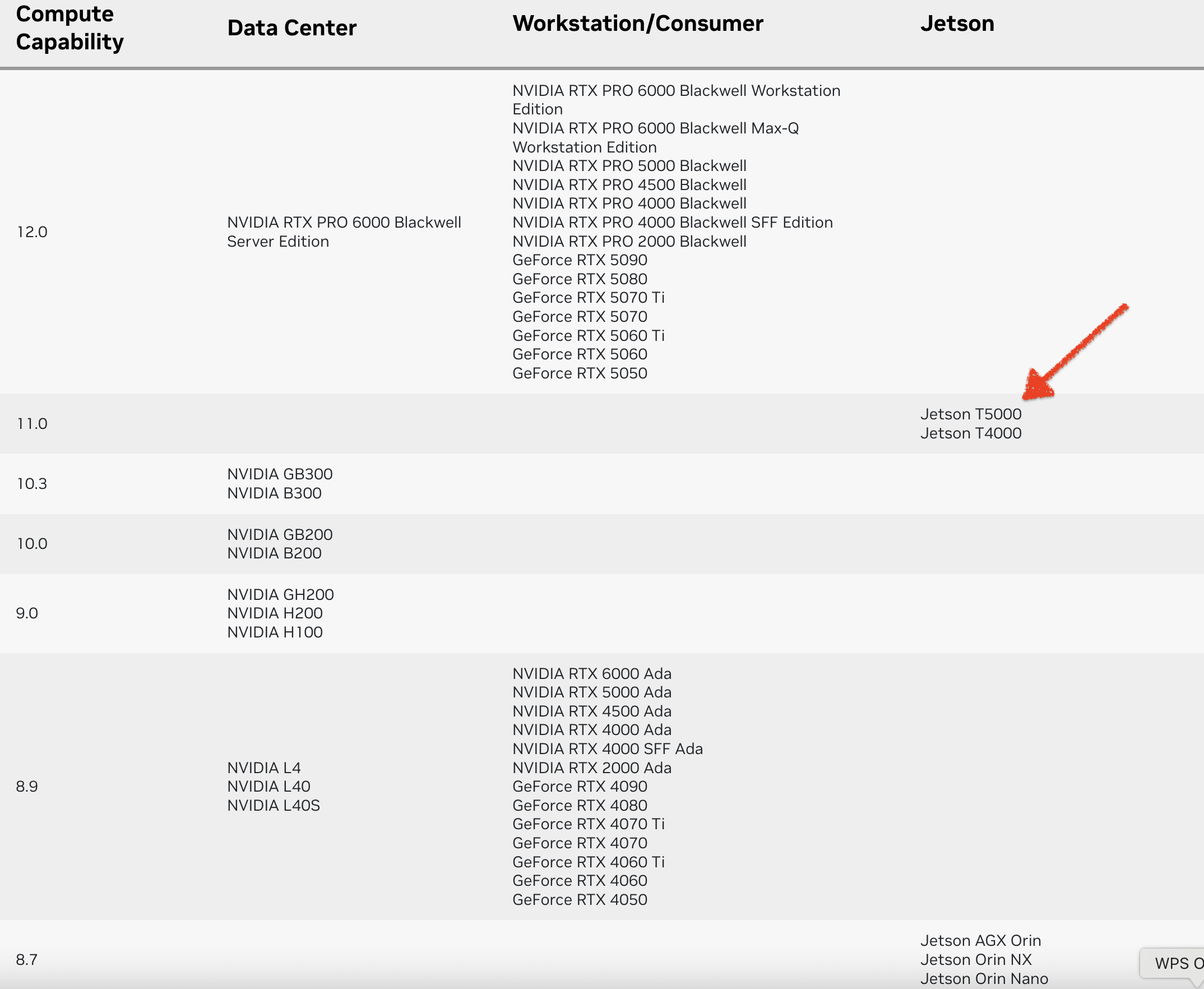
CUDA GPU Compute Capability(计算能力)
计算能力(CC)定义了每种 NVIDIA GPU 架构的硬件特性和支持的指令。在下表中查找您的GPU的计算能力。
vLLM
docker run -it --rm \
  --ipc=host \
  --net=host \
  --runtime=nvidia \
  --name=vllm-test \
  -v /models:/models \
  -v ~/.cache/huggingface:/root/.cache/huggingface \
  -v ~/.cache/modelscope:/root/.cache/modelscope \
  nvcr.io/nvidia/vllm:25.10-py3 \
  bash
默认情况下,如果模型未指向有效的本地目录,它将从 Hugging Face Hub 下载模型文件。要从 ModelScope 下载模型,请在运行命令之前进行如下设置:
export VLLM_USE_MODELSCOPE=true
vllm serve /models/Qwen/Qwen3-8B \
  --served-model-name qwen3 \
  --chat-template /models/Qwen/Qwen3-8B/qwen3_nonthinking.jinja
SGLang
编译 whisper.cpp
克隆仓库
git clone https://github.com/ggml-org/whisper.cpp.git
cd whisper.cpp
编译 whisper.cpp
cmake -B build -DGGML_CUDA=1 -DCMAKE_CUDA_ARCHITECTURES="110"
cmake --build build -j --config Release
下载模型
sh ./models/download-ggml-model.sh small
sh ./models/download-ggml-model.sh large-v3-turbo
运行 whisper-cli
./build/bin/whisper-cli -f samples/jfk.wav
./build/bin/whisper-cli -m /models/whisper.cpp/models/ggml-large-v3-turbo.bin -f samples/jfk.wav
whisper-server
本文将介绍如何在 Jetson Thor 平台上编译、部署和测试 llama.cpp 项目中的 GGUF 格式的大模型。
克隆 llama.cpp
git clone https://github.com/ggml-org/llama.cpp.git
cd llama.cpp
CUDA GPU Compute Capability(计算能力)
计算能力(CC)定义了每种 NVIDIA GPU 架构的硬件特性和支持的指令。在下表中查找您的GPU的计算能力。
编译
cmake -B build -DGGML_CUDA=ON -DCMAKE_CUDA_ARCHITECTURES="110"
cmake --build build --config Release -j $(nproc)
模型部署
运行 llama-server
这些文档主要围绕着在 NVIDIA Jetson AGX Orin 开发者套件上部署 多模态大型语言模型 (LLMs) 所面临的 系统升级挑战。核心问题在于,当前系统的 JetPack、Ubuntu、CUDA 和 GPU 驱动版本 过低,无法满足 vLLM 和 Ollama 等主流推理框架对 更高 CUDA 和驱动版本 的要求。文章详细阐述了 升级至 JetPack 6.0 是解决兼容性问题的关键,但这将强制要求 将 Ubuntu 升级到 22.04,从而导致 需要重装系统 和 可能与 ROS1 产生兼容性问题 等一系列复杂挑战。此外,文档还探讨了 替代推理引擎和云端推理 等备选方案,但最终建议进行 系统全面升级 以实现长期兼容性和性能优化。
系统信息
当前系统配置
系统升级需求
SGLang
SGLang is a fast serving framework for large language models and vision language models. It makes your interaction with models faster and more controllable by co-designing the backend runtime and frontend language.
SGLang 是用于大型语言模型和视觉语言模型的快速服务框架。通过协同设计后端运行时和前端语言,使您与模型的交互更快速、更可控。
The core features include:
核心功能包括: Fast Backend Runtime: Efficient serving with RadixAttention for prefix caching, jump-forward constrained decoding, continuous batching, token attention (paged attention), tensor parallelism, FlashInfer kernels, and quantization (AWQ/FP8/GPTQ/Marlin).
[llama.cpp][llama.cpp]
模型量化 量化类型 ./quantize --help Allowed quantization types: 2 or Q4_0 : 3.56G, +0.2166 ppl @ LLaMA-v1-7B 3 or Q4_1 : 3.90G, +0.1585 ppl @ LLaMA-v1-7B 8 or Q5_0 : 4.33G, +0.0683 ppl @ LLaMA-v1-7B 9 or Q5_1 : 4.70G, +0.0349 ppl @ LLaMA-v1-7B 19 or IQ2_XXS : 2.06 bpw quantization 20 or IQ2_XS : 2.31 bpw quantization 10 or Q2_K : 2.63G, +0.6717 ppl @ LLaMA-v1-7B 21 or Q2_K_S : 2.16G, +9.0634 ppl @ LLaMA-v1-7B 12 or Q3_K : alias for Q3_K_M 11 or Q3_K_S : 2.75G, +0.5551 ppl @ LLaMA-v1-7B 12 or Q3_K_M : 3.07G, +0.2496 ppl @ LLaMA-v1-7B 13 or Q3_K_L : 3.35G, +0.
安装 FastChat & vLLM
安装 FastChat
pip install "fschat[model_worker,webui]"
Turing GPU T4 不支持 FlashAttention 2,需要使用 FlashAttention 1.x 。Turing GPU T4 不支持 bf16,需要使用 fp16 。安装 vLLM
pip install vllm -i https://mirrors.aliyun.com/pypi/simple/
升级 FastChat & vLLM
git pull
pip install -e ".[model_worker,webui]"
pip install -U vllm
部署 LLM
运行 Controller
python -m fastchat.serve.controller
运行 OpenAI API Server
python -m fastchat.serve.openai_api_server
运行 Model Worker Qwen-1_8B-Chat export CUDA_VISIBLE_DEVIC
我的 GPU:GP106 [GeForce GTX 1060 6GB]
安装 NVIDIA 驱动
查看哪些进程正在使用 NVIDIA 设备
lsof -n -w /dev/nvidia*
lsof 是一个在 Unix 和类 Unix 系统(如 Linux)上的命令行工具,用于列出当前系统打开的文件。在这里,"文件" 的概念很广泛,除了常见的文件和目录,还包括网络套接字、设备、管道等。
所以,sudo lsof -n -w /dev/nvidia* 命令的作用是查看哪些进程正在使用 NVIDIA 设备。
杀死使用 NVIDIA 设备的进程或停止服务
kill -9 <pid>sudo systemctl stop <service_name>列出系统中所有需要驱动的设备 sudo ubuntu-drivers devices WARNING:root:_pkg_get_support nvidia-driver-525: package has invalid
困难重重 😭
服务器是 NVIDIA Tesla T4,系统是 Ubuntu 20.04,从 Kubernetes 集群中分离出来的,因 Tabby 请求 CUDA >= 11.7,需要重新安装新版本的驱动。
sudo sh NVIDIA-Linux-x86_64-535.129.03.run
就两步就完成了,简单吧 😄
实际安装过程 😭
安装驱动
sudo sh NVIDIA-Linux-x86_64-535.129.03.run
日志查看错误信息
Coding LLMs Leaderboard (TabbyML Team)
Introducing the Coding LLM Leaderboard

更新日期:2023-11-13
Next Line Accuracy
什么是 Next Line Accuracy ?
在代码补全中,模型预测的是跨越多行的代码块。一种朴素的方法是直接将预测的代码块与实际提交的代码进行比较。虽然这种方法看起来理想,但它通常被认为是一个“过于稀疏”的度量标准。另一方面,下一行准确度可以作为整体代码块匹配准确度的可靠代理。
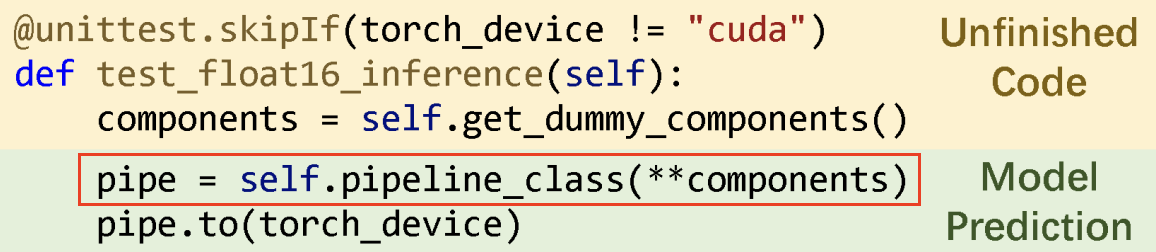
只有红色框内的内容被用于与真实值进行比较,以计算准确度指标。
安装 Tabby
安装 tabby brew install tabbyml/tabby/tabby ==> Fetching tabbyml/tabby/tabby ==> Downloading https://github.com/TabbyML/tabby/releases/download/v0.7.
测试结果
模型 & 精度 & 显存 & 速度
Ubuntu 下安装依赖包
sudo apt-get update
sudo apt-get install -y python3 python3-dev python3-setuptools gcc libtinfo-dev zlib1g-dev build-essential cmake libedit-dev libxml2-dev
获取源代码
git clone --recursive https://github.com/apache/tvm tvm
安装 LLVM
TVM 需要 LLVM 用于 CPU 代码生成,使用 LLVM 构建需要 LLVM 4.0 或更高版本。
wget https://github.com/llvm/llvm-project/releases/download/llvmorg-11.0.0/clang+llvm-11.0.0-x86_64-linux-gnu-ubuntu-20.04.tar.xz
tar xvf clang+llvm-11.0.0-x86_64-linux-gnu-ubuntu-20.04.tar.xz
mv clang+llvm-11.0.0-x86_64-linux-gnu-ubuntu-20.04 llvm
构建共享库 创建 build 目录,将 cmake/config.
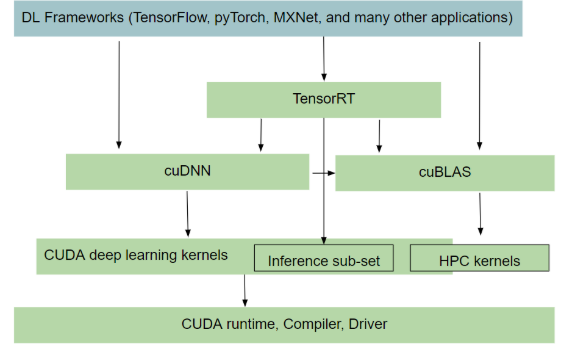
NVIDIA 软件栈
GPU Driver
Ubuntu
sudo ubuntu-drivers devices
#搜索匹配
sudo apt search nvidia-
sudo apt install nvidia-driver-510
sudo reboot
nvidia-smi
sudo apt purge nvidia*
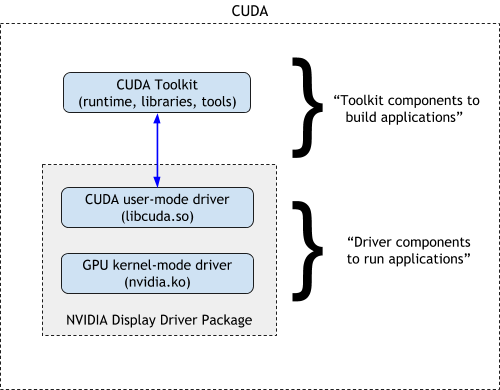
CUDA Toolkit
CUDA Toolkit 自带驱动。
下载
这里下载 run 格式安装包。
安装
$ sudo sh cuda_xx.x.x_xxx.xx.xx_linux.run
deviceQuery $ ./deviceQuery ./deviceQuery Starting... CUDA Device Query (Runtime API) version (CUDART static linking) Detected 1 CUDA Capable device(s) Device 0: "NVIDIA GeForce GTX 1060 6GB" CUDA Driver Version / Runtime Version 11.6 / 11.
构建镜像
FROM paddlepaddle/paddle:2.2.2-gpu-cuda10.2-cudnn7
LABEL maintainer="wang-junjian@qq.com"

RUN apt-get update && apt-get install libjpeg-dev zlib1g-dev -y

RUN pip install -i https://mirrors.aliyun.com/pypi/simple/ \
    numpy fastapi paddleocr opencv-python

EXPOSE 20000

WORKDIR /inference-serving
ADD . ./

CMD ["python", "app.py"]
官方推荐:非安培架构的GPU,推荐使用CUDA10.2,性能更优。
自己构建 paddlepaddle 镜像
通过官方的 Docker Hub 没有找到 runtime 版本,想着节省几个G的空间,于是考虑自己来构建。
构建 ONNXRuntime-GPU 镜像
编写 requirements.txt
$ vim requirements.txt
flask
connexion[swagger-ui]
connexion
gunicorn
numpy
opencv-python
scikit-image
psutil
pynvml
onnxruntime-gpu
编写 Dockerfile 需要带 cudnn 库的 CUDA 作为基镜像 $ vim Dockerfile FROM nvidia/cuda:11.4.0-cudnn8-runtime-ubuntu20.04 LABEL maintainer="wang-junjian@qq.com" RUN rm /etc/apt/sources.list.d/cuda.list /etc/apt/sources.list.d/nvidia-ml.list && \ sed -i 's/archive.ubuntu.com/mirrors.aliyun.com/g' /etc/apt/sources.
安装 CUDA Toolkit
下载
wget https://developer.download.nvidia.com/compute/cuda/11.6.0/local_installers/cuda_11.6.0_510.39.01_linux.run
安装 $ sudo sh cuda_11.5.1_495.29.05_linux.run =========== = Summary = =========== Driver: Installed Toolkit: Installed in /usr/local/cuda-11.5/ Samples: Installed in /home/lnsoft/, but missing recommended libraries Please make sure that - PATH includes /usr/local/cuda-11.5/bin - LD_LIBRARY_PATH includes /usr/local/cuda-11.5/lib64, or, add /usr/local/cuda-11.5/lib64 to /etc/ld.so.
容器技术由于其轻量级和可伸缩的优势而被广泛使用。GPU也因为其强大的并行计算能力被用于应用程序加速。在云计算环境下,容器可能需要一块或者多块GPU计算卡来满足应程序的资源需求,但另一方面,容器独占GPU计算卡常常会带来资源利用率低的问题。因此,对于云计算资源提供商而言,如何解决在多个容器之间共享GPU计算卡是一个很有吸引力的问题。本文中我们提出了一种称为GaiaGPU的方法,用于在容器间共享GPU存储和GPU的计算资源。GaiaGPU会将物理GPU计算卡分割为多个虚拟GPU并且将虚拟GPU按需分配给容器。同时我们采用了弹性资源分配和动态资源分配的方法来提高资源利用率。实验结果表明GaiaGPU平均仅带来1.015%的性能损耗并且能够高效的为容器分配和隔离GPU资源。
编译 GaiaGPU 服务
配置 git 加速
$ git config --global url."https://github.com.cnpmjs.org".insteadOf "https://github.com"

$ vim /etc/profile
export GOPROXY=https://goproxy.cn,direct
export GO111MODULE=on
$ source /etc/profile
vCUDA Controller $ git clon
NVIDIA CUDA
单步构建
git clone --recursive https://github.com/microsoft/onnxruntime.git
docker pull nvidia/cuda:11.1-cudnn8-devel-ubuntu20.04
docker run -it --name build-onnxruntime-gpu --runtime nvidia \
    -v $(pwd)/onnxruntime:/onnxruntime -w /onnxruntime \
    nvidia/cuda:11.1-cudnn8-devel-ubuntu20.04
sed -i 's/archive.ubuntu.com/mirrors.aliyun.com/g' /etc/apt/sources.list
apt-get update
apt-get install language-pack-en git cmake python3 python3-pip -y
locale-gen en_US.UTF-8
update-locale LANG=en_US.UTF-8
pip3 config set global.index-url https://mirrors.aliyun.com/pypi/simple/
FROM nvidia/cuda:11.1-cudnn8-devel-ubuntu20.04 AS builder
LABEL maintainer="wang-junjian@qq.com"

#E: Failed to fetch https://developer.download.nvidia.cn/compute/cuda/repos/ubuntu2004/x86_64/by-hash/SHA256/f10fc2a7a0d072ddcf141af2ef28f1e97ab4b3a5c3b9bbe34ed845d174fb4979  404  Not Found [IP: 61.155.167.2 443]
#E: Some index files failed to download. They have been ignored, or old ones used instead.
RUN rm /etc/apt/sources.list.d/cuda.list /etc/apt/sources.list.d/nvidia-ml.list

RUN sed -i 's/archive.ubuntu.com/mirrors.aliyun.com/g' /etc/apt/sources.list && \
    apt-get update && \
    apt-get install language-pack-en git python3 python3-pip -y && \
    DEBIAN_FRONTEND=noninteractive apt-get install cmake -y && \
    locale-gen en_US.UTF-8 && \
    update-locale LANG=en_US.UTF-8

RUN pip3 install numpy -i https://mirrors.aliyun.com/pypi/simple/
// ...
没有找到匹配的文章