5 篇文章带有标签 “inference-serving”

Text Generation Inference

TGI 介绍

TGI 是一个用于部署和服务大型语言模型(LLM)的工具包。 TGI 为最流行的开源 LLM 提供高性能文本生成,包括 Llama、Falcon、StarCoder、BLOOM、GPT-NeoX 和 T5 。

  • 张量并行性,可在多个 GPU 上进行更快的推理
  • 批处理连续传入的请求,以增加总吞吐量
  • 在最流行的架构上使用 [Flash Attention][Flash-Attention] 和 [Paged Attention][Paged-Attention] 优化 Transformers 代码进行推理
  • 使用 [bitsandbytes][bitsandbytes] 和 [GPT-Q][GPT-Q] 进行量化
  • [safetensors][safetensors] 权重加载
  • 给模型输出加水印(Watermark)
  • 微调支持:定制针对特定任务的微调模型来实现更高的准确性和性能

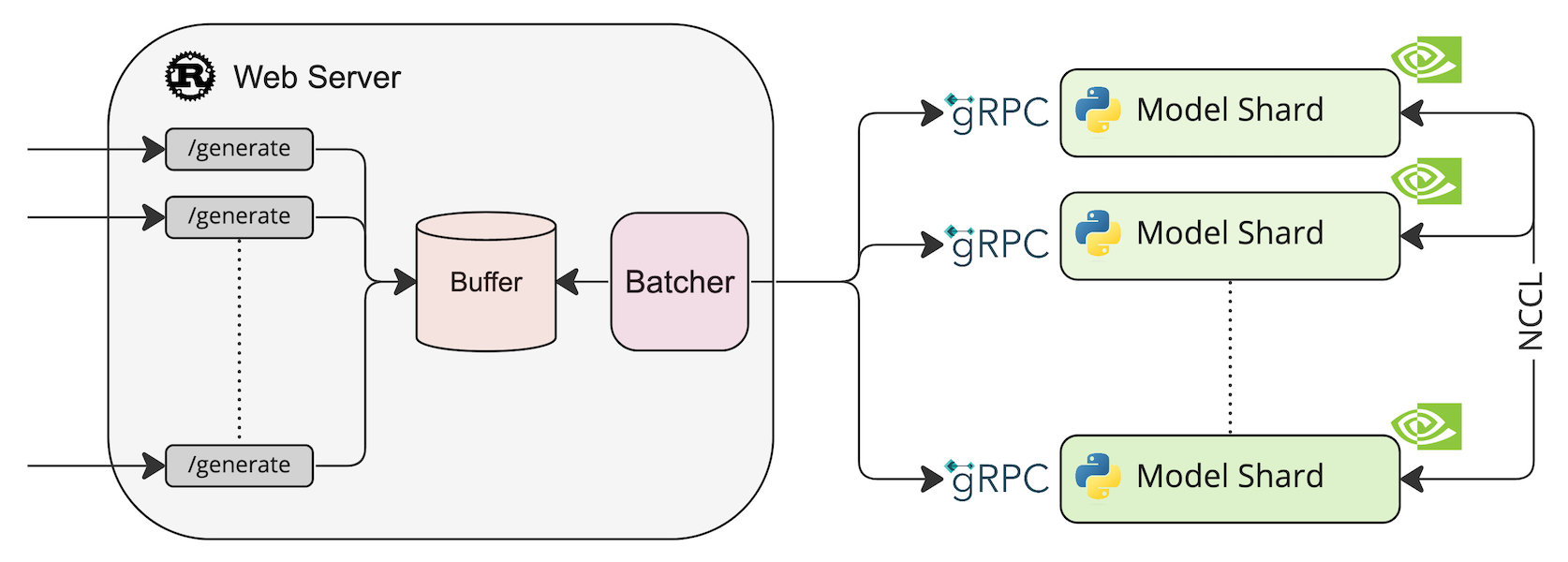
系统架构

部署模型 HuggingFaceH4/zephyr-7b-beta model=HuggingFaceH4/zephyr-7b-beta volume=$PWD/data # Avoid downloading weights every run docker run --

FastChat 部署多模型


* [Chatbot Arena](https://chat.lmsys.org/) * [FastChat](https://github.com/lm-sys/FastChat) * [LMSYS BLOG](https://lmsys.org/blog/) * [Use AutoGen for Local LLMs](https://microsoft.github.io/autogen/blog/2023/07/14/Local-LLMs/)

安装

pip

pip install "fschat[model_worker,webui]"

源代码

这种方式安装比较容易调试,适合开发者。

克隆代码

git clone https://github.com/lm-sys/FastChat.git
cd FastChat

创建环境

python -m venv env
source env/bin/activate

安装

构建基于 ONNXRuntime 的推理服务

构建 ONNXRuntime-GPU 镜像

编写 requirements.txt

$ vim requirements.txt
flask
connexion[swagger-ui]
connexion
gunicorn
numpy
opencv-python
scikit-image
psutil
pynvml
onnxruntime-gpu

编写 Dockerfile 需要带 cudnn 库的 CUDA 作为基镜像 $ vim Dockerfile FROM nvidia/cuda:11.4.0-cudnn8-runtime-ubuntu20.04 LABEL maintainer="wang-junjian@qq.com" RUN rm /etc/apt/sources.list.d/cuda.list /etc/apt/sources.list.d/nvidia-ml.list && \ sed -i 's/archive.ubuntu.com/mirrors.aliyun.com/g' /etc/apt/sources.

如何使用 Docker 打包已注册的模型

模型打包成镜像

手工打包

project_dir=platen-switch
darknet_model_name=darknet-model-platen-switch

cd $project_dir
docker run -d --name $darknet_model_name alpine
docker cp model/ $darknet_model_name:/
docker commit -a 'wang-junjian@qq.com' -m 'darknet model [platen-switch recognition]' \
  $darknet_model_name gouchicao/$darknet_model_name:latest
docker rm -v $darknet_model_name

docker push gouchicao/$darknet_model_name:latest

Python 脚本 import docker import tarfile import tempfile import os def simple_tar(path): f = tempfile.NamedTemporaryFile() t = tarfile.