65 篇文章带有标签 “agent”
OpenAI: 构建智能体的实用指南
什么是智能体?
传统软件帮助用户简化和自动化工作流程,而智能体则能够以高度独立的方式代表用户执行这些工作流程。
智能体是能够独立代表您完成任务的一种系统。
工作流程是指为了实现用户目标而必须执行的一系列步骤,无论是解决客户服务问题、预订餐厅、提交代码变更,还是生成报告。
那些集成了大语言模型(LLM)但并未用其控制工作流程执行的应用程序(例如简单聊天机器人、单轮对话LLM或情感分类器)不属于智能体。
具体来说,智能体具备以下核心特征,使其能够可靠且一致地代表用户行动:
- 它利用LLM来管理工作流程的执行并做出决策。它能识别工作流程何时完成,并在需要时主动修正行为。如果执行失败,它可以停止操作并将控制权交还给用户。
- 它能够调用多种工具与外部系统交互(既用于获取上下文信息,也用于执行操作),并根据工作流程的当前状态动态选择合适工具,同时始终在明确定义的边界内运行。
何时应该构建智能体?
构建智能体需要重新思考系统如何决策和处理复杂性。与传统自动化不同,智能体特别适合那些传统确定性和基于规则的方法无法胜任的工作流程。
以支付欺诈分析为例:传统的规则引擎像一份检查清单,根据预设条件标记交易;而基于大语言模型的智能体则更像经验丰富的调查员,它能评估上下文、捕捉细微模式,即使没有明确违反规则也能识别可疑行为。
Agent2Agent 协议 (A2A) DEMO


Agent2Agent 协议 (A2A)
一个开放协议,旨在实现不透明的智能代理应用程序之间的通信和互操作性。
- Agent2Agent 协议 A2A - 入门 - 贡献 - 下一步是什么 - 关于
企业采用人工智能的最大挑战之一是如何让基于不同框架和供应商构建的代理协同工作。这就是我们创建开放的 Agent2Agent (A2A) 协议的原因,这是一种协作方式,旨在帮助不同生态系统中的代理相互通信。Google 正在推动这项行业开放协议倡议,因为我们相信这个协议对于支持多代理通信至关重要,它将为您的代理提供一种通用语言——无论它们构建于哪个框架或供应商之上。借助 A2A,代理可以相互展示它们的功能并协商如何与用户交互(通过文本、表单或双向音频/视频)——所有这些都在安全地协同工作的同时进行。
观看 A2A 的实际应用
观看此演示视频,了解 A2A 如何实现不同代理框架之间的无缝通信。
概念概述
Agent2Agent (A2A) 协议促进了独立 AI 代理之间的通信。以下是核心概念:
- 代理卡片 (Agent Card): 一个公开的元数据文件(通常位于
/.well-known/agent.json),描述了代理的功能、技能、端点 URL 和身份验证要求。客户端使用它进行发现。- A2A 服务器 (A2A Server): 一个公开 HTTP 端点并实现 A2A 协议方法(定义在 json 规范 中)的代理。它接收请求并管理任务执行。
- A2A 客户端 (A2A Client): 一个消费 A2A 服务的应用程序或另一个代理。它向 A2A 服务器的 URL 发送请求(如
tasks/send)。 - 任务 (Task): 中心的工作单元。客户端通过发送消息(
tasks/send或tasks/sendSubscribe)来启动任务。任务具有唯一的 ID,并经历以下状态:submitted(已提交)、working(工作中)、input-required(需要输入)、completed(已完成)、failed(失败)、canceled(已取消)。 - 消息 (Message): 表示客户端(
role: "user")和代理(role: "agent")之间的通信轮次。消息包含Parts(部件)。 - 部件 (Part):
Message或Artifact(工件)中的基本内容单元。可以是TextPart(文本部件)、FilePart(文件部件,包含内联字节或 URI)或DataPart(数据部件,用于结构化 JSON,例如表单)。 - 工件 (Artifact): 表示代理在任务期间生成的输出(例如,生成的文件、最终的结构化数据)。工件也包含
Parts(部件)。 - 流式传输 (Streaming): 对于长时间运行的任务,支持
streaming功能的服务器可以使用tasks/sendSubscribe。客户端接收服务器发送事件 (SSE),其中包含TaskStatusUpdateEvent(任务状态更新事件)或TaskArtifactUpdateEvent(任务工件更新事件)消息,提供实时的进度。 - 推送通知 (Push Notifications): 支持
pushNotifications的服务器可以主动向客户端提供的 webhook URL 发送任务更新,该 URL 通过tasks/pushNotification/set配置。
使用 Cline 构建和管理 MCP 服务器:增强 AI 能力的全面指南
Cline 和模型上下文协议 (MCP) 服务器:增强 AI 能力
快速链接:
- 从 GitHub 构建 MCP 服务器
- 从头开始构建自定义 MCP 服务器
本文档解释了模型上下文协议 (MCP) 服务器的功能以及 Cline 如何帮助构建和使用它们。
概述
MCP 服务器充当大型语言模型 (LLM)(如 Claude)与外部工具或数据源之间的中介。它们是向 LLM 提供功能的小程序,使其能够通过 MCP 与外部世界交互。MCP 服务器本质上就像 LLM 可以使用的 API。
核心概念
MCP 服务器定义了一组"工具",即 LLM 可以执行的函数。这些工具提供了广泛的功能。
MCP 的工作原理:
- MCP 主机发现连接的服务器的功能并加载它们的工具、提示和资源。
- 资源提供对只读数据的一致访问,类似于文件路径或数据库查询。
- 安全性由服务器隔离凭证和敏感数据来确保。交互需要明确的用户批准。
使用场景
MCP 服务器的潜力非常广阔。它们可以用于多种用途。
以下是 MCP 服务器的一些具体使用示例:
- Web 服务和 API 集成:
- 监控 GitHub 存储库的新问题
- 根据特定触发器发布 Twitter 更新
- 检索基于位置的服务的实时天气数据
- 浏览器自动化:
- 自动化 Web 应用程序测试
- 抓取电子商务网站进行价格比较
- 为网站监控生成截图
- 数据库查询:
- 生成每周销售报告
- 分析客户行为模式
- 为业务指标创建实时仪表板
Qwen2.5-VL Technical Report
Abstract(摘要)
We introduce Qwen2.5-VL, the latest flagship model of Qwen vision-language series, which demonstrates significant advancements in both foundational capabilities and innovative functionalities. Qwen2.5-VL achieves a major leap forward in understanding and interacting with the world through enhanced visual recognition, precise object localization, robust document parsing, and long-video comprehension. A standout feature of Qwen2.5-VL is its ability to localize objects using bounding boxes or points accurately.
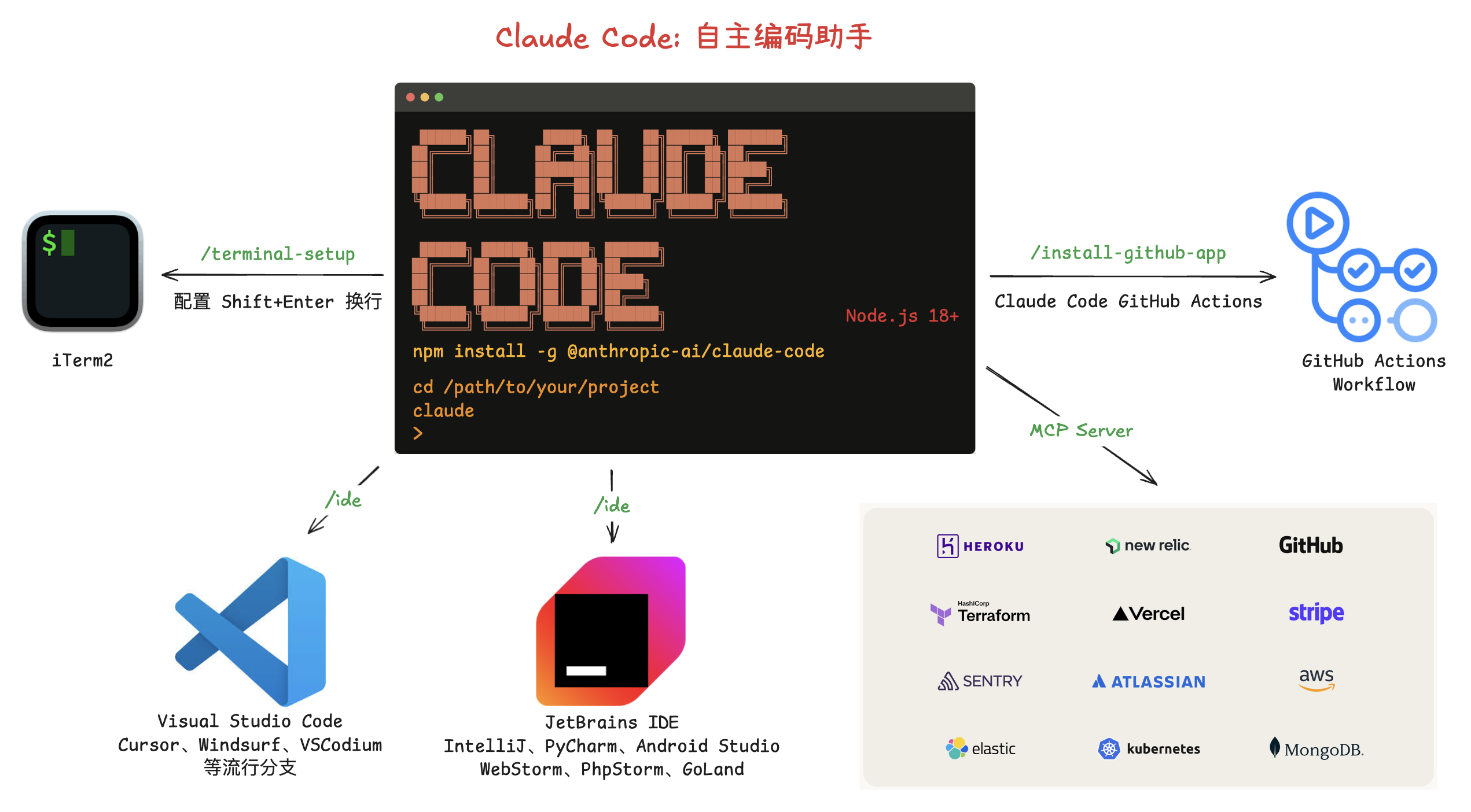
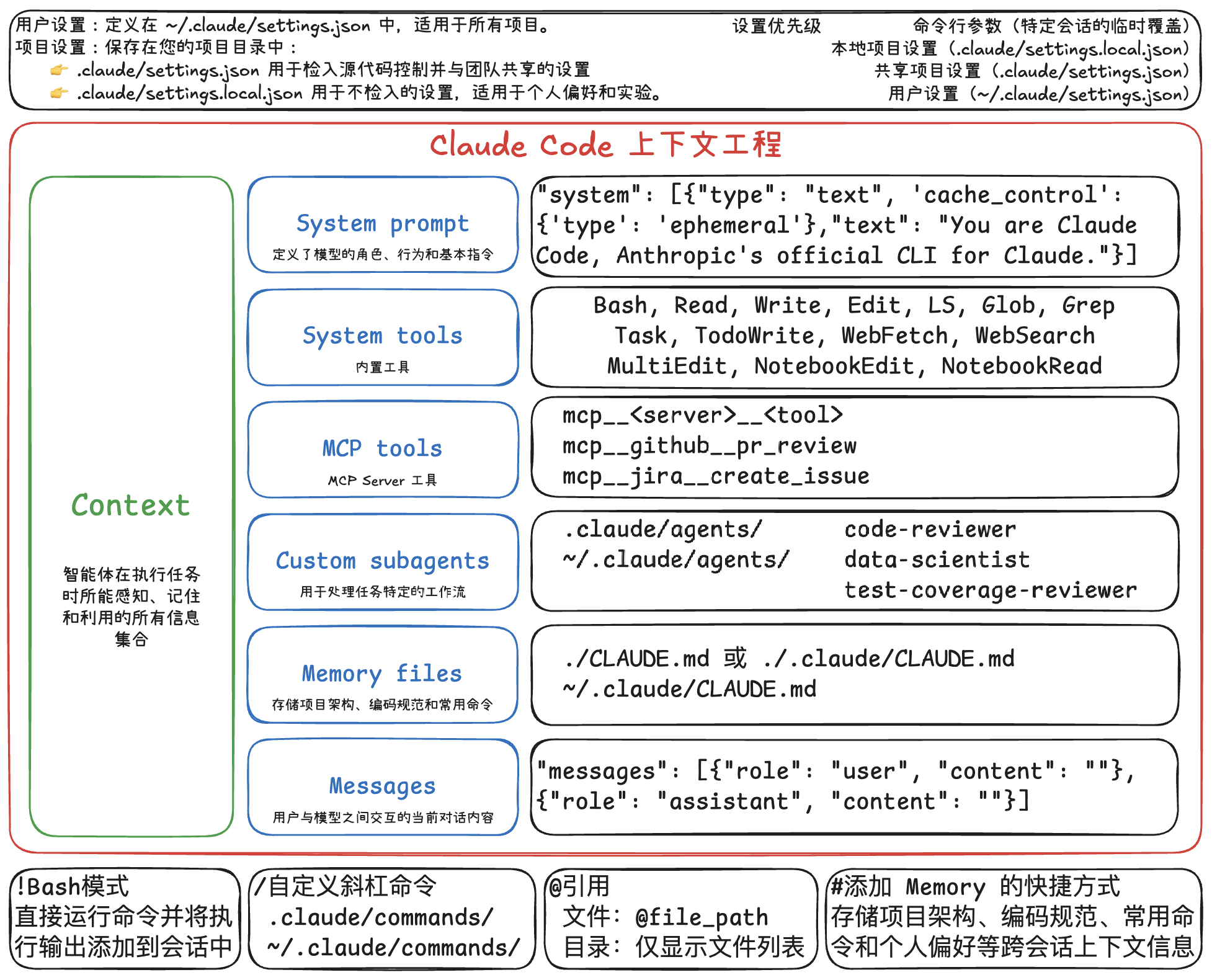
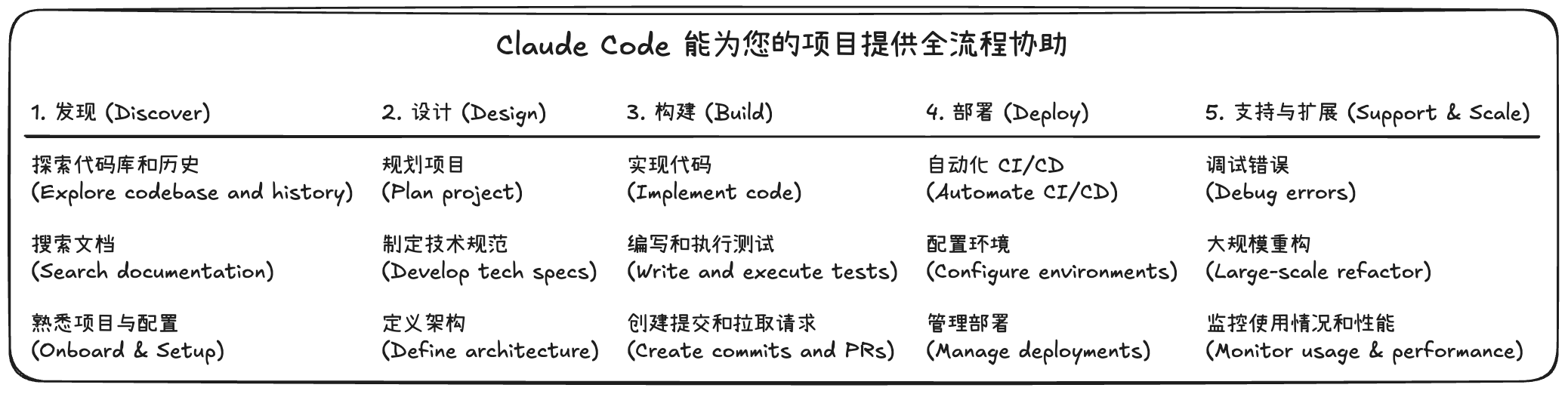
Cline: 自主编程助手
开发
克隆仓库
git clone https://github.com/cline/cline.git
打开项目
code cline
安装依赖
npm run install:all
安装 esbuild problem matchers 扩展
如果构建项目时遇到问题,请安装 esbuild problem matchers 扩展。
Activating task providers npm
错误: problemMatcher 引用无效: $esbuild-watch
启动
打开 运行和调试 侧边栏,运行 Run Extension,或者按 F5 键启动调试,打开一个新的 VSCode 窗口,加载扩展。
配置
配置模型 Ollama

智能体编码
查看 issue

显示 issue

创建分支

修复 issue

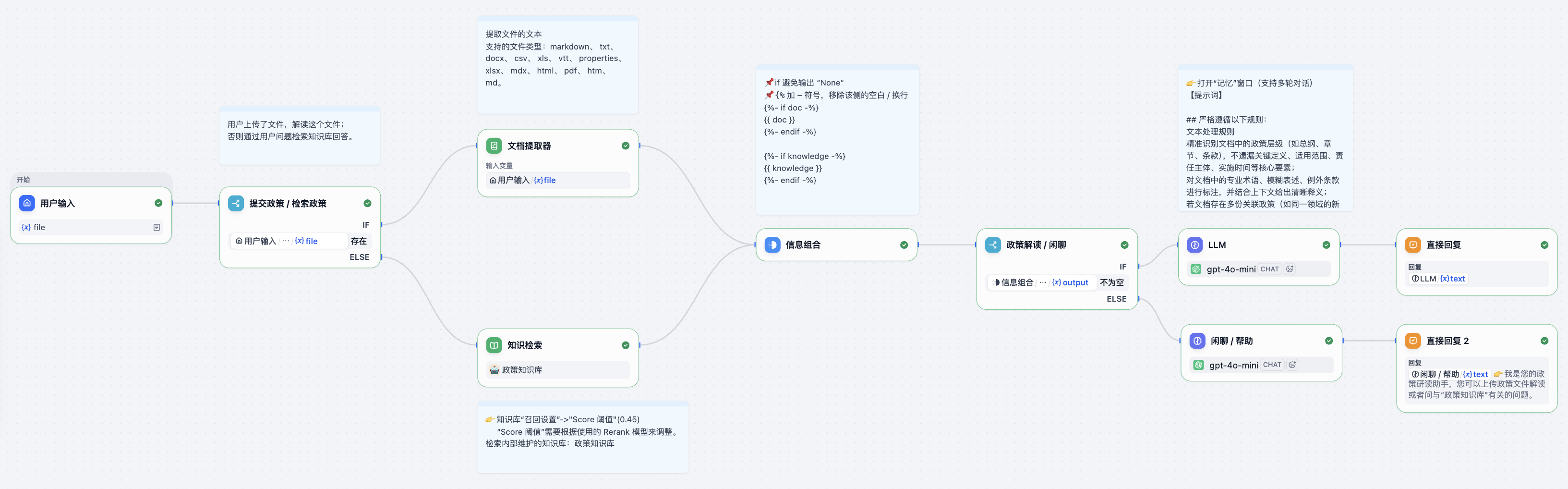
运行 RAGFlowAssistant

安装 GitHub MCP Server

构建自主答题的智能体
目标
这里想探索使用多模态大模型答题的技术方案,包含单选题、多选题、判断题,最终构建自主答题的智能体。
工作流程:🏞️ -> MLM(多模态大模型)-> 答案
📝思路一
直接使用多模态大模型读题(转成文字),然后检索答案,把题和答案组合的提示词输入给语言大模型。
我使用了 Ollama 调用多模态大模型
minicpm-v:8b来生成文字。llava:7b的效果不好。
代码示例:
import ollama
response = ollama.chat(
model="minicpm-v:8b",
messages=[
{
'role': 'user',
'content': '读取图像中的题。',
'images': ['ti.png']
}
]
)
print(response['message']['content'])
Open-source DeepResearch – Freeing our search agents
TLDR
Yesterday, OpenAI released Deep Research, a system that browses the web to summarize content and answer questions based on the summary. The system is impressive and blew our minds when we tried it for the first time.
昨天,OpenAI 发布了 Deep Research,这是一个浏览网页以总结内容并根据总结回答问题的系统。当我们第一次尝试时,这个系统给我们留下了深刻的印象。
One of the main results in the blog post is a strong improvement of performances on the General AI Assistants benchmark (GAIA), a benchmark we’ve been playing with recently as well, where they successfully reached near 67% correct answers on 1-shot on average, and 47.
Introducing deep research
- Introduction to Deep Research from OpenAI [LIVESTREAM]
- Open-source DeepResearch – Freeing our search agents
An agent that uses reasoning to synthesize large amounts of online information and complete multi-step research tasks for you.
一个代理,使用推理来综合大量在线信息,并为您完成多步研究任务。
Today we’re launching deep research in ChatGPT, a new agentic capability that conducts multi-step research on the internet for complex tasks. It accomplishes in tens of minutes what would take a human many hours.
今天我们在 ChatGPT 中推出了 deep research,这是一种新的代理能力,可以在互联网上进行复杂任务的多步研究。 它可以在几十分钟内完成人类需要花费数小时才能完成的任务。
Claude API: Computer use
Computer use reference implementation(计算机使用参考实现)
Get started quickly with our computer use reference implementation that includes a web interface, Docker container, example tool implementations, and an agent loop.
快速开始使用我们的计算机使用参考实现,其中包括Web界面、Docker容器、示例工具实现和代理循环。
Here’s an example of how to provide computer use tools to Claude using the Messages API:
以下是如何使用消息API为Claude提供计算机使用工具的示例:
Claude: Developing a computer use model
Developing a computer use model(开发计算机使用模型)
Claude can now use computers. The latest version of Claude 3.5 Sonnet can, when run through the appropriate software setup, follow a user’s commands to move a cursor around their computer’s screen, click on relevant locations, and input information via a virtual keyboard, emulating the way people interact with their own computer.
Claude现在可以使用计算机了。最新版本的Claude 3.5 Sonnet可以在通过适当的软件设置后,按照用户的命令在计算机屏幕上移动光标,单击相关位置,并通过虚拟键盘输入信息,模拟人们与自己的计算机交互的方式。
We think this skill—which is currently in public beta—represents a significant breakt
OSWorld:在真实计算机环境中为开放式任务进行多模态代理基准测试
参考
Abstract(摘要)
Autonomous agents that accomplish complex computer tasks with minimal human interventions have the potential to transform human-computer interaction, significantly enhancing accessibility and productivity. However, existing benchmarks either lack an interactive environment or are limited to environments specific to certain applications or domains, failing to reflect the diverse and complex nature of real-world computer use, thereby limiting the scope of tasks and agent scalability.
UI-TARS: Pioneering Automated GUI Interaction with Native Agents
UI-TARS: Pioneering Automated GUI Interaction with Native Agents(与本地代理进行自动化 GUI 交互的先驱)
Abstract(摘要)
This paper introduces UI-TARS, a native GUI agent model that solely perceives the screenshots as input and performs human-like interactions (e.g., keyboard and mouse operations). Unlike prevailing agent frameworks that depend on heavily wrapped commercial models (e.g., GPT-4o) with expert-crafted prompts and workflows, UI-TARS is an end-to-end model that outperforms these sophisticated frameworks.
Computer-Using Agent
Computer-Using Agent (CUA)
A universal interface for AI to interact with the digital world. AI 与数字世界交互的通用接口。
Today we introduced a research preview of Operator, an agent that can go to the web to perform tasks for you. Powering Operator is Computer-Using Agent (CUA), a model that combines GPT-4o's vision capabilities with advanced reasoning through reinforcement learning. CUA is trained to interact with graphical user interfaces (GUIs)—the buttons, menus, and text fields people see on a screen—just as humans do.
Operator System Card
1 Introduction(简介)
Operator is a research preview of our Computer-Using Agent (CUA) model, which combines GPT-4o’s vision capabilities with advanced reasoning through reinforcement learning. It interprets screenshots and interacts with graphical user interfaces (GUIs) — the buttons, menus, and text fields people see on a computer screen — just as people do. Operator’s ability to use a computer enables it to interact with the same tools and interfaces that people rely on daily, unlocking the potential to assist with an unparalleled range of tasks.
Operator 是我们计算机使用代理(CUA)模型的研究
LangChain Blog: In the Loop
“什么是代理?”
几乎每天都会有人问我这个问题。在 LangChain,我们构建工具来帮助开发者构建 LLM 应用程序,特别是那些充当推理引擎并与外部数据和计算源交互的应用程序。这包括通常被称为“代理”的系统。
每个人似乎对代理都有稍微不同的定义。我的定义可能比大多数人更技术性:
💡 代理是一个使用 LLM 来决定应用程序控制流的系统。
即使在这里,我也承认我的定义并不完美。人们通常认为代理是高级的、自主的、类人的——但如果是一个简单的系统,LLM 在两个不同路径之间进行路由呢?这符合我的技术定义,但不符合人们对代理应具备能力的普遍看法。很难准确定义什么是代理!
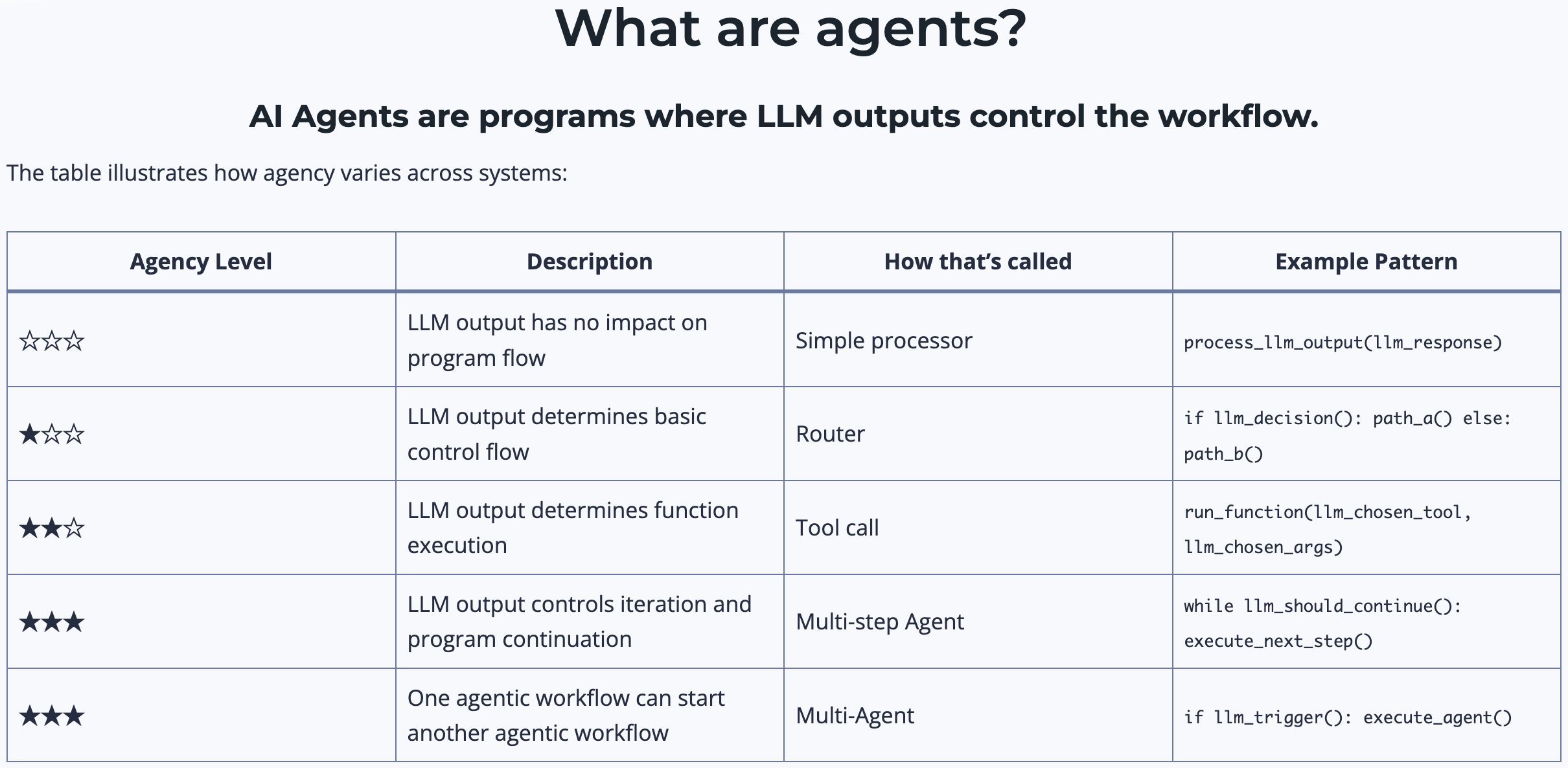
这就是为什么我非常喜欢 Andrew Ng 上周的推文。在推文中,他建议“与其争论哪些工作应被包括或排除为真正的代理,我们可以承认系统可以有不同程度的代理性。”就像自动驾驶汽车有不同的自动化级别一样,我们也可以将代理能力视为一个光谱。我非常同意这个观点,我认为 Andrew 表达得很好。将来,当有人问我什么是代理时,我会转而讨论什么是“代理性”。
什么是代理性(agentic)?
去年我在 TED 演讲中谈到了 LLM 系统,并使用下面的幻灯片讨论了 LLM 应用程序中存在的不同自主级别。

一个系统越“代理性”,LLM 决定系统行为的程度就越高。
使用 LLM 将输入路由到特定的下游工作流中具有一些小的“
AutoGen
AutoGen
定义 Agent
from autogen import ConversableAgent
llm_config = {"model": "gpt-3.5-turbo"}
agent = ConversableAgent(
name="chatbot",
llm_config=llm_config,
human_input_mode="NEVER",
)
reply = agent.generate_reply(
messages=[{"content": "给我讲个笑话。", "role": "user"}]
)
print(reply)
// ...
为什么八卦杂志最爱讲床上故事?因为上面都有新闻!哈哈哈~
为什么兔子喜欢吃胡萝卜?因为胡萝卜有好处,营养丰富!
多智能体对话
双人笑话