5 篇文章带有标签 “多模态”

🦞 本地 AI 助手 OpenClaw 的架构与记忆系统

🦞 OpenClaw 是一个本地优先(Local-First)、高度自治、基于 Markdown 记忆管理的 AI Agent(智能体)系统。

它的核心亮点在于:

  1. 数据主权 (Local-First): 记忆和配置都在本地 Markdown 文件中,用户完全掌控。
  2. 拟人化设计: 通过心跳机制 (HEARTBEAT) 和分层记忆,试图构建一个有“长期记忆”和“自主行为”的 AI,而不仅仅是一个聊天机器人。
  3. 工程化落地: 考虑了多端接入、混合检索 RAG、上下文压缩以及安全沙盒,这是一个生产力级别的架构。

架构系统
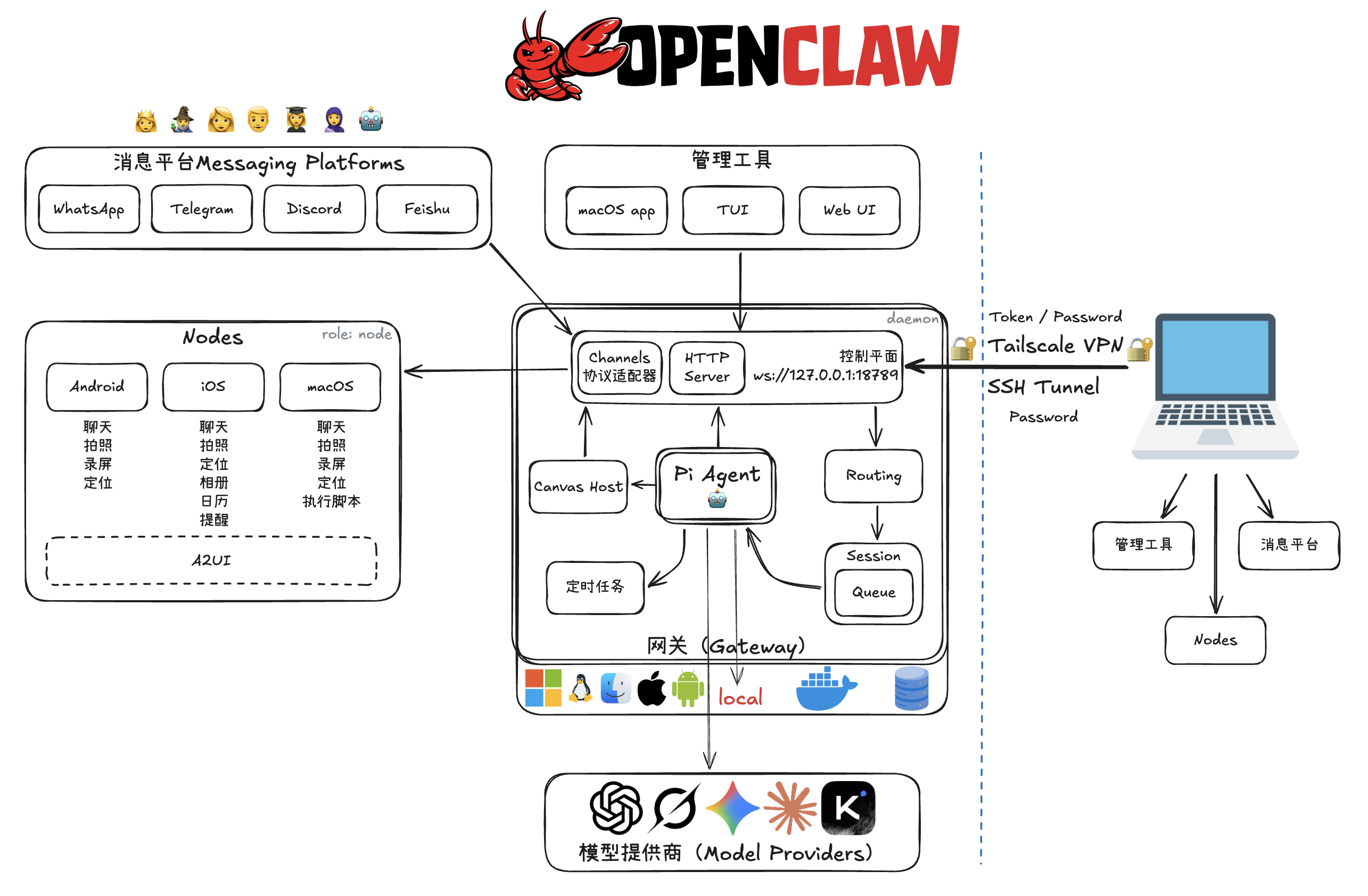
  • 多端接入 (Messaging & Nodes):
    • 消息平台: 支持 WhatsApp, Telegram, Discord, 飞书等主流通讯软件,意味着用户可以在这些 App 里直接与 Agent 对话。
    • 客户端节点 (Nodes): 覆盖 Android, iOS, macOS。这些节点不仅是聊天窗口,还能调用设备能力(如拍照、定位、录屏、执行脚本),让 AI 拥有“手”和“眼”。
  • 核心网关 (Gateway):
    • 运行在本地(支持 Windows, Linux, macOS, iOS, Android, Docker 等)。
    • 包含控制平面、HTTP Server、路由、会话管理和任务队列。
    • Pi Agent: 是核心大脑,负责处理逻辑。
  • 远程管理: 通过 Tailscale VPNSSH Tunnel 进行安全的远程连接,保障了数据传输的安全性(无需暴露公网 IP)。
探索多模态大模型 Qwen2.5-VL

本文档提供了一篇关于Qwen2.5-VL 多模态大模型的详细指南,涵盖了从模型架构、性能到实际部署和使用的各个方面。它不仅介绍了如何下载不同版本(如 3B 和 7B Instruct)的模型,还提供了安装和启动模型的命令行指令。此外,文档还展示了如何通过 cURL 命令测试模型,并给出了一个使用 OpenAI API 与 Qwen2.5-VL 进行交互的 Python 示例代码,该代码专注于图像中的火灾、烟雾和安全帽佩戴情况检测,支持本地和网络图片。

Qwen2.5-VL

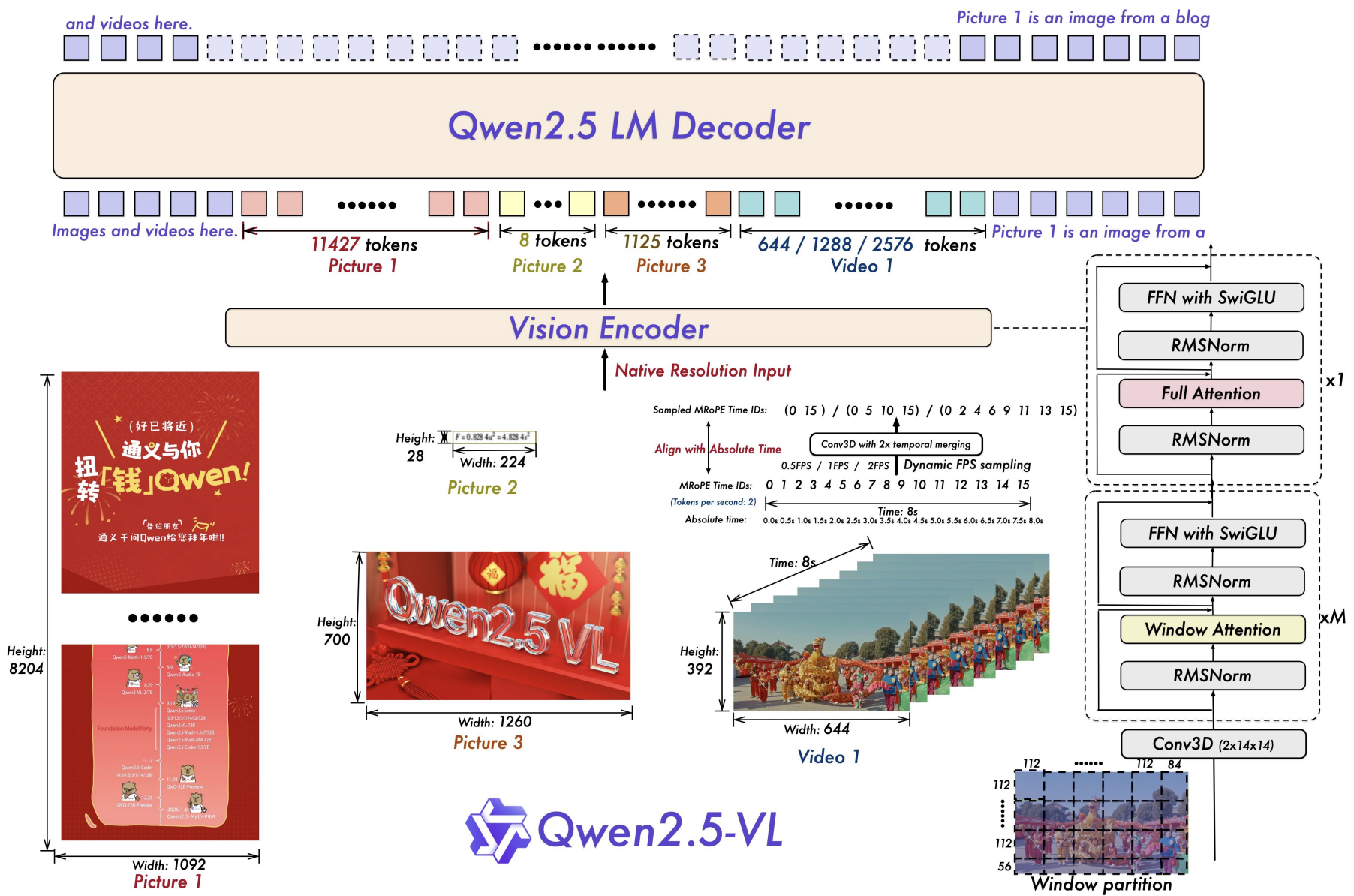
模型架构

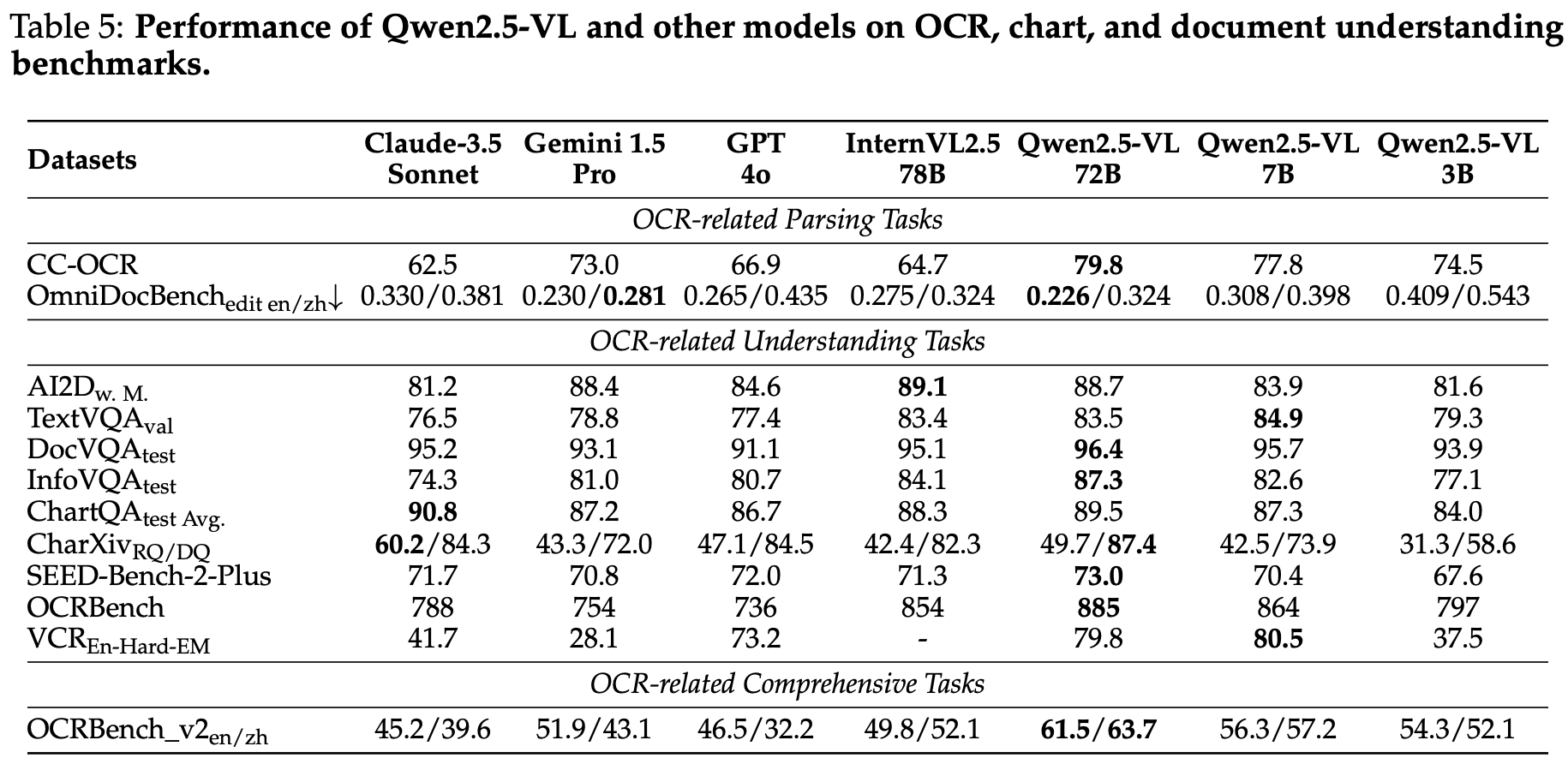
模型性能

魔搭下载

在下载前,请先通过如下命令安装 ModelScope

pip install modelscope

Qwen2.5-VL-3B-Instruct

modelscope download --model Qwen/Qwen2.5-VL-3B-Instruct --local_dir Qwen2.5-VL-3B-Instruct

Qwen2.5-VL-7B-Instruct

modelscope download --model Qwen/Qwen2.5-VL-7B-Instruct --local_dir Qwen2.5-VL-7B-Instruct

默认存储到 ~/.

Qwen2.5-VL Technical Report

Abstract(摘要)

We introduce Qwen2.5-VL, the latest flagship model of Qwen vision-language series, which demonstrates significant advancements in both foundational capabilities and innovative functionalities. Qwen2.5-VL achieves a major leap forward in understanding and interacting with the world through enhanced visual recognition, precise object localization, robust document parsing, and long-video comprehension. A standout feature of Qwen2.5-VL is its ability to localize objects using bounding boxes or points accurately.

构建自主答题的智能体

目标

这里想探索使用多模态大模型答题的技术方案,包含单选题、多选题、判断题,最终构建自主答题的智能体。

工作流程:🏞️ -> MLM(多模态大模型)-> 答案

📝思路一

直接使用多模态大模型读题(转成文字),然后检索答案,把题和答案组合的提示词输入给语言大模型。

我使用了 Ollama 调用多模态大模型 minicpm-v:8b 来生成文字。llava:7b 的效果不好。

代码示例:

import ollama

response = ollama.chat(
	model="minicpm-v:8b",
	messages=[
		{
			'role': 'user',
			'content': '读取图像中的题。',
			'images': ['ti.png']
		}
	]
)

print(response['message']['content'])

DeepSeek Janus Pro 7B

SiliconFlow 图像生成

从实验来看,需要用英文描述,中文描述生成的效果不好。

实验 1

This year is the Year of the Snake. I want to create a lifelike snake, wearing a fiery red new outfit, holding its head high, floating in the air, and writing "Happy New Year 2025" in snake-like font.

今年是蛇年,我想生成一只栩栩如生的蛇,穿着火红色的新衣,高昂着头,悬浮于空,用蛇体字型写上“2025年新年快乐”。

下面的图是快手可灵生成的。

实验 2

I wanted to create a lifelike snake, with its head held high, suspended in the air.

我想生成一只栩栩如生的蛇,高昂着头,悬浮于空。

实验 3

Modern abstract digital artwork with a split layout, black on the left and beige on the right.