12 篇文章带有标签 “fastapi”

Reachy Mini Conversation App

源码安装

克隆 Reachy Mini Conversation App

git clone https://github.com/wang-junjian/reachy_mini_conversation_app
cd reachy_mini_conversation_app

创建虚拟环境并安装依赖

uv venv --python 3.12
source .venv/bin/activate
uv sync

⚠️ 注意:要完全复现此仓库 uv.lock 文件中的依赖关系,请运行 uv sync --frozen 命令。这将确保 uv 直接从 lock 文件安装依赖项,而无需重新解析或更新任何版本。

安装可选功能

uv sync --extra local_vision         # Local PyTorch/Transformers vision
uv sync --extra yolo_vision          # YOLO face-detection backend for head tracking
uv sync --extra mediapipe_vision     # MediaPipe-based head-tracking
uv sync --extra all_vision           # All vision features

合并额外功能或包含开发依赖项:

SenseVoice

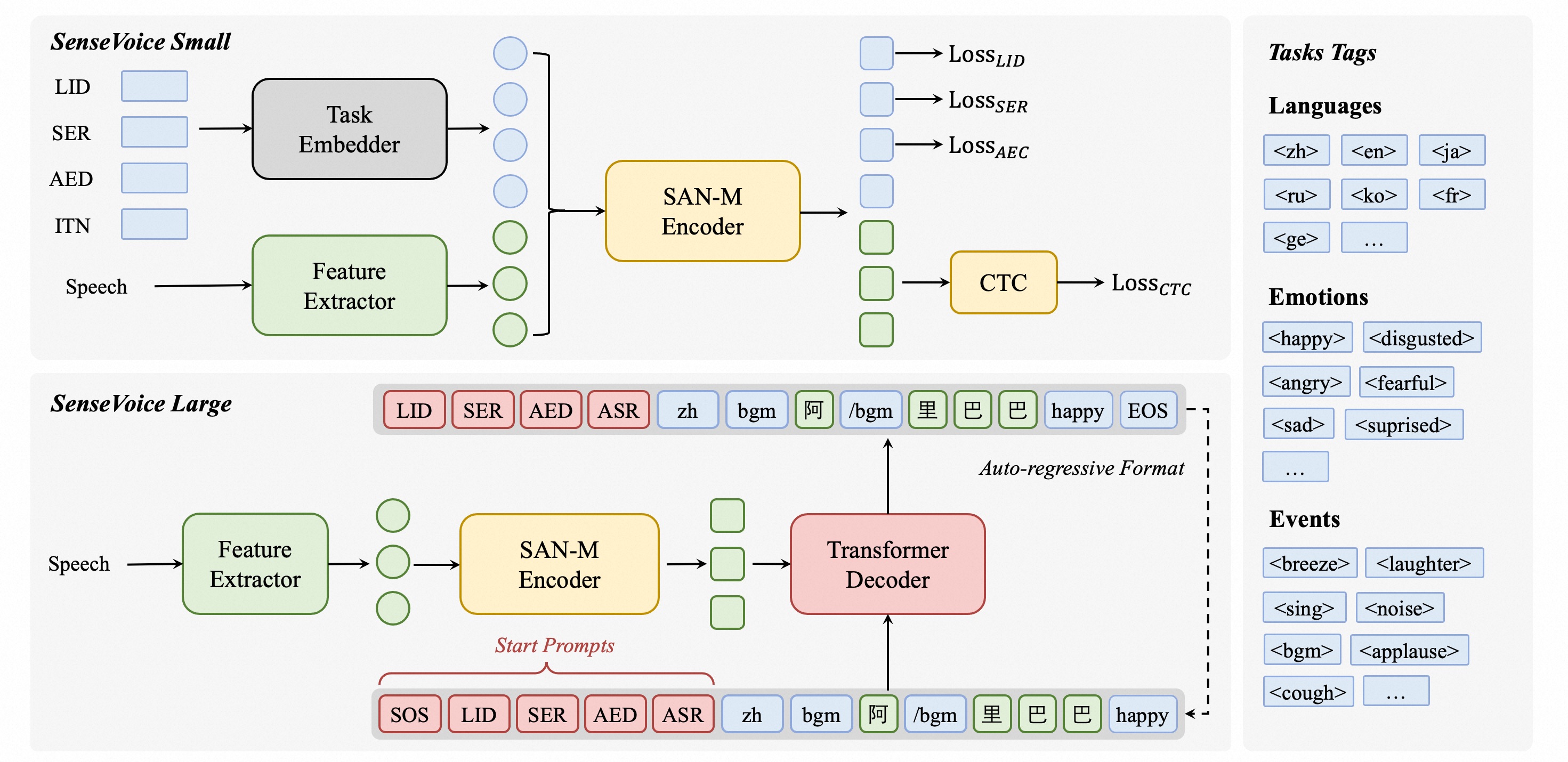
SenseVoice 是具有音频理解能力的音频基础模型,包括语音识别(ASR)、语种识别(LID)、语音情感识别(SER)和声学事件分类(AEC)或声学事件检测(AED)。

SenseVoice

核心功能 🎯

SenseVoice 专注于高精度多语言语音识别、情感辨识和音频事件检测

  • 多语言识别: 采用超过 40 万小时数据训练,支持超过 50 种语言,识别效果上优于 Whisper 模型。
  • 富文本识别:
    • 具备优秀的情感识别,能够在测试数据上达到和超过目前最佳情感识别模型的效果。
    • 支持声音事件检测能力,支持音乐、掌声、笑声、哭声、咳嗽、喷嚏等多种常见人机交互事件进行检测。
  • 高效推理: SenseVoice-Small 模型采用非自回归端到端框架,推理延迟极低,10s 音频推理仅耗时 70ms,15 倍优于 Whisper-Large。
  • 微调定制: 具备便捷的微调脚本与策略,方便用户根据业务场景修复长尾样本问题。
  • 服务部署: 具有完整的服务部署链路,支持多并发请求,支持客户端语言有,python、c++、html、java 与 c# 等。

架构图

  • 语音识别(ASR)
  • 语言识别(LID)
  • 语音情感识别(SER)
  • 音频事件检测(AED,比如笑声、掌声、背景音乐、咳嗽等)
  • 逆文本归一化(ITN)

安装

克隆代码库

将 API 密钥身份验证添加到 FastAPI 应用程序

API_KEY

方法一

from fastapi import Security, HTTPException, status
from fastapi.security.api_key import APIKeyHeader


API_KEY="123456"
API_KEY_NAME = "X-API-KEY"
api_key_header = APIKeyHeader(name=API_KEY_NAME, auto_error=True)

async def get_api_key(api_key: str = Security(api_key_header)):
    if api_key != API_KEY:
        raise HTTPException(
             status_code=status.HTTP_401_UNAUTHORIZED,
             detail="Invalid API Key"
        )


@app.get('/index', dependencies=[Security(get_api_key)])
async def index():
    return {"message": "Hello World"}

APIKeyHeader 的源码

FastAPI 开发 RESTAPI 实践

首页

重定向到 Swagger UI

@app.get("/", include_in_schema=False)
async def index():
    return RedirectResponse('/docs', status_code=303)

使用 route 的 docstring 作为首页内容

@app.get("/", response_class=HTMLResponse, include_in_schema=False)
async def index():
    # 需要过滤的路由
    filted_routes = [
        "/openapi.json",
        "/docs",
        "/docs/oauth2-redirect",
        "/redoc",
        "/static",
        "/"
    ]
    
    routes = []
    for route in app.routes:
        if route.path not in filted_routes:
// ...

Markdown to HTML

安装

pip install markdown

使用

FastAPI : Request File and Form(BaseModel)

两种方法

(file: UploadFile = File(...), mask: Json = Form(default=None))

from pydantic import BaseModel, Json, ValidationError
from fastapi import APIRouter, File, UploadFile, HTTPException, Form, Depends

class Box(BaseModel):
    x: int
    y: int
    w: int
    h: int

router = APIRouter()

@router.post("/test")
async def test(file: UploadFile = File(...), 
               mask: Json = Form(default=None), 
               n: int = Form(default=0)) -> str:
// ...

(file: UploadFile = File(...), mask: Box = Depends(validate_json(Box)))

构建容器化 Python 应用程序

这里使用 Ultralytics Serving 作为示例,它是一个基于 FastAPIUltralytics YOLOv8 的模型推理服务。

选择 Python 镜像

Tag Python Version OS Version Size
3.10 3.10 Debian GNU/Linux 11 (bullseye) 861MB
3.10-slim 3.10 Debian GNU/Linux 11 (bullseye) 114MB
3.10-alpine 3.10 Alpine Linux 3.15.0 44.7MB

克隆 Ultralytics Serving

git clone https://github.com/gouchicao/ultralytics-serving.git
cd ultralytics-serving

编写 Dockerfile

采用两阶段构建,第一阶段安装依赖环境和编译应用,第二阶段发布应用。第二阶段可以使用小一点的镜像,比如 python:3.10-slimpython:3.10-alpine

普通版本 FROM python:3.10 AS builder ENV APP_HOME=/ultralytics-serving WORKDIR ${APP_HOME} # 提前安装,因为 cpu 版本需要指定 index-url。

基于 FastAPI 开发 Ultralytics Serving

Ultralytics Serving

Inference service based on Ultralytics

创建虚拟环境

python -m venv venv source venv/bin/activate

安装依赖包

创建 requirements.txt

fastapi
python-multipart
aiofiles
onnxruntime
ultralytics
uvicorn[standard]
gunicorn
pytest
httpx

安装

pip install -r requirements.txt

调试

创建 launch.json 文件,用于调试 FastAPI 应用。

.vscode/launch.json { "version": "0.2.0", "configurations": [ { "name": "Python: FastAPI", "type": "python", "request": "launch", "module": "uvicorn", "args": [ "app.

使用 FastAPI 开发 RESTAPI 服务

创建项目

创建目录

mkdir project
cd project

创建虚拟环境

python -m venv env
source env/bin/activate
# 退出命令 deactivate

创建 requirements.txt 文件

fastapi
python-multipart
aiofiles
uvicorn
gunicorn

安装需要的库

pip install -r requirements.txt -i https://mirrors.aliyun.com/pypi/simple/

项目目录结构

project
├── app
│   ├── __init__.py
│   ├── dependencies.py
│   ├── main.py
│   └── routers
│       ├── __init__.py
│       ├── files.py
│       └── users.py
└── requirements.txt

main.py import uvicorn from fastapi import FastAPI from .routers import users from .routers import files app = FastAPI(title='REST API Interface', version='1.

使用 wrk 对 FastAPI 上传和下载文件的基准测试

服务器 CPU 40核,内存 256G,操作系统 Ubuntu 20.04,Python3.9

RESTAPI 基于 FastAPI 实现的文件上传和下载 router = APIRouter(prefix='/file_benchmarking', tags=['Files']) @router.post('/upload/binary/chunk/async_func/async_r_sync_w', tags=['Upload', 'binary']) async def upload_binary_chunk_async_func_async_r_sync_w(request: Request): file_path = get_random_filename() with open(file_path, "wb") as file: async for chunk in request.stream(): file.write(chunk) return {'file_path': file_path} @router.

FastAPI 上传和下载文件的基准测试

使用 FastAPI 实现了文件的上传和下载,部署服务使用了 uvicorn 和 gunicorn+uvicorn 两种方法。

基准测试工具使用的是 wrk

服务器 CPU 40核,内存 256G,操作系统 Ubuntu 20.04,Python3.9

测试流程

使用的测试图片 health.jpg (256kb)

生成测试数据

生成通过 HTTP POST 发送二进制数据的文件。

python make_http_postdata.py make health.jpg postdata
file: /home/wjj/test/postdata
boundary: gouchicao0123456789

创建用于 wrk 的 lua 脚本:postfile.lua

wrk.method = "POST"
local f = io.open("postdata", "rb")
wrk.body   = f:read("*all")
wrk.headers["Content-Type"] = "multipart/form-data; boundary=gouchicao0123456789"

部署 FastAPI 应用 uvicorn uvicorn app.

阿里云服务器 ECS 开放端口

开放端口设置

配置路径

配置规则

授权策略 优先级 协议类型 端口范围 授权对象 描述
允许 1 自定义 TCP 目的:5000/5000 源:0.0.0.0/0 Flask
允许 1 自定义 TCP 目的:8000/8000 源:0.0.0.0/0 FastAPI

问题

今天通过上面的配置后,发现不能访问,上网搜索了半天,看到有说需要配置 iptables ,于是开始了一顿搜索和学习(Linux上iptables基础应用),进行了如下配置,发现还是访问不了。

iptables -A INPUT -p tcp --dport 5000 -j ACCEPT
iptables -A INPUT -p tcp --dport 8000 -j ACCEPT

解决

突然想到了 Web 应用服务器的配置 --host,我这里用的是 uvicorn,默认使用的 127.0.0.1,这样只能接收本机的访问,需要接收其它主机的访问就需要配置为 0.0.0.0。

Web 应用服务器的配置

  • uvicorn --host 0.0.0.0
  • gunicorn --bind 0.0.0.0

最后测试了一下,发现根本不需要使用 iptables 配置。

参考资料

基于健康码识别的 FastAPI 同步和异步函数的基准测试

健康码识别服务使用了 FastAPI 进行开发的,本周主要工作是为了对健康码识别的服务进行性能调优。接口函数使用了 async 关键字,但是内部的实现并没有使用 await。由于改写成异步代码需要时间,这里并没有改写代码,只是删除了 async 关键字。部署服务使用了 uvicorn 和 gunicorn+uvicorn 两种方法。

基准测试工具使用的是 ab

测试流程

生成测试数据

准备测试图片 health.jpg

echo -n '{"base64": "' > health.json
base64 -w0 health.jpg >> health.json
echo -n '"}' >> health.json

部署服务

uvicorn

docker run --runtime=nvidia --rm -it -e NVIDIA_VISIBLE_DEVICES=2 -p 20001:8000 \
    -v $(pwd):/health_code_service --name=health-uvicorn  health-code-service \
    uvicorn controller:app --host 0.0.0.0 --workers 1
  • workers 并发进程数