28 篇文章带有标签 “langchain”

LangChain

介绍

LangChain 是一个用于开发由大型语言模型(LLM)支持的应用程序的框架。

LangChain 简化了 LLM 应用程序生命周期的每个阶段:

  • 开发(Development):使用 LangChain 的开源构建块和组件构建您的应用程序。使用第三方集成和模板快速启动。
  • 生产化(Productionization):使用 LangSmith 检查、监控和评估您的链,以便您可以持续优化并放心部署。
  • 部署(Deployment):使用 LangServe 将任何链转换为 API。

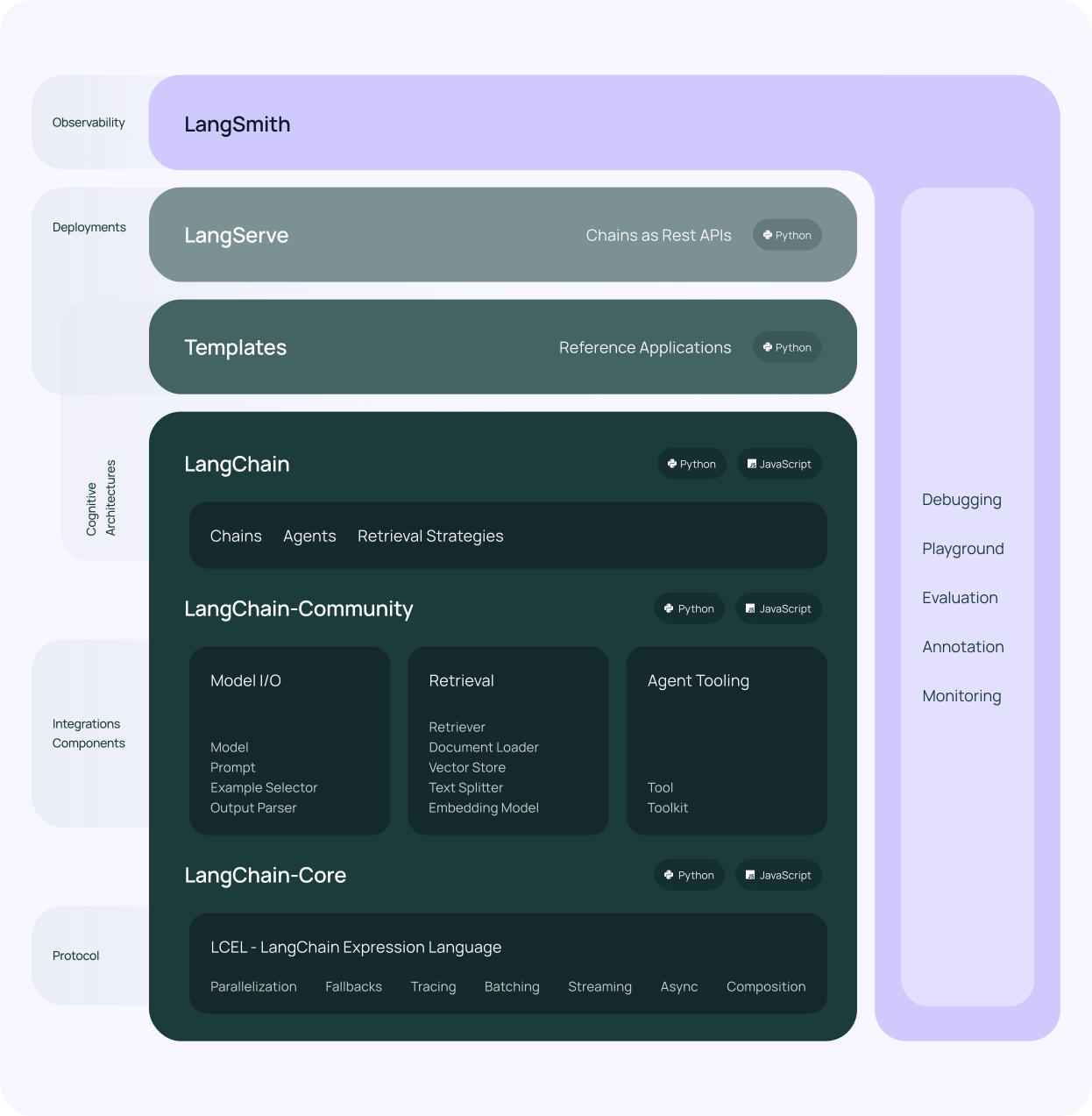
具体来说,该框架由以下开源库组成:

  • langchain-core: 基本抽象和 LangChain 表达语言(LangChain Expression Language)。
  • langchain-community: 第三方集成。
    • 合作伙伴包(例如 langchain-openai、langchain-anthropic 等):一些集成已进一步拆分为自己的轻量级包,这些包仅依赖于 langchain-core。
  • langchain: 构成应用程序认知架构(Cognitive Architecture)的链(Chains)、代理(Agents)和检索策略(Retrieval Strategies)。
  • langgraph: 通过将步骤建模为图中的边和节点,使用 LLM 构建强大且有状态的多参与者应用程序。
  • langserve: 将 LangChain 链部署为 REST API。

Functions, Tools and Agents with LangChain

OpenAI Function Calling (OpenAI 函数调用)

import os
import openai
import json

from dotenv import load_dotenv, find_dotenv
_ = load_dotenv(find_dotenv()) # read local .env file
openai.api_key = os.environ['OPENAI_API_KEY']


# Example dummy function hard coded to return the same weather
# In production, this could be your backend API or an external API
def get_current_weather(location, unit="fahrenheit"):
    """Get the current weather in a given location"""
    weather_info = {
        "location": location,
        "temperature": "72",
        "unit": unit,
        "forecast": ["sunny", "windy"],
    }
    return json.dumps(weather_info)

# define a function
functions = [
    {
        "name": "get_current_weather",
        "description": "Get the current weather in a given location",
        "parameters": {
            "type": "object",
            "properties": {
                "location": {
                    "type": "string",
                    "description": "The city and state, e.g. San Francisco, CA",
                },
                "unit": {"type": "string", "enum": ["celsius", "fahrenheit"]},
            },
            "required": ["location"],
        },
    }
]

messages = [
    {
        "role": "user",
        "content": "What's the weather like in Boston?"
    }
]

response = openai.ChatCompletion.create(
    model="gpt-3.5-turbo",
    messages=messages,
    functions=functions
)
print(response)
{
  "id": "chatcmpl-9CK2or9rtxzcsVgbfwWmIvqi36wF0",
  "object": "chat.completion",
  "created": 1712724014,
  "model": "gpt-3.5-turbo-0125",
  "choices": [
    {
      "index": 0,
      "message": {
        "role": "assistant",
        "content": null,
        "function_call": {
          "name": "get_current_weather",
          "arguments": "{\"location\":\"Boston\",\"unit\":\"celsius\"}"
        }
      },
      "logprobs": null,
      "finish_reason": "function_call"
    }
  ],
  "usage": {
    "prompt_tokens": 82,
    "completion_tokens": 20,
    "total_tokens": 102
  },
  "system_fingerprint": "fp_b28b39ffa8"
}
FastChat 部署多模型


* [Chatbot Arena](https://chat.lmsys.org/) * [FastChat](https://github.com/lm-sys/FastChat) * [LMSYS BLOG](https://lmsys.org/blog/) * [Use AutoGen for Local LLMs](https://microsoft.github.io/autogen/blog/2023/07/14/Local-LLMs/)

安装

pip

pip install "fschat[model_worker,webui]"

源代码

这种方式安装比较容易调试,适合开发者。

克隆代码

git clone https://github.com/lm-sys/FastChat.git
cd FastChat

创建环境

python -m venv env
source env/bin/activate

安装

LangChain HuggingFaceEmbeddings + FAISS

数据

weather_texts = [
    "😀 今天天气舒适,心情大好。",
    "😀 今天天气晴朗,阳光明媚。",
    "😀 今天天气宜人,适合出门游玩。",
    "😀 今天天气没有下雨,真是太好了。",
    "😀 今天天气比昨天好多了,真是令人欣喜。",
    "😀 今天天气晴空万里,蓝天白云,真是美不胜收。",
    "😀 今天天气温暖如春,空气清新,让人心旷神怡。",
    "😀 今天天气风和日丽,微风徐徐,让人心情舒畅。",
    "😀 今天天气万里无云,阳光灿烂,让人精神振奋。",
    "😀 今天天气秋高气爽,天朗气清,让人心胸开阔。",
    "🥶 今天天气很糟糕。",
    "🥶 今天天气阴沉沉的,让人心情烦躁。",
    "🥶 今天天气下雨了,真是让人沮丧。",
    "🥶 今天天气太热了,出门都觉得热得受不了。",
    "🥶 今天天气太冷了,出门都要穿上厚衣服。",
    "🥶 今天天气乌云密布,风雨欲来,真是让人提心吊胆。",
    "🥶 今天天气寒风刺骨,道路结冰,真是让人寸步难行。",
    "🥶 今天天气闷热潮湿,空气污浊,真是让人喘不过气来。",
    "🥶 今天天气灰蒙蒙的,看不到蓝天白云,真是让人心情沉重。",
    "🥶 今天天气狂风暴雨,树木倒伏,道路封闭,真是让人措手不及。"
]

LangChain for LLM Application Development

LangChain for LLM Application Development

LangChain 是用于构建 LLM 应用程序的开源框架

LLM 应用程序开发的 LangChain

LangChain: Models, Prompts and Output Parsers

安装依赖包

pip install python-dotenv
pip install openai

ChatCompletion import os import openai from dotenv import load_dotenv, find_dotenv _ = load_dotenv(find_dotenv()) # read local .env file openai.api_key = os.environ['OPENAI_API_KEY'] def get_completion(prompt, model="gpt-3.5-turbo"): messages = [{"role": "user", "content": prompt}] response = openai.ChatCompletion.

LangChain - Chain

Chain

链允许我们将多个组件组合在一起以创建一个单一的、连续的应用程序。我们可以通过将多个链组合在一起,或者通过将链与其他组件组合来构建更复杂的链。

LLMChain

LLMChain 是一个简单的链,它接受一个提示模板,用用户输入格式化它并返回来自 LLM 的响应。

语言模型(text-davinci-003) from langchain.chains import LLMChain from langchain.llms import OpenAI from langchain.prompts import PromptTemplate llm = OpenAI(temperature=0.9) prompt = PromptTemplate(input_variables=["product"], template="What is a good name for a company that makes {product}?

LangChain 快速入门

LangChain

通过可组合性使用 LLM 构建应用程序

介绍

大型语言模型 (LLM) 正在成为一种变革性技术,使开发人员能够构建他们以前无法构建的应用程序。 但是,单独使用这些 LLM 往往不足以创建真正强大的应用程序——当您可以将它们与其他计算或知识来源相结合时,真正的力量就来了。

Documentation

安装

pip install langchain
# or
conda install langchain -c conda-forge

配置环境

使用 LangChain 通常需要与一个或多个模型提供者、数据存储、api 等集成。

对于这个例子,将使用 OpenAI 的 API

pip install openai
export OPENAI_API_KEY="..."

LLMs:从语言模型获得预测结果

在这个例子中,我们可能希望输出更加随机,所以将 temperature 设置的更高一些。

from langchain.llms import OpenAI

llm = OpenAI(temperature=0.9)

text = "一家生产彩色袜子的公司取什么名字好?"
print(llm(text))
可以取名为:Colorful Socks Factory。

提示模板(Prompt Templates):管理 LLM 的提示 from la