重新设计 Anthropic 的源代码管理(中文翻译)HTML
Anthropic 自研版本控制系统 Scion,五个月内把巨型 monorepo 从 git 完全迁移过来,支撑每天 3 万+ 次代码合并,并分享面向智能体规模的源代码管理原则、扩展架构与工程收获。
Anthropic 自研版本控制系统 Scion,五个月内把巨型 monorepo 从 git 完全迁移过来,支撑每天 3 万+ 次代码合并,并分享面向智能体规模的源代码管理原则、扩展架构与工程收获。
GitHub 仓库初始化
git init
git add .
git commit -m "first commit"
关联远程仓库并推送
git remote add origin https://github.com/wang-junjian/open-ai-eco.git
git branch -M main
git push -u origin main
视频没有使用 Git LFS
remote: warning: File public/videos/open-design-webprototype.mp4 is 84.20 MB; this is larger than GitHub's recommended maximum file size of 50.00 MB
remote: warning: GH001: Large files detected. You may want to try Git Large File Storage - https://git-lfs.github.com.
remote: warning: See https://gh.io/lfs for more information.
解决方案:
一、全局配置 public/videos/ 下所有文件走 Git LFS 1.
这是一篇由 Anthropic 发布的技术博客文章,探讨了如何通过构建有效的“脚手架”(harnesses)来提升长时运行智能体(long-running agents)的工作效率。
发布日期:2025 年 11 月 26 日
智能体在跨越多个上下文窗口工作时仍面临挑战。我们从人类工程师身上汲取灵感,为长时运行的智能体构建了一个更有效的脚手架。
随着 AI 智能体(agents)能力的不断提升,开发者正越来越多地要求它们承担复杂的任务,这些任务往往需要持续数小时甚至数天的工作。然而,让智能体在多个上下文窗口(context windows)中保持连贯的进度仍然是一个悬而未决的问题。
长时运行智能体的核心挑战在于:它们必须在离散的“会话”中工作,且每个新会话开始时都没有之前发生的记忆。想象一下,一个软件项目由实行轮班制的工程师负责,而每位新来的工程师对上一班发生的事情毫无记忆。由于上下文窗口是有限的,且大多数复杂项目无法在单个窗口内完成,智能体需要一种方法来弥合多次编码会话之间的差距。
我们开发了一种方案,使 Claude Agent SDK 能够有效地跨多个上下文窗口工作。
Anthropic的“Claude Code”是一款终端内AI编程助手,旨在通过自然语言交互帮助开发者更快地编写、调试和管理代码。它提供了一系列功能,包括根据描述构建功能、识别并修复bug、理解复杂代码库以及自动化日常开发任务。用户可以通过简单的NPM安装和登录快速开始使用,并能通过聊天式的命令直接编辑文件、执行Shell命令和管理Git操作。该工具还支持自定义子代理以处理特定任务,并提供了灵活的配置选项,包括记忆管理、权限设置和环境变量,以适应个人、项目和企业级的开发需求。
Claude Code 概览
了解 Anthropic 的智能编程工具 Claude Code,它运行在你的终端中,帮你比以往更快地将创意转化为代码。
30 秒快速上手
前提条件:
# 安装 Claude Code
npm install -g @anthropic-ai/claude-code

# 进入你的项目目录
cd your-awesome-project

# 开始使用 Claude 编程
claude
# 首次使用时,系统会提示你登录
就是这么简单!你已经准备好使用 Claude 编写代码了。继续学习快速入门(5 分钟)→
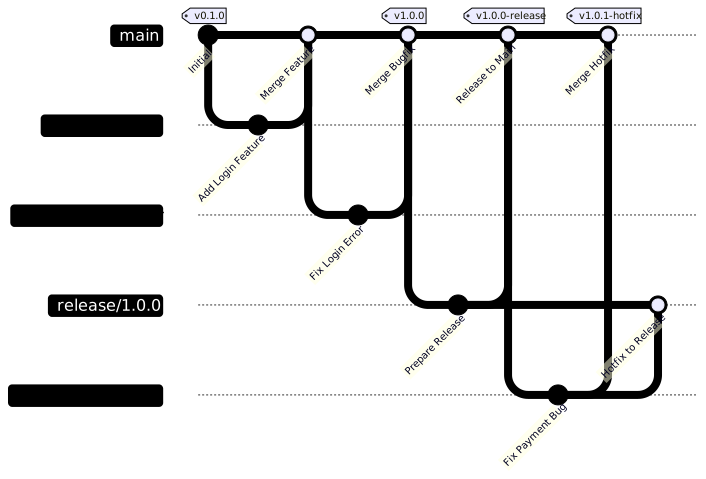
该文档概述了 Cherry Studio 的分支策略指南,详述了其软件开发中的主要分支和贡献分支的使用规范。它明确指出,main分支作为主开发线,只接受通过拉取请求(PR)合入的代码,且可能包含不稳定功能;而release/*分支则用于稳定的发布代码,主要用于文档更新和错误修复。此外,文档还详细列举了不同类型的贡献分支(如功能、错误修复、文档和热修复分支)的命名约定和提交PR的目标分支,并强调了PR必须遵循的准则,包括与main同步、包含问题编号以及通过测试。最后,它还提及了版本标签管理的分类,以确保代码库的组织性和可追溯性。
Cherry Studio 采用结构化的分支策略,以维护代码质量并简化开发流程。
工作流图
主要分支
main: 主开发分支release/*: 发布分支main 分支创建。
* 包含已准备好发布的稳定代码。
* 只接受文档更新和错误修复。
* 在部署到生产环境之前,会进行彻底测试。贡献分支
向 Cherry Studio 贡献代码时,请遵循以下准则:
main 分支创建。
* 命名格式: feature/issue-number-brief-description (例如: feature/123-add-user-profile)。
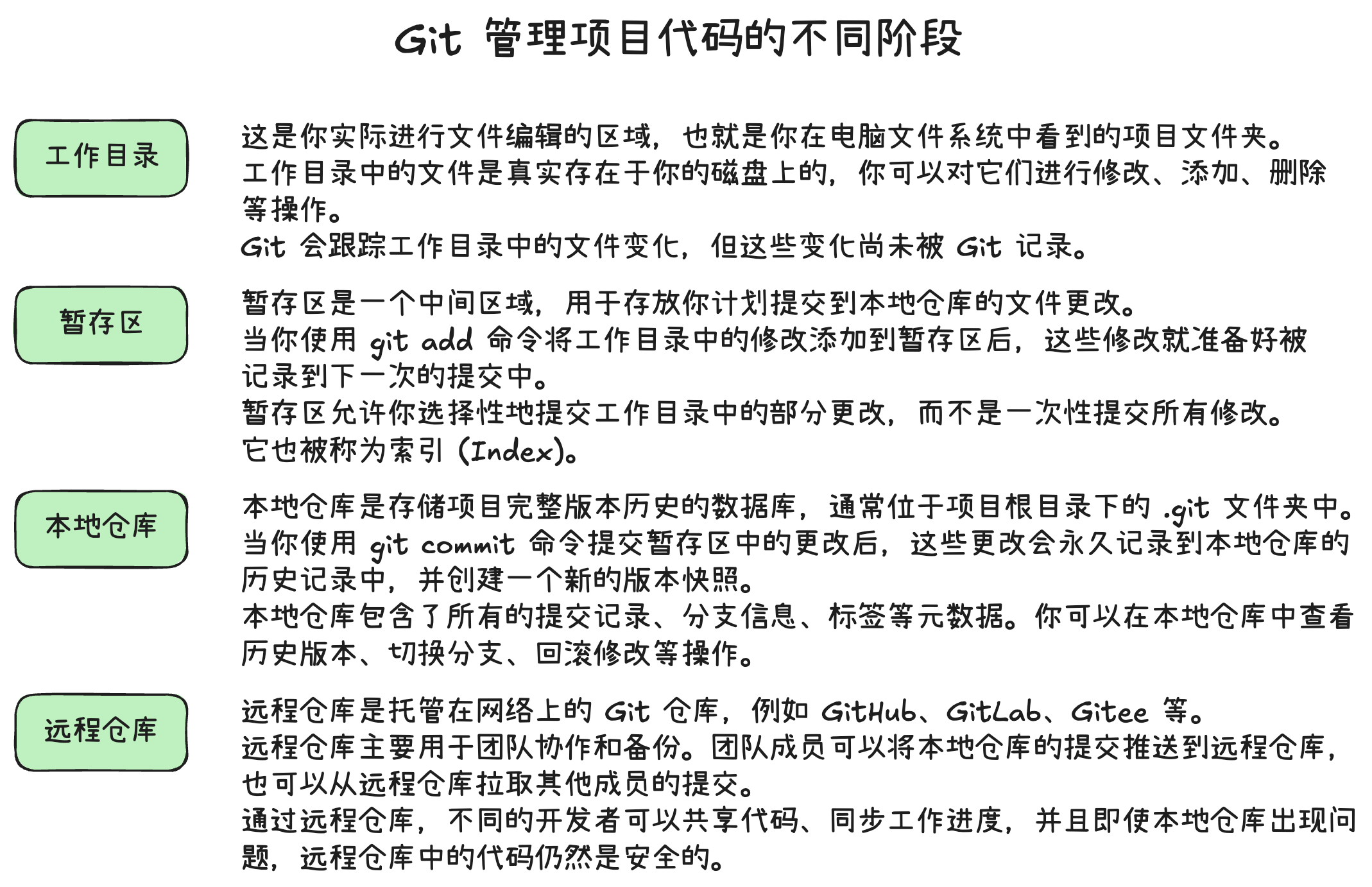
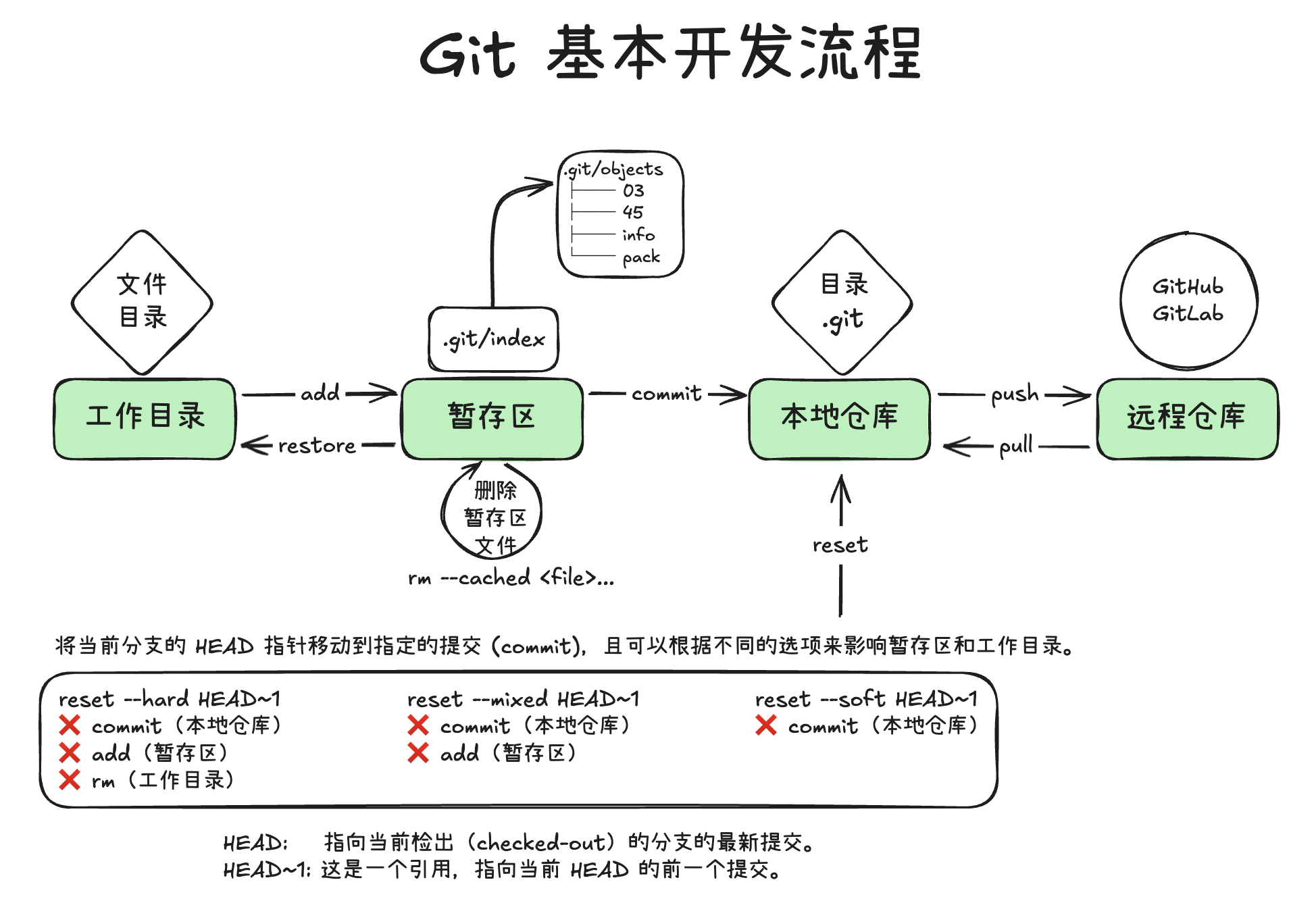
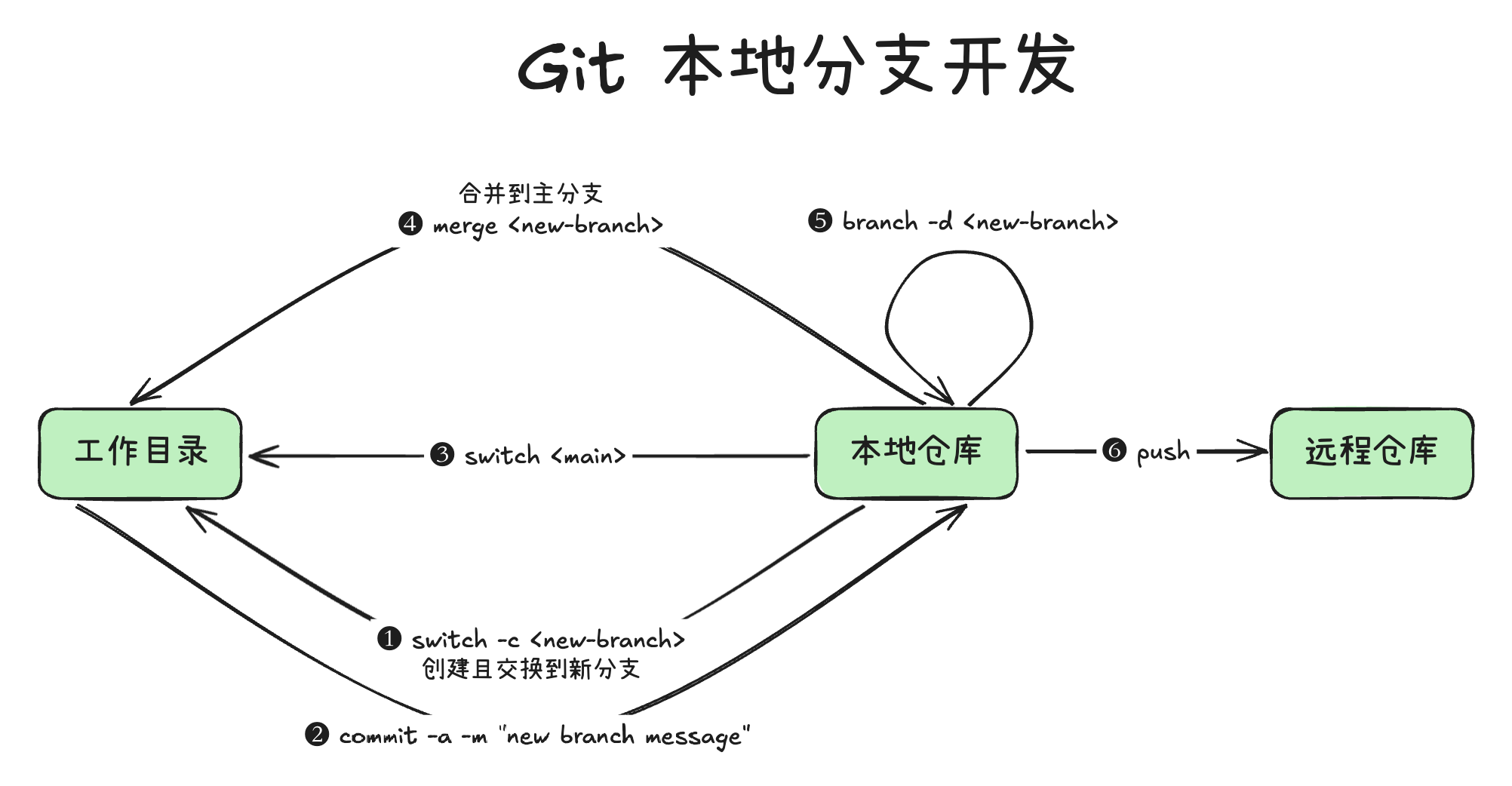
* 提交 PR 到 main 分支。使用 Git 的工作流程
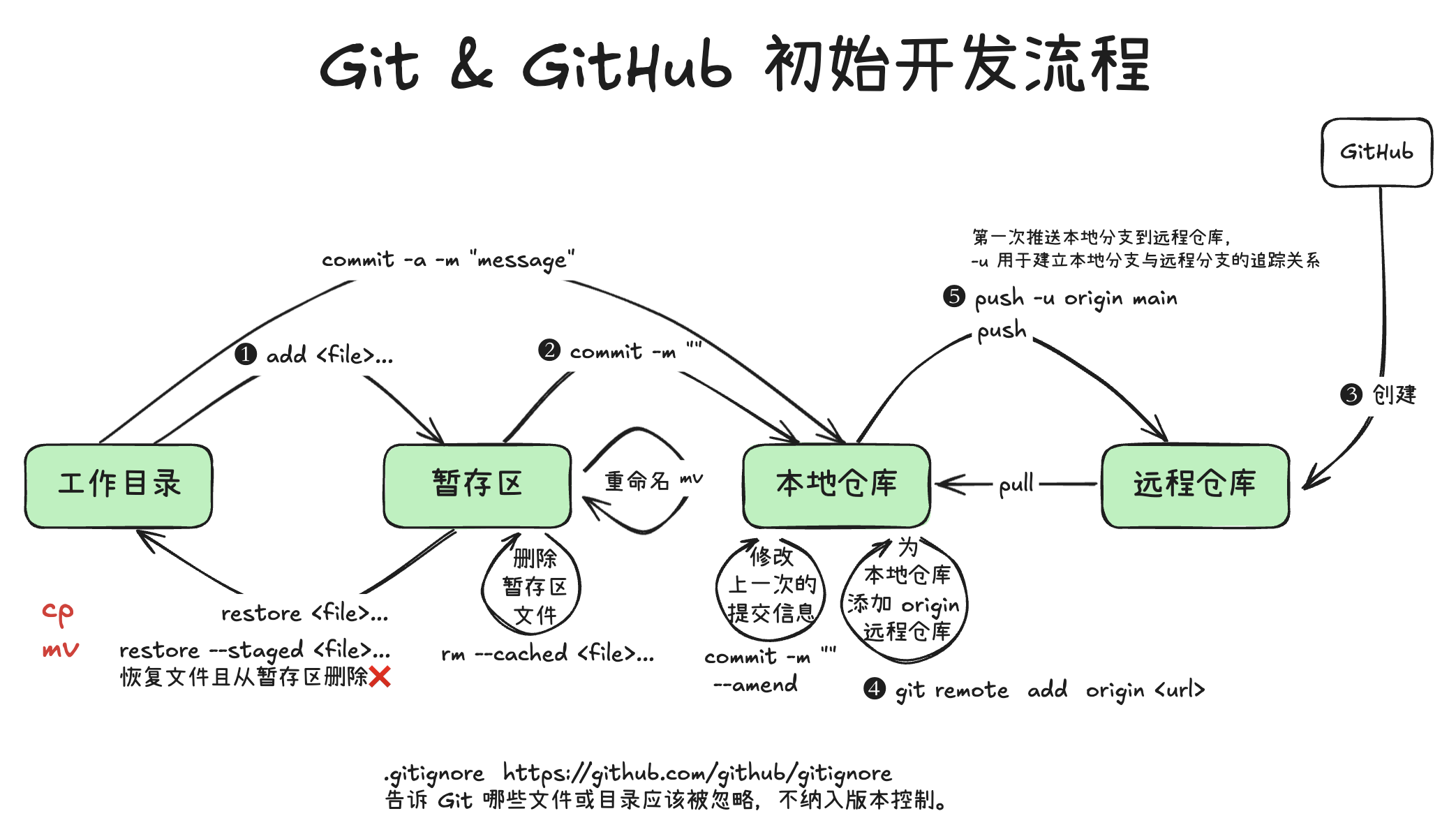
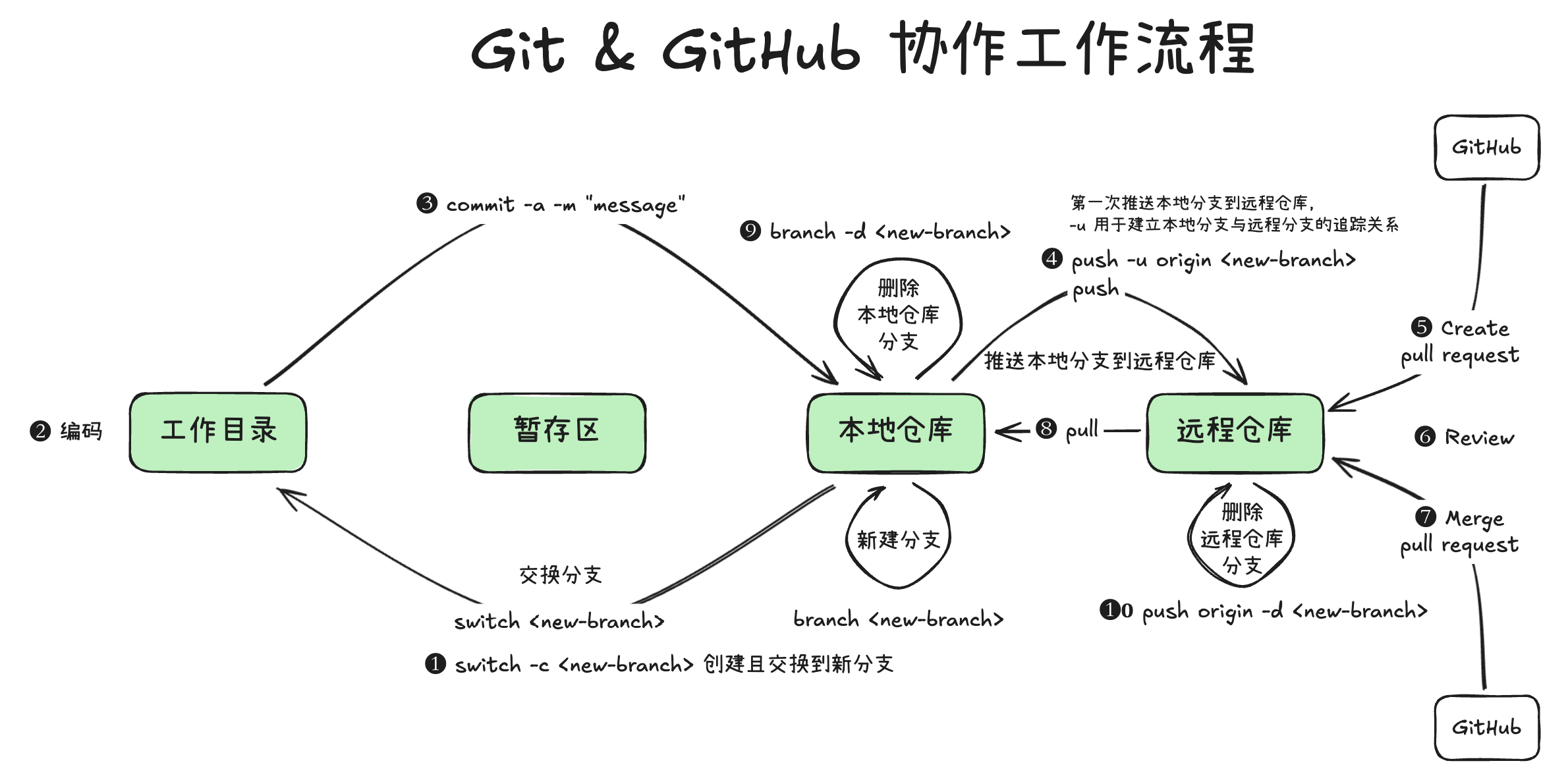
配置
查看全局配置
git config --global --list
filter.lfs.clean=git-lfs clean -- %f
filter.lfs.smudge=git-lfs smudge -- %f
filter.lfs.process=git-lfs filter-process
filter.lfs.required=true
user.name=军舰
user.email=wang-junjian@qq.com
http.postbuffer=524288000
http.version=HTTP/1.1
设置全局配置
git config --global user.name "军舰"
git config --global user.email wang-junjian@qq.com
初始化仓库
git init
Initialized empty Git repository in /Users/junjian/GitHub/wang-junjian/HelloGit/.git/
设置远程仓库
git remote add origin https://github.com/wang-junjian/HelloGit.git
基础
查看状态
git -C <目录> pull
这个命令用于从远程仓库获取最新代码并合并到当前分支。-C 选项允许你在指定的目录中运行 git 命令,而不需要先切换到那个目录。
下面是 MCP 相关的仓库
create-python-server
create-typescript-server
docs
inspector
python-sdk
quickstart-resources
servers
specification
typescript-sdk
更新所有仓库
方法一:手动更新
我使用 v2ray 科学上网,并且已经开启了全局模式,所有网络连接都应该通过 v2ray 的代理服务器。但我使用 git 命令行应用发现不能连接 GitHub,但 GitHub Desktop 可以正常使用。
git clone https://github.com/wang-junjian/chatbox
Cloning into 'chatbox'...
fatal: unable to access 'https://github.com/wang-junjian/chatbox/': Failed to connect to github.com port 443 after 75011 ms: Couldn't connect to server
在这种情况下,你需要手动为 git 设置代理。
设置代理
git config --global http.proxy 'socks5://127.0.0.1:1080'
git config --global https.proxy 'socks5://127.0.0.1:1080'
这些命令将 git 的 HTTP 和 HTTPS 代理设置为 socks5://127.0.0.1:1080。你需要将 1080 替换为你的 v2ray 服务的端口。
在 macOS 安装 GitHub CLI
brew install gh
brew upgrade gh
gh auth login
? What account do you want to log into? GitHub.com
? What is your preferred protocol for Git operations on this host? HTTPS
? Authenticate Git with your GitHub credentials? Yes
? How would you like to authenticate GitHub CLI? Login with a web browser

! First copy your one-time code: EA2E-F864
Press Enter to open github.com in your browser...
✓ Authentication complete.
gh auth status
github.com
  ✓ Logged in to github.com account wang-junjian (keyring)
  - Active account: true
  - Git operations protocol: https
  - Token: gho_************************************
  - Token scopes: 'gist', 'read:org', 'repo', 'workflow'
OpenIL 是一个基于 Buildroot 的开源项目,专为嵌入式工业解决方案而设计。
Buildroot 是一个简单、高效、易用的工具,通过交叉编译生成嵌入式 Linux 系统。
获取 OpenIL
git clone https://github.com/openil/openil.git
cd openil/
切换版本
查看版本
$ git tag
OpenIL-201705
OpenIL-201708
OpenIL-201712
OpenIL-201803
OpenIL-201805
OpenIL-201808
OpenIL-201810
OpenIL-201901
OpenIL-201904
OpenIL-201908
OpenIL-v1.10-202012
OpenIL-v1.10-202012-EAR
OpenIL-v1.11-202104
OpenIL-v1.11-RC2
OpenIL-v1.6.1-201909
OpenIL-v1.6.2-201911
OpenIL-v1.7-202001
OpenIL-v1.7-202001-update
OpenIL-v1.8-202005
OpenIL-v1.8.1-202009
OpenIL-v1.8.2-202009
OpenIL-v1.9-202009
切换版本
git branch OpenIL-v1.8-202005
通过网游加速器
在路径上增加 .cnpmjs.org
正常下载:git clone https://github.com/microsoft/onnxruntime.git
加速下载:git clone https://github.com.cnpmjs.org/microsoft/onnxruntime.git
查找当前位置距离最快的 GitHub IP
运行测速脚本 gh-check
curl -fsSL  https://gist.githubusercontent.com/lilydjwg/93d33ed04547e1b9f7a86b64ef2ed058/raw/134c1971ad95930aaec4cf93c8509f0f4927c03c/gh-check \
    | python3 -
文件 hosts 路径
C:\Windows\System32\drivers\etc\hosts
/etc/hosts
/etc/hosts
修改 hosts 文件
199.232.69.194 github.global.ssl.fastly.net
140.82.112.4 github.com
下载
git clone https://github.com/microsoft/onnxruntime.git
没有找到匹配的文章