31 篇文章带有标签 “MacBookProM2Max”

Python 配置共享软件包缓存

共享软件包缓存的好处是,一旦用户已经下载了软件包的特定版本,它将不会再次下载并存储在单独的缓存中。这节省了磁盘使用量并加快了安装速度,因为它不需要再次下载软件包。

通过查看了解到我现在已经配置了共享软件包的缓存目录(package cache):/opt/miniconda/pkgs/Users/junjian/.conda/pkgs,根据顺序优先存放在 /opt/miniconda/pkgs 目录中。

配置完成后,可以通过运行 conda info 来查看配置是否生效。

在 MacBook Pro M2 Max 上测试 LLaMA

bash download.sh
模型 大小 量化(4位) 内存
7B 13G 3.9G 4.0G
13B 24G 7.6G 7.8G
30B 61G 19G 19.4G
65B 122G 38G 38.5G

GGUF 是一种二进制格式,旨在快速加载和保存模型。它是 GGML、GGMF 和 GGJT 的后继文件格式,通过包含加载模型所需的所有信息来确保明确性。 它还被设计为可扩展的,以便可以在不破坏兼容性的情况下将新信息添加到模型中。

  • GGML(无版本):基线格式,没有版本控制或对齐。
  • GGMF(版本化):与 GGML 相同,但具有版本化。
  • GGJT:对齐张量以允许与需要对齐的 mmap 一起使用。 v1、v2 和 v3 相同,但后面的版本使用与以前版本不兼容的不同量化方案。

What is GGUF and GGML?

REPO_ID=TheBloke/CodeLlama-7B-GGUF
FILENAME=codellama-7b.Q4_K_M.gguf
huggingface-cli download ${REPO_ID} ${FILENAME} \
    --local-dir . --local-dir-use-symlinks False

❶ 编译 llama.cpp git clone https://github.com/ggerganov/llama.cpp.

在 MacBook Pro M2 Max 上测试 Whisper

转录(X->X)

whisper test.wav --model small

翻译(X->English)

whisper test.wav --model small --task translate

使用 time 命令测试使用资源详情和度量

model user(s) system(s) cpu total(s) 内存
tiny 7.13 6.01 358% 3.664 370M
base 12.21 10.29 362% 6.211 430M
small 39.15 23.90 380% 16.569 1.2G
medium 117.27 68.43 377% 49.172 3.2G
large 184.13 114.85 361% 1:22.73 6.3G

tiny [00:00.000 --> 00:04.000] 荷蘭发布了一份主题为 [00:04.000 --> 00:09.500] 宣布即将对先进半道体知道设备采取的 [00:09.500 --> 00:13.000] 出口管制措施的公告表示 [00:13.000 --> 00:17.000] 坚于技术的发展和地缘政治的背景 [00:17.000 --> 00:20.000] 政府已经得出结论 [00:20.
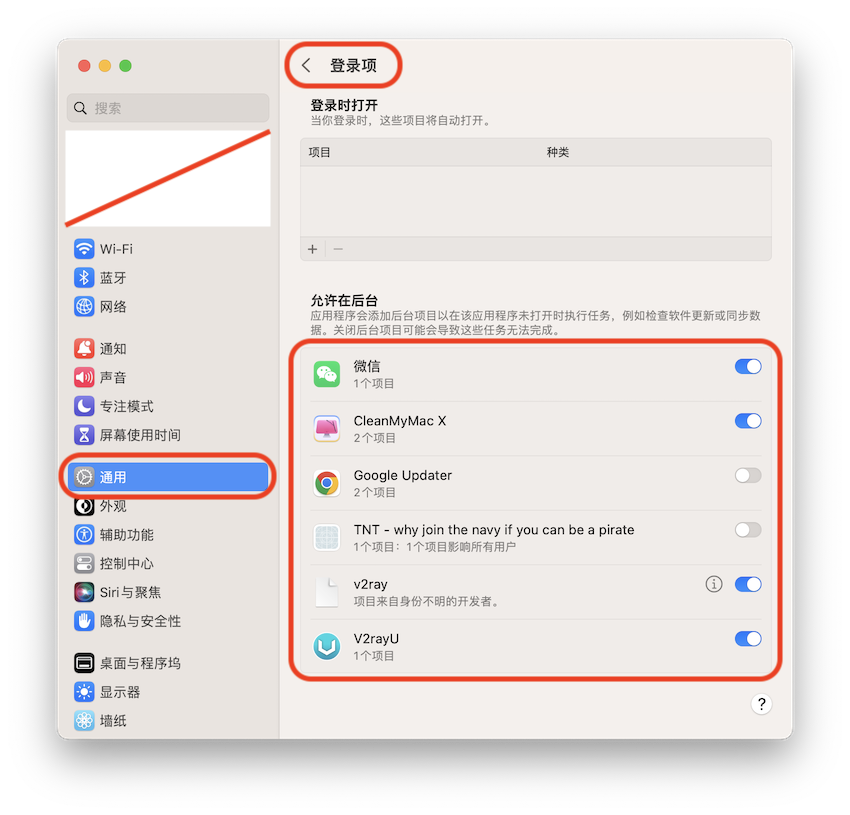
macOS 上删除登录项中允许在后台的项目

对操作系统操作至关重要的作业定义存储在 /System/Library 下。您永远不需要在这些目录中创建守护进程或代理。与每个用户相关的第三方定义存储在 /Library 下。特定用户的作业定义存储在相应用户的 Library 目录下。

Type Location Run on behalf of
User Agents ~/Library/LaunchAgents Currently logged in user
Global Agents /Library/LaunchAgents Currently logged in user
Global Daemons /Library/LaunchDaemons root or the user specified with the key UserName
System Agents /System/Library/LaunchAgents Currently logged in user
System Daemons /System/Library/LaunchDaemons root or the user specified with the key UserName

在 MacBook Pro M2 Max 上安装 PyTorch

安装每日构建版本

pip3 install --pre torch torchvision torchaudio --index-url https://download.pytorch.org/whl/nightly/cpu

升级

pip3 install --upgrade --pre torch torchvision torchaudio --index-url https://download.pytorch.org/whl/nightly/cpu

在 MacBook Pro M2 Max 上构建开发环境

今天预订的 MacBook Pro M2Max 16寸 顶配 64G内存 2T硬盘到了,¥36097 。

# zsh => .zshrc  bash => .bashrc
vim ~/.zshrc
export PATH=$PATH:/opt/homebrew/bin
source ~/.zshrc
source ~/.bash_profile
conda clean -i

我配置了清华和阿里云的镜像源,但是都没有成功,最后还是使用了默认的源。

配置文件在 ~/.docker/daemon.json

运行 docker info 查看配置是否生效。

$ docker info

Server:
 Registry Mirrors:
  https://75oltije.mirror.aliyuncs.com/
  http://hub-mirror.c.163.com/
  https://docker.mirrors.ustc.edu.cn/

必须指定 python 的版本,高版本会出现下面的错误: 2023-03-26 17:28:36.