18 篇文章带有标签 “Install”

Claude Code 安装、更新与卸载指南

⚠️ 国内用户会出现不能访问或卡住的问题。

curl -fsSL https://claude.ai/install.sh | bash

安装后的可执行文件路径:/Users/junjian/.local/bin/claude

下面是安装卡住,但是程序已经下载成功,我手动安装完成的过程

下载的二进制文件会被保存在 ~/.claude/downloads 目录下:

ll ~/.claude/downloads
-rwxr-xr-x  1 junjian  staff   205M  5月 29 22:56 claude-2.1.156-darwin-arm64

我们需要把它移动到 ~/.local/share/claude/versions 目录下,并创建一个软链接到 ~/.local/bin

华为 Atlas 800I A2 大模型部署实战(七):完整的安装部署流程

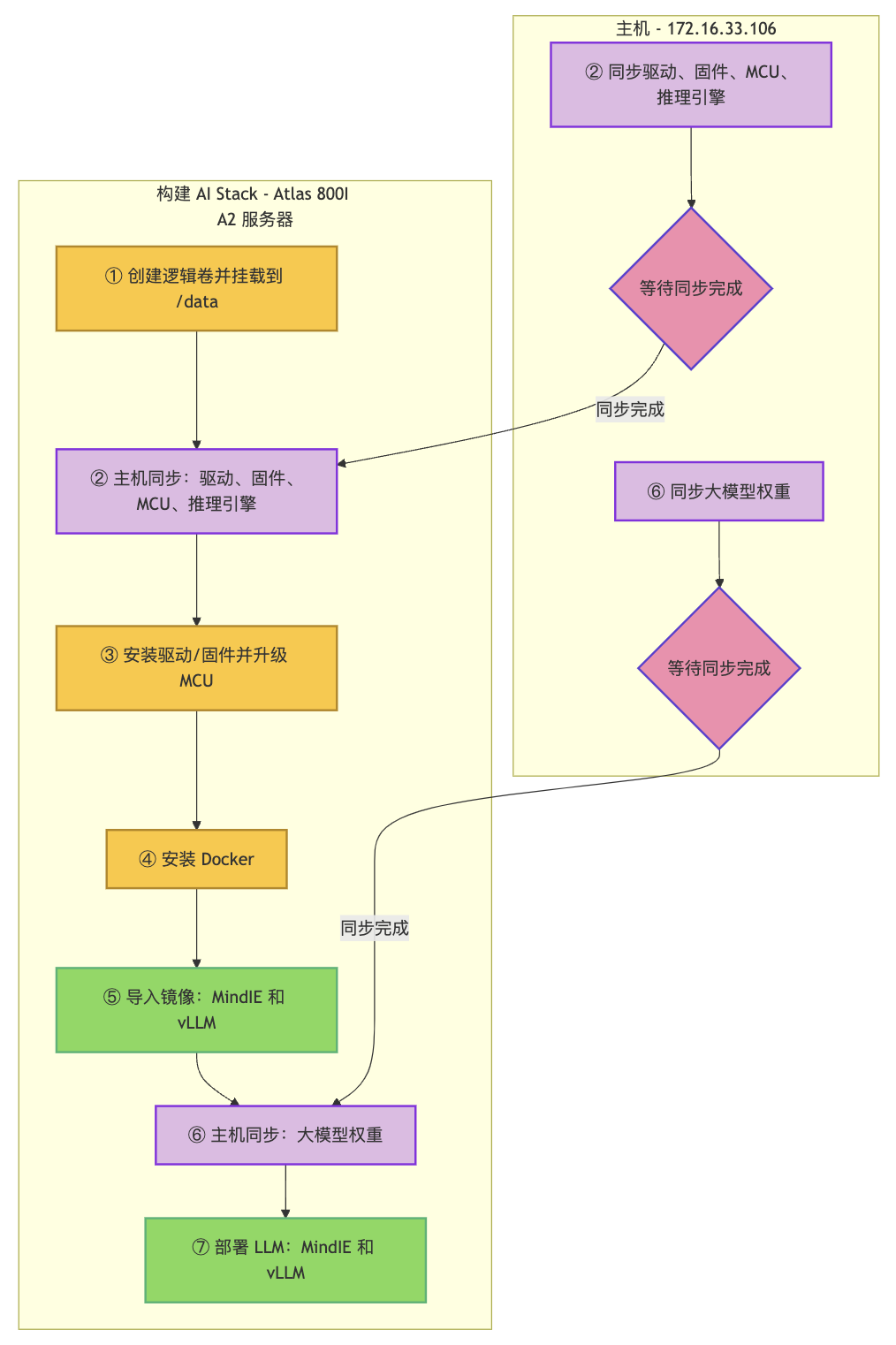
这份指南详细阐述了华为Atlas 800I A2推理服务器上大型模型的部署流程,旨在提供一个全面的安装与配置实践,用于扩展部署到其它服务器。随后,文章通过流程图和具体命令脚本,逐步指导用户如何创建和挂载逻辑卷同步并安装驱动固件部署Docker环境以及导入所需的MindIE和vLLM镜像。最后,指南还涵盖了同步大型模型权重文件的关键步骤,并指示用户通过Docker Compose启动模型服务,确保MindIE和vLLM能够顺利运行,以实现AI推理功能。

AI 服务器:华为 Atlas 800I A2 推理服务器

组件 规格
CPU 鲲鹏 920(5250)
NPU 昇腾 910B4(8X32G)
内存 1024GB
硬盘 系统盘:450GB SSDX2 RAID1
数据盘:3.5TB NVME SSDX4
操作系统 openEuler 22.03 LTS

Gemini CLI - 开源命令行 AI 智能体

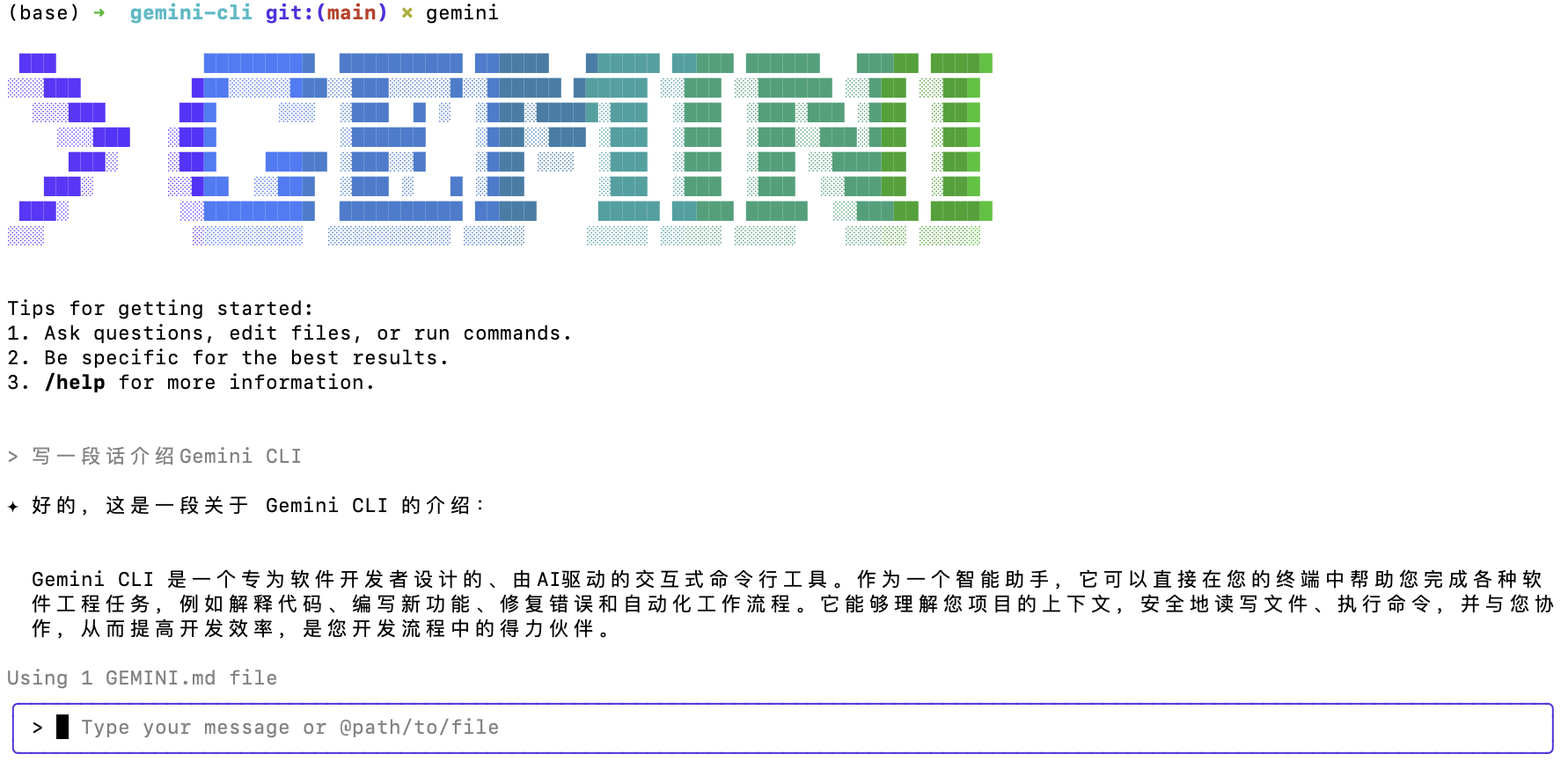
Gemini CLI 是一个专为软件开发者设计的、由AI驱动的交互式命令行工具。作为一个智能助手,它可以直接在您的终端中帮助您完成各种软件工程任务,例如解释代码、编写新功能、修复错误和自动化工作流程。它能够理解您项目的上下文,安全地读写文件、执行命令,并与您协作,从而提高开发效率,是您开发流程中的得力伙伴。

一个将 Gemini 强大功能直接带入你终端的开源 AI 智能体。

Gemini CLI 提供了强大的 AI 功能,涵盖了从代码理解和文件操作,到命令执行和动态故障排除的方方面面。它对您的命令行体验进行了根本性的升级,让您能够通过自然语言编写代码、调试问题并简化工作流程。

其强大之处源于内置工具,使您能够:

  • 使用 Google 搜索来奠定提示基础,以便您可以抓取网页并为模型提供实时的外部上下文。
  • 通过内置支持模型上下文协议 (MCP) 或捆绑扩展来扩展 Gemini CLI 的功能
  • 自定义提示和指令,根据您的具体需求和工作流程定制 Gemini。
  • 通过在脚本中非交互式地调用 Gemini CLI,实现任务自动化并与现有工作流程集成

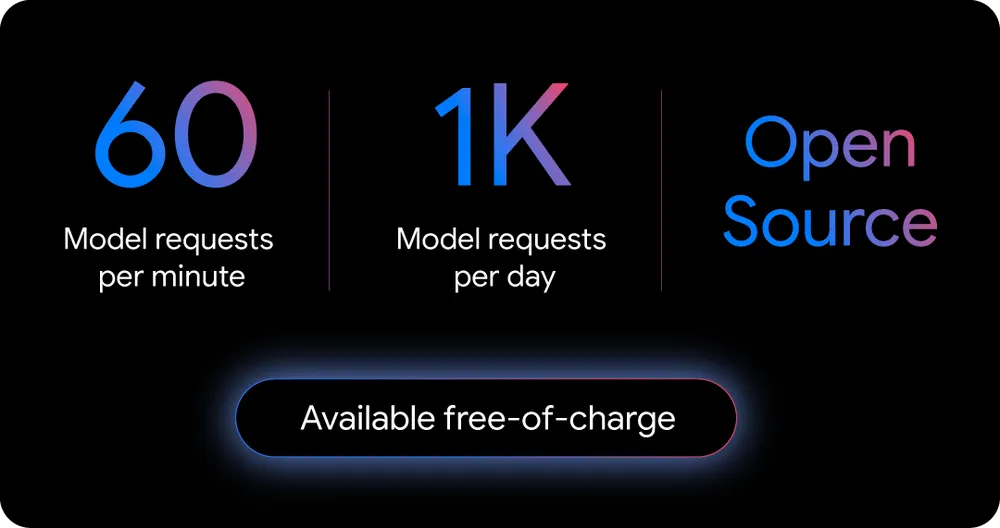
Gemini CLI 提供业界最高的免费使用限额,每分钟可发送 60 个模型请求,每天最多 1,000 个模型请求。

  • 安装最新的 LTS 版本
nvm install --lts
  • 安装最新的稳定版本
nvm install node

在 CentOS 上安装 EPEL 软件仓库

EPEL(Extra Packages for Enterprise Linux)是为企业级Linux操作系统(如CentOS、Red Hat Enterprise Linux等)提供的一个高质量、稳定的软件仓库,包含了许多不包含在标准软件仓库中的软件包。

安装Kubernetes 1.26.0

kubectl apply -f components.yaml

角色绑定

kubectl create clusterrolebinding kubernetes-dashboard-cluster-admin --clusterrole=cluster-admin --serviceaccount=kubernetes-dashboard:kubernetes-dashboard

本机运行

scp root@172.16.33.157:/etc/kubernetes/admin.conf ~/.kube/config
kubectl proxy
http://localhost:8001/api/v1/namespaces/kubernetes-dashboard/services/https:kubernetes-dashboard:/proxy/#/node?namespace=default

服务器端获取 Token

kubectl -n kubernetes-dashboard create token kubernetes-dashboard

解决方法:

sudo mv /etc/containerd/config.toml /tmp/
sudo systemctl restart containerd

解决方法: sudo systemctl daemon-reload su

Install TVM from Source

LLVM Download Page

wget https://github.com/llvm/llvm-project/releases/download/llvmorg-11.0.0/clang+llvm-11.0.0-x86_64-linux-gnu-ubuntu-20.04.tar.xz
tar xvf clang+llvm-11.0.0-x86_64-linux-gnu-ubuntu-20.04.tar.xz
mv clang+llvm-11.0.0-x86_64-linux-gnu-ubuntu-20.04 llvm

最终编译出两个动态库:libtvm_runtime.so, libtvm.so

想要使用 RPC Tracker

pip3 install --user tornado

想要使用 auto-tuning module

pip3 install --user tornado psutil xgboost cloudpickle

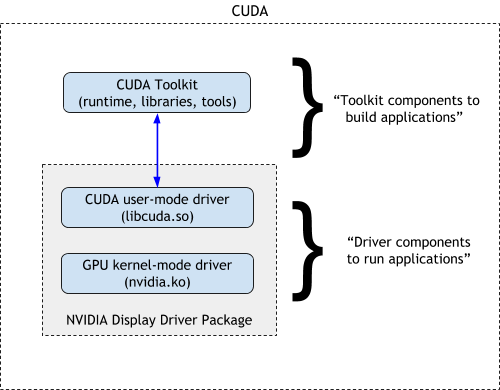
NVIDIA 软件栈搭建

  1. 安装驱动
sudo apt install nvidia-driver-510
  1. 重启系统
sudo reboot
  1. 查看
nvidia-smi
  1. 卸载驱动
sudo apt purge nvidia*

CUDA Toolkit 下载

cuDNN 下载

  1. 层和张量融合(Layer and Tensor Fusion) 通过融合内核中的节点来优化GPU内存和带宽的使用。
  1. 内核自动调谐(Kernel Auto-Tuning) 根据目标GPU平台选择最佳数据层和算法。
  1. 动态张量内存(Dynamic Tensor Memory) 最大限度地减少内存占用,并有效地将内存重用到张量上。
  1. 多流执行(Multi-Stream Execution) 使用可扩展的设计并行处理多个输入流。
  1. 时间融合(Time Fusion) 使用动态生成的内核优化时间步骤中的循环神经网络。

TensorRT 下载

配置环境变量 LD_LIBRARY_PATH export LD_LIBRARY_PATH=$LD_LIBRARY

Get Started OpenVINO

安装 OpenVINO 开发工具

python -m venv openvino_env
  • Linux
source openvino_env/bin/activate
  • Windows
openvino_env\Scripts\activate.bat
python -m pip install --upgrade pip
pip install openvino-dev[onnx,pytorch,kaldi,mxnet,caffe,tensorflow2]==2022.1.0 -i https://mirrors.aliyun.com/pypi/simple/

Install Python3.9 in Ubuntu20.04

在看到这个错误,首先想到的就是安装包 python3.9-distutils,但是在安装的时候看到它依赖的安装包都是 python3.8 的。没有找到更好的解决方法,这里找到一个解释

I believe this is a bug in Debian's Python package. Their modifications to Python have been a source of a long standing debate: https://gist.github.com/tiran/2dec9e03c6f901814f6d1e8dad09528e has a lot of discussion.
I think that is the issue, Ubuntu packages are inconsistent, i.e. python3.8 and python3.9 bring different set of modules, as well as have different set of decencies, while all that should really differ is just Python version. Same applies for python3.[89]-minimal. However, all 4 are consentient in one thing - not having sys.prefix/lib/pythonX.Y/site-packages in sys.path
To have that (and distutils) sorted, one needs to install a collection of python3 packages, but those are Python3.8 (and bring tons of semi-random libraries and so).

All Ubuntu provided Python3.[89] 'installations' have ensurepip removed. I think, the 'logic' is to force people to use python3-pip that (unless --no-install-recommends is used) brings whole tone of things including make, cpp and perl(!)

I strongly recommend filing an issue with Debian and Ubuntu for this -- while pip can do things to paper over the issue, the fundamental problem is that the Python installation is not proper. Part of the problem is that Debian users don't ask Debian's maintainers to make fixes for the things they break.
I will consider that.

manually installing distutils
How did you do this? If you've used what is available in CPython's source tree, then you've installed an incompatible distutils for the Python interpreter -- Debian relies on patches they make to distutils to keep things working.
Installing might be a bit of overstatement, since I am working with Docker container I am doing:

COPY --from=python:3.9-slim /usr/local/lib/python3.9/distutils /usr/lib/python3.9/distutils
I would do FROM python:3.9-slim but I have to rely on specific 'base' container.
python:3.9-slim has FROM debian:bullseye-slim
安装Go

PATH=$PATH:/usr/local/go/bin

#Go代理配置(解决墙的问题)
export GOPROXY=https://goproxy.cn,direct
export GO111MODULE=on
$ source /etc/profile

命令brew

  • 方法2:替换brew源
cd "$(brew --repo)"
git remote set-url origin https://mirrors.tuna.tsinghua.edu.cn/git/brew.git
cd "$(brew --repo)/Library/Taps/homebrew/homebrew-core"
git remote set-url origin https://mirrors.tuna.tsinghua.edu.cn/git/homebrew-core.git
brew update