5 篇文章带有标签 “gui”

OSWorld:在真实计算机环境中为开放式任务进行多模态代理基准测试

参考

Abstract(摘要)

Autonomous agents that accomplish complex computer tasks with minimal human interventions have the potential to transform human-computer interaction, significantly enhancing accessibility and productivity. However, existing benchmarks either lack an interactive environment or are limited to environments specific to certain applications or domains, failing to reflect the diverse and complex nature of real-world computer use, thereby limiting the scope of tasks and agent scalability.
UI-TARS: Pioneering Automated GUI Interaction with Native Agents

UI-TARS: Pioneering Automated GUI Interaction with Native Agents(与本地代理进行自动化 GUI 交互的先驱)

Abstract(摘要)

This paper introduces UI-TARS, a native GUI agent model that solely perceives the screenshots as input and performs human-like interactions (e.g., keyboard and mouse operations). Unlike prevailing agent frameworks that depend on heavily wrapped commercial models (e.g., GPT-4o) with expert-crafted prompts and workflows, UI-TARS is an end-to-end model that outperforms these sophisticated frameworks.

Computer-Using Agent

Computer-Using Agent (CUA)

A universal interface for AI to interact with the digital world. AI 与数字世界交互的通用接口。

Today we introduced a research preview of Operator⁠, an agent that can go to the web to perform tasks for you. Powering Operator is Computer-Using Agent (CUA), a model that combines GPT-4o's vision capabilities with advanced reasoning through reinforcement learning. CUA is trained to interact with graphical user interfaces (GUIs)—the buttons, menus, and text fields people see on a screen—just as humans do.

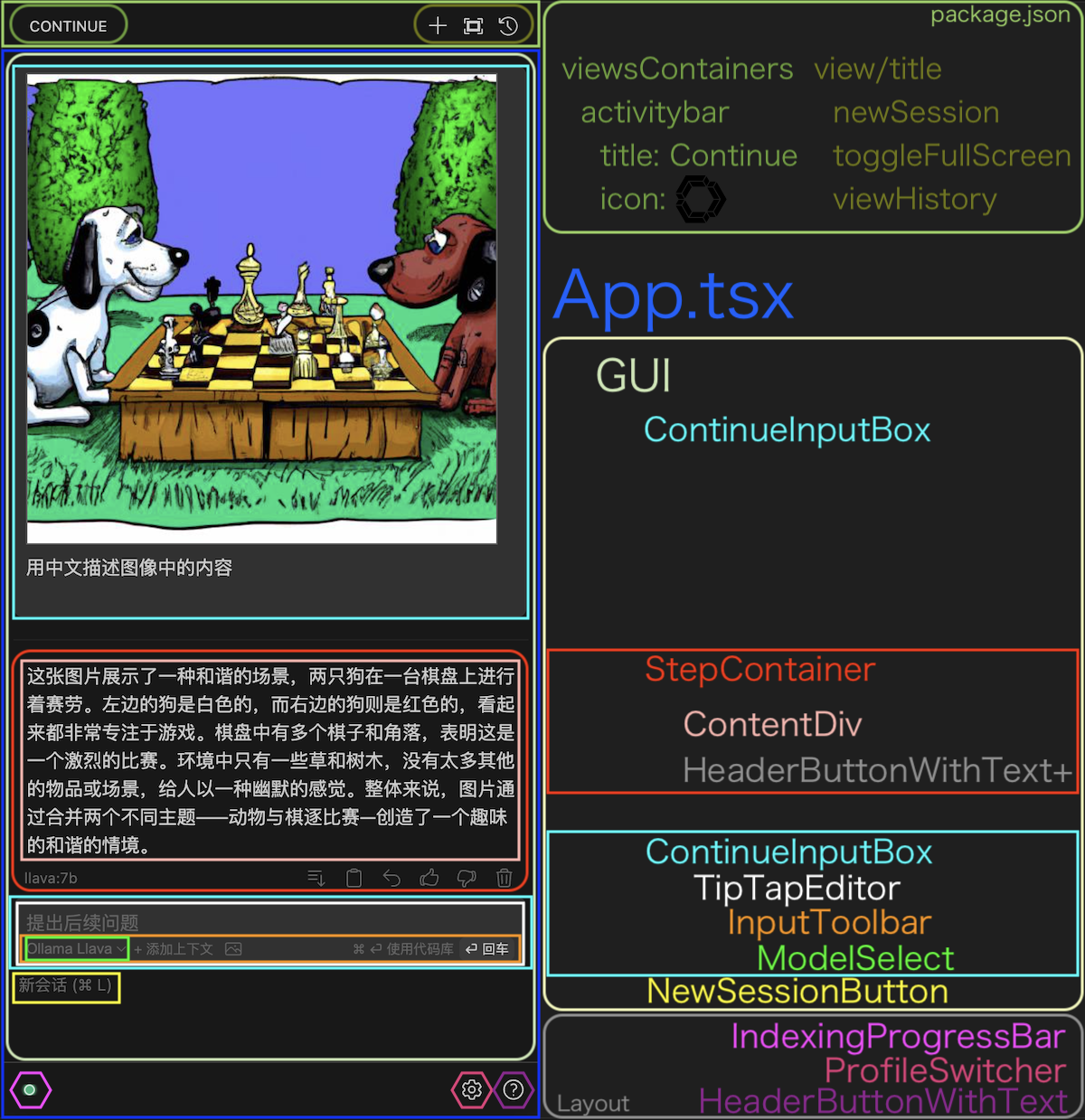
Continue 源码分析 - 键盘快捷键

聊天窗口

输入框(TipTapEditor)

Enter ()

  • 不使用 Codebase

Cmd-Enter ( )

  • 使用 Codebase

Alt-Enter ( )

  • 使用 ActiveFile(打开且激活的文件)

Cmd-Backspace ( )

  • 放弃响应

Shift-Enter ( )

  • 换行

源代码:gui/src/components/mainInput/TipTapEditor.tsx

function TipTapEditor(props: TipTapEditorProps) {
  //...
  const editor: Editor = useEditor({
    extensions: [
      Document,
      History,
      Image,
      Placeholder.configure({
        placeholder: () =>
          historyLengthRef.current === 0
            ? "提出任何问题,'/' 斜杠命令,'@' 添加上下文"
            : "提出后续问题",
      }),
      Paragraph.extend({
        addKeyboardShortcuts() {
// ...

新会话 ( L)

源代码:gui/src/pages/gui.tsx

OpenCV Python实践

安装

Python

sudo apt install python3
sudo apt install python3-pip
sudo pip3 install --upgrade pip

OpenCV

sudo pip3 install opencv-python
sudo pip3 install opencv-contrib-python

图像

读取图像

import cv2

img_file = 'python-logo@2x.png'
img = cv2.imread(img_file)

获取图像大小

width = img.shape[1]
height = img.shape[0]

显示图像并等待按任意键退出

import cv2

img_file = 'python-logo@2x.png'
img = cv2.imread(img_file)
cv2.imshow('', img)
cv2.waitKey(0)

宽高缩小一倍 比例 import cv2 img_file = 'python-logo@2x.png' img = cv2.imread(img_file) img = cv2.resize(img, None, fx=0.5, fy=0.5) cv2.