3 篇文章带有标签 “database”

Vanna.AI

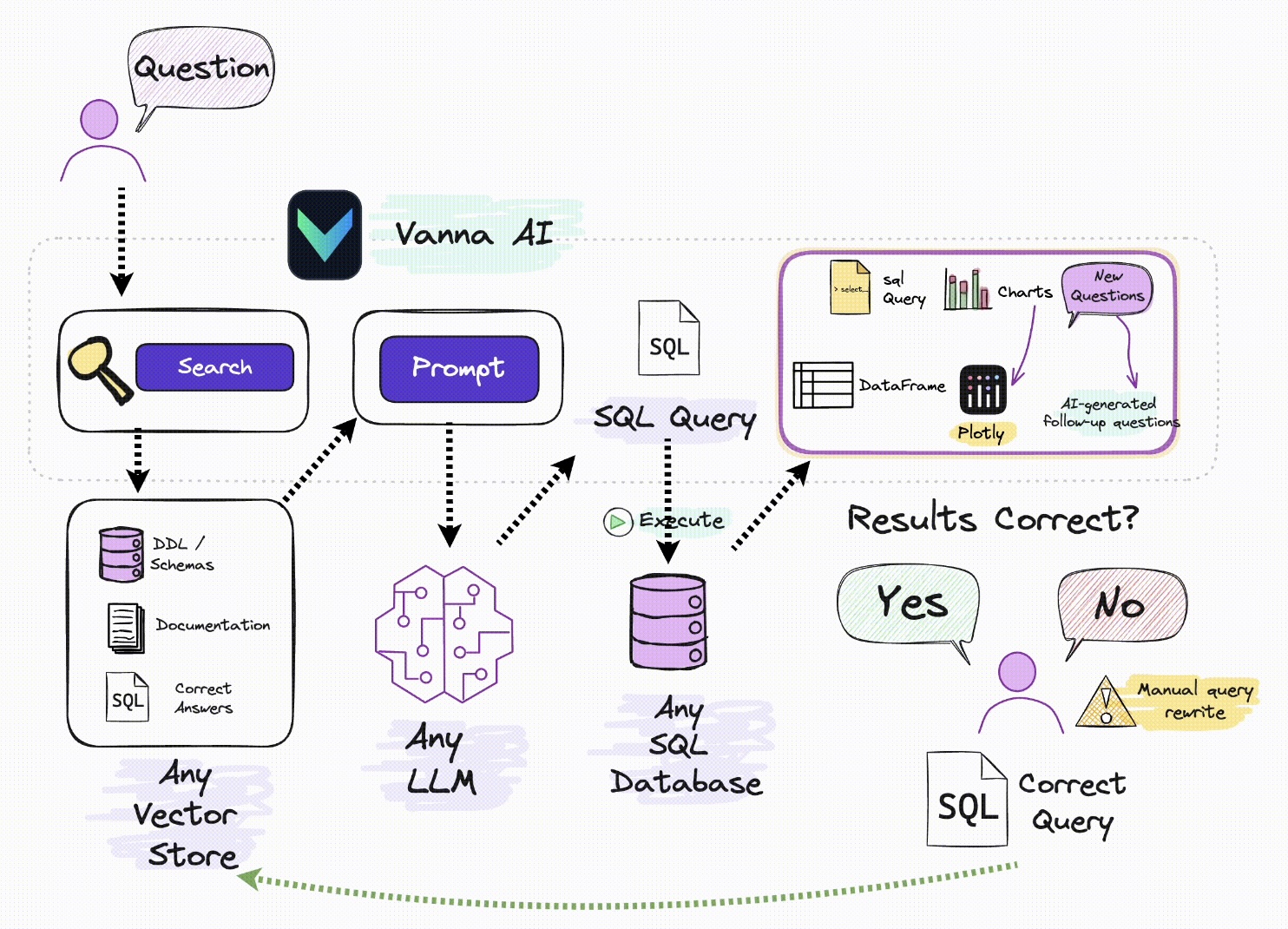
Vanna 工作原理

使用检索增强来帮助您使用 LLM 为数据库生成准确的 SQL 查询。

Vanna 的工作过程分为两个简单步骤 - 在您的数据上训练 RAG“模型”,然后提出问题,这些问题将返回 SQL 查询,这些查询可以设置为在您的数据库上自动运行。

  • vn.train(...)

在您的数据上训练 RAG“模型”。这些方法将添加到参考语料库。

  • vn.ask(...)

问问题。这将使用参考语料库生成可以在您的数据库上运行的 SQL 查询。

例子

与您的 SQL 数据库聊天 📊。通过 RAG 使用 LLM 实现准确的文本到 SQL 生成 🔄。

ChromaDB & Ollama from vanna.ollama import Ollama from vanna.chromadb import ChromaDB_VectorStore class MyVanna(ChromaDB_VectorStore, Ollama): def init(self, config=None): ChromaDB_VectorStore.init(self, config=config) Ollama.init(self, config=config) vn = MyVanna(config={'model': 'qwen2:7b'}) vn.

在 macOS 上安装 PostgreSQL

安装 PostgreSQL

下载

安装

Installation Directory: /Library/PostgreSQL/16
Server Installation Directory: /Library/PostgreSQL/16
Data Directory: /Library/PostgreSQL/16/data
Database Port: 5432
Database Superuser: postgres
Operating System Account: postgres
Database Service: postgresql-16
Command Line Tools Installation Directory: /Library/PostgreSQL/16
pgAdmin4 Installation Directory: /Library/PostgreSQL/16/pgAdmin 4
Stack Builder Installation Directory: /Library/PostgreSQL/16
Installation Log: /tmp/install-postgresql.log

使用默认设置安装即可。

Locale 我选择了 zh_CN,在创建数据库的时候遇到了错误:The

LangChain : SQL Chain & SQL Agent

SQL Chain

from datetime import datetime
from operator import itemgetter

from langchain.chains import create_sql_query_chain

from langchain_core.output_parsers import StrOutputParser
from langchain_core.prompts import PromptTemplate
from langchain_core.runnables import RunnablePassthrough
from langchain_core.runnables import RunnableLambda

from langchain_community.chat_models.tongyi import ChatTongyi
from langchain_community.utilities import SQLDatabase
from langchain_community.tools.sql_database.tool import QuerySQLDataBaseTool


// ...