MCPHub 自定义服务器配置及内网部署(二)
本文档指导用户构建一个本地 PyPI 源,以便持久化存储 Python 包并进行离线安装。接着,文档说明了自定义 MCPHub 配置,包括定义 MCP 服务器市场中的服务(例如:mcp-server-time, calculator-mcp-server)以及调整 MCPHub 自身的运行时设置,例如指定本地 PyPI 源和用户认证信息。
架构图
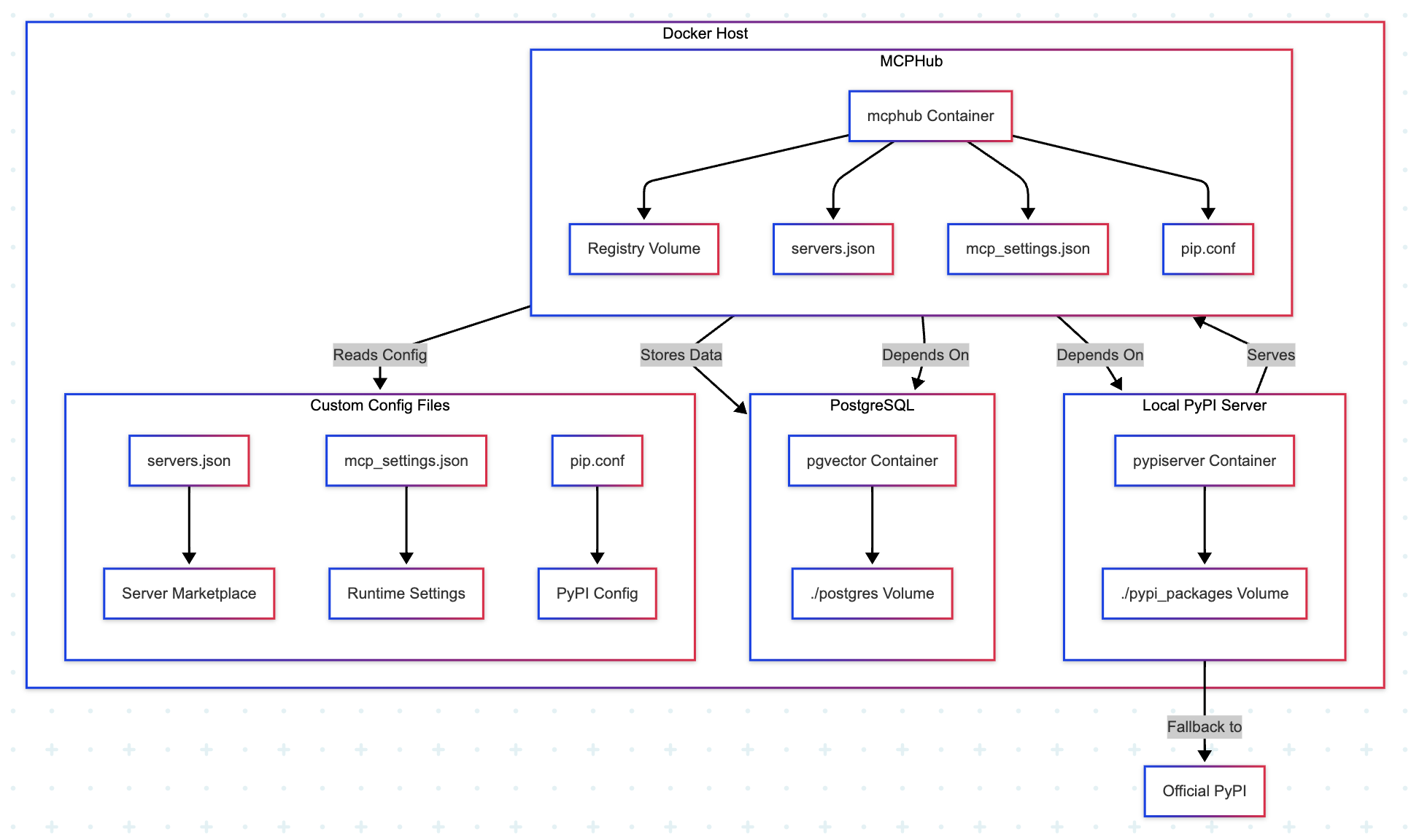
graph TD
    subgraph Docker Host
        A[Local PyPI Server] -->|Serves| B[MCPHub]
        B -->|Stores Data| C[PostgreSQL]
        B -->|Reads Config| D[Custom Config Files]
    end

    subgraph A[Local PyPI Server]
        A1[pypiserver Container] --> A2[./pypi_packages Volume]
    end

    subgraph B[MCPHub]
        B1[mcphub Container] --> B2[Registry Volume]
        B1 --> B3[servers.json]
        B1 --> B4[mcp_settings.json]
        B1 --> B5[pip.conf]
    end

    subgraph C[PostgreSQL]
        C1[pgvector Container] --> C2[./postgres Volume]
    end

    subgraph D[Custom Config Files]
        D1[servers.json] --> D2[Server Marketplace]
        D3[mcp_settings.json] --> D4[Runtime Settings]
        D5[pip.conf] --> D6[PyPI Config]
    end

    A -->|Fallback to| E[Official PyPI]
    B -->|Depends On| A
    B -->|Depends On| C
搭建本地 PyPI 源
拉取 pypiserver 镜像
docker pull pypiserver/pypiserver
创建存储 Python 包的目录
Docker 容器是隔离的,容器内的数据默认会随着容器的删除而丢失。为了持久化你的 Python 包,你需要将宿主机上的一个目录挂载到容器内部。
mkdir pypi_packages
下载 mcp-server-time 及其依赖包
把需要部署的 MCP 服务器及其依赖包存储到 pypi_packages 目录中,以便在内网环境中使用。
pip download mcp-server-time --dest ./pypi_packages
最好到 mcphub 容器中进行下载
- 📌 calculator-mcp-server
pip download calculator-mcp-server --dest /app/registry -i https://pypi.org/simple/ --resume-retries 3