LLM 推理
LLM 推理
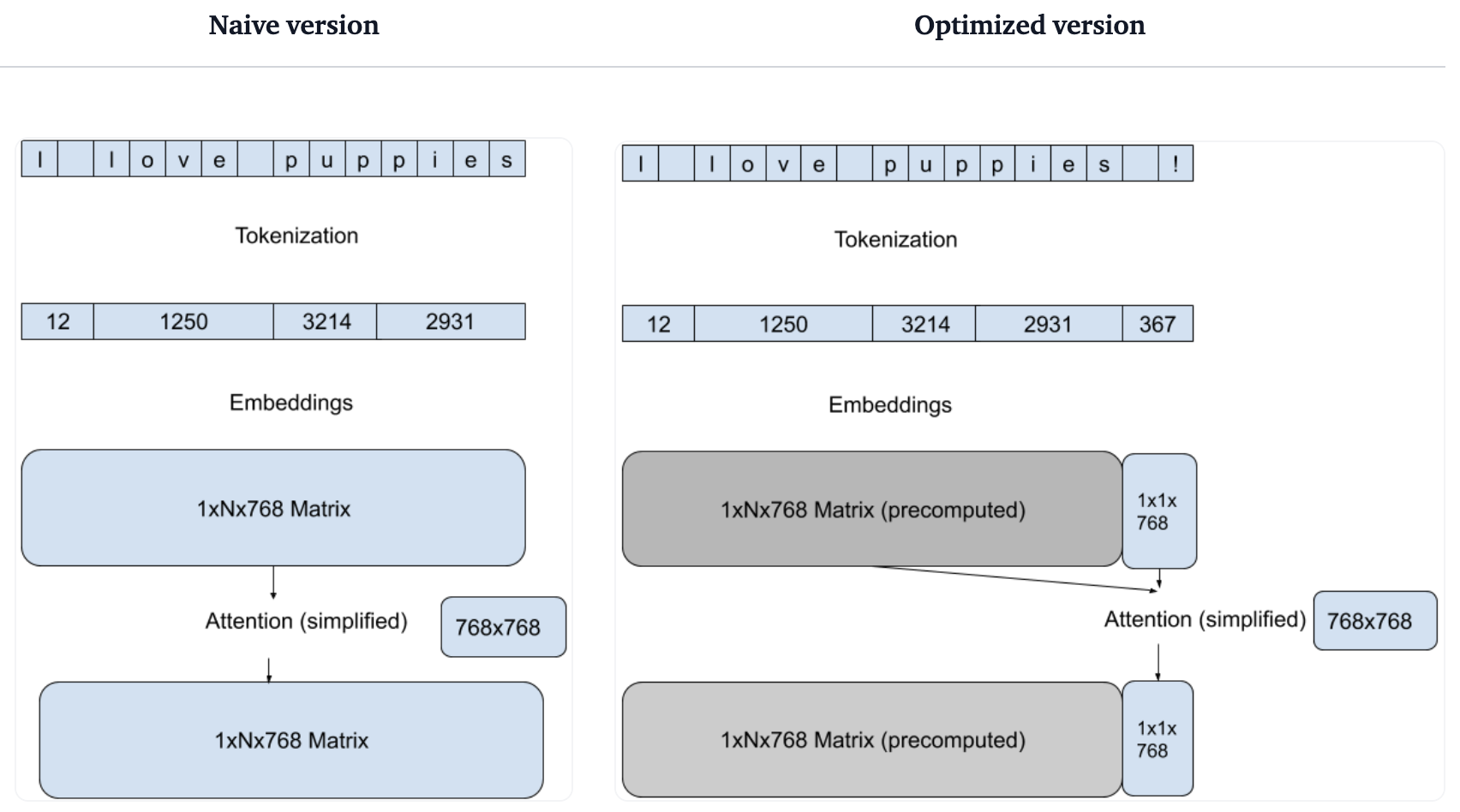
加速推理
平台无关的优化
- 减少每次前向传播计算量
- 高效分词
平台相关的优化
- 图优化 (删除无用节点和边)
- 层融合 (使用特定的 CPU 算子)
- 量化
加速推理
加快托管LLM推理速度的7种方法 7 Ways To Speed Up Inference of Your Hosted LLMs Generation with LLMs LLM Inference Performance Engineering: Best Practices A Comparison Between vLLM and OpenLLM: Choosing the Right Platform for LLM
Cloud GPU
Hugging Face
Transformers Pipelines
Transformers Pipeline 使用
pip install datasets evaluate transformers[sentencepiece]
from transformers import pipeline

classifier = pipeline("sentiment-analysis")
classifier(
    [
        # 我一直都在等待 HuggingFace 课程。
        "I've been waiting for a HuggingFace course my whole life.",
        # 我非常讨厌这个!
        "I hate this so much!",
    ]
)
结果:
[{'label': 'POSITIVE', 'score': 0.9598047137260437},
 {'label': 'NEGATIVE', 'score': 0.9994558095932007}]
Pipeline:将预处理、推理和后处理三部分组合在一起
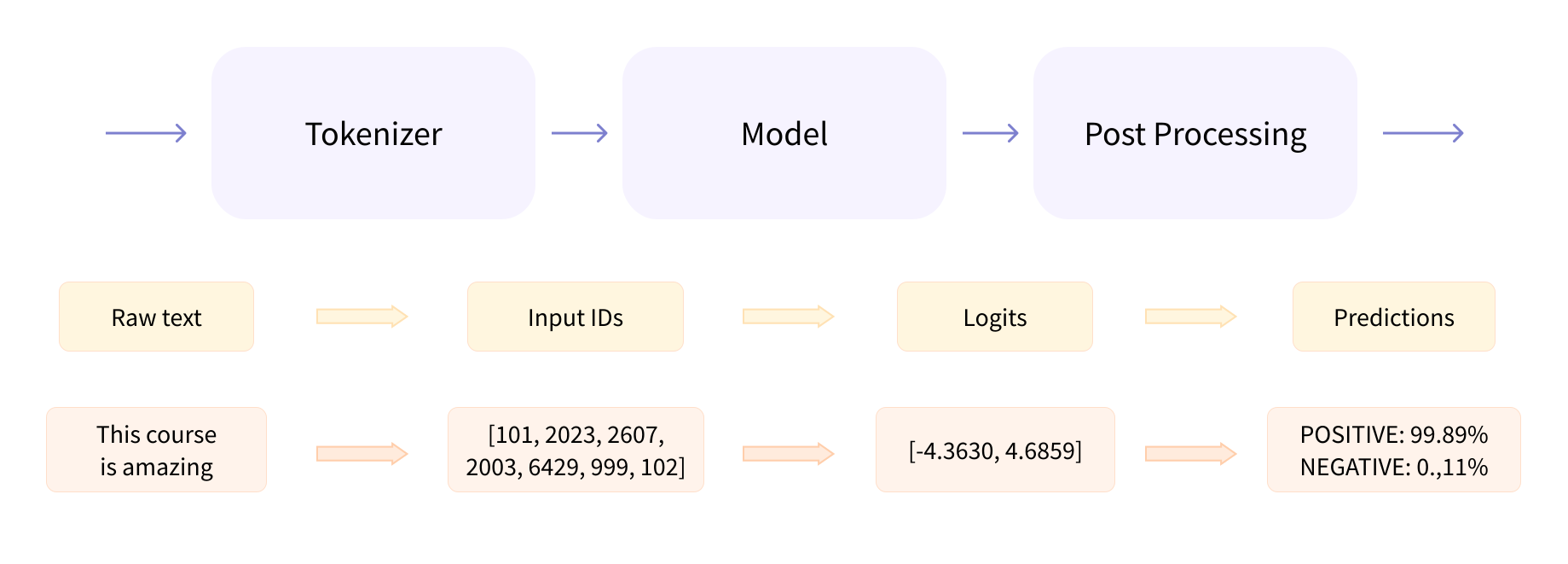
❶ 预处理:使用分词器将文本输入转换为模型能够理解的数字 ❷ 推理 ❸ 后处理
❶ 预处理
from transformers import AutoTokenizer

checkpoint = "uer/roberta-base-finetuned-dianping-chinese"
tokenizer = AutoTokenizer.from_pretrained(checkpoint)

raw_inputs = [
    "我一直都在等待 HuggingFace 课程。",
    "我非常讨厌这个!",
]
inputs = tokenizer(raw_inputs, padding=True, truncation=True, return_tensors="pt")
print(inputs)
结果:
{
    'input_ids': tensor([
        [  101,  2769,   671,  4684,  6963,  1762,  5023,  2521, 12199,  9949,  8221, 12122,  6440,  4923,   511,   102],
        [  101,  2769,  7478,  2382,  6374,  1328,  6821,   702,  8013,   102,     0,     0,     0,     0,     0,     0]
    ]),
    'attention_mask': tensor([
        [1, 1, 1, 1, 1, 1, 1, 1, 1, 1, 1, 1, 1, 1, 1, 1],
        [1, 1, 1, 1, 1, 1, 1, 1, 1, 1, 0, 0, 0, 0, 0, 0]
    ])
}
❷ 推理
from transformers import AutoModelForSequenceClassification

checkpoint = "uer/roberta-base-finetuned-dianping-chinese"
model = AutoModelForSequenceClassification.from_pretrained(checkpoint)

outputs = model(**inputs)
print(outputs.logits)
结果:
tensor([[-0.7019,  0.6344],
        [ 2.8446, -2.7260]], grad_fn=<AddmmBackward0>)
logits 不是概率,是模型最后一层输出的原始非标准化分数。
❸ 后处理
labels = model.config.id2label
predictions = torch.nn.functional.softmax(outputs.logits, dim=-1)

for input, prediction in zip(raw_inputs, predictions):
    score = torch.max(prediction).item()
    label = labels[torch.argmax(prediction).item()]
    print(f"input: {input}")
    print(f"label: {label.upper()}, score: {score}")
    print()
结果:
input: 我一直都在等待 HuggingFace 课程。
label: POSITIVE (STARS 4 AND 5), score: 0.7918757796287537

input: 我非常讨厌这个!
label: NEGATIVE (STARS 1, 2 AND 3), score: 0.9962064027786255
直接使用 Pipeline
from transformers import AutoModelForSequenceClassification,AutoTokenizer,pipeline

checkpoint = "uer/roberta-base-finetuned-dianping-chinese"

tokenizer = AutoTokenizer.from_pretrained(checkpoint)
model = AutoModelForSequenceClassification.from_pretrained(checkpoint)
text_classification = pipeline('sentiment-analysis', tokenizer=tokenizer, model=model)

raw_inputs = [
    "我一直都在等待 HuggingFace 课程。",
    "我非常讨厌这个!",
]
outputs = text_classification(raw_inputs)
print(outputs)
结果:
[{'label': 'positive (stars 4 and 5)', 'score': 0.7918757796287537},
 {'label': 'negative (stars 1, 2 and 3)', 'score': 0.9962064027786255}]
LLM.int8 节省显存
%load_ext autotime
from transformers import AutoModelForSequenceClassification,AutoTokenizer,pipeline

checkpoint = "uer/roberta-base-finetuned-dianping-chinese"

tokenizer = AutoTokenizer.from_pretrained(checkpoint, device_map='auto', load_in_8bit=True)
model = AutoModelForSequenceClassification.from_pretrained(checkpoint, load_in_8bit=True)
text_classification = pipeline('sentiment-analysis', tokenizer=tokenizer, model=model)

raw_inputs = [
    "我一直都在等待 HuggingFace 课程。",
    "我非常讨厌这个!",
]
for _ in range(500):
    text_classification(raw_inputs)

print(model.get_memory_footprint())
不使用 LLM.int8:显存: 205MB;用时: 140秒
使用 LLM.int8:显存: 119MB;用时: 105秒
显存减少📉 72%,速度提升📈 33%
ChatGLM3-6B 推理
FP16
from transformers import AutoTokenizer, AutoModel
tokenizer = AutoTokenizer.from_pretrained("THUDM/chatglm3-6b", trust_remote_code=True)
model = AutoModel.from_pretrained("THUDM/chatglm3-6b", trust_remote_code=True).eval()
response, history = model.chat(tokenizer, "你是谁?", history=[])
print(response)
LLM.int8
model = AutoModel.from_pretrained("THUDM/chatglm3-6b", trust_remote_code=True,
    load_in_8bit=True).eval()
ChatGLM3-6B 精度量化性能对比
| 模型 | 序列长度 | 量化精度 | 显存(GB) | 速度(字符数/秒) |
|---|---|---|---|---|
| ChatGLM3-6B | 8k | FP16 | 14 | 29.35 |
| ChatGLM3-6B | 8k | LLM.int8 | 8 | 15.90 🐢🐢 |
| ChatGLM3-6B | 8k | INT8 | 7.5 | 4.93 🐢🐢🐢🐢🐢🐢 |
| ChatGLM3-6B-32K | 32k | FP16 | 14 | 30.52 |
| ChatGLM3-6B-32K | 32k | LLM.int8 | 8 | 15.49 🐢🐢 |
| ChatGLM3-6B-32K | 32k | INT8 | 7.5 | 4.88 🐢🐢🐢🐢🐢🐢 |
LLM 推理框架
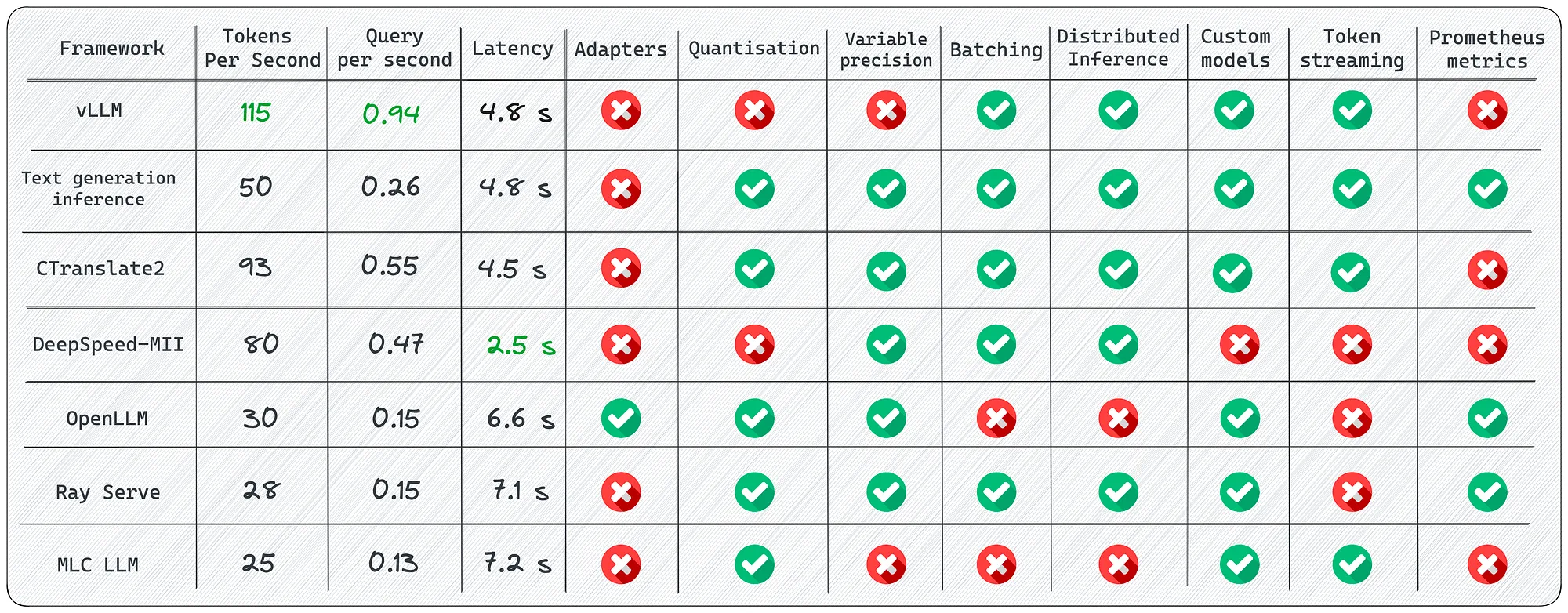
vLLM
vLLM 介绍
vLLM 是一个快速且易于使用的 LLM 推理和服务库。
速度很快
- 最先进的服务吞吐量
- 使用 PagedAttention 高效管理注意力键和值内存
- 连续批处理传入请求
- 优化的 CUDA 内核
灵活且易于使用
- 与流行的 Hugging Face 模型无缝集成
- 高吞吐量服务与各种解码算法,包括并行采样、波束搜索等
- 对分布式推理的张量并行支持
- 流输出
- 兼容 OpenAI 的 API 服务器
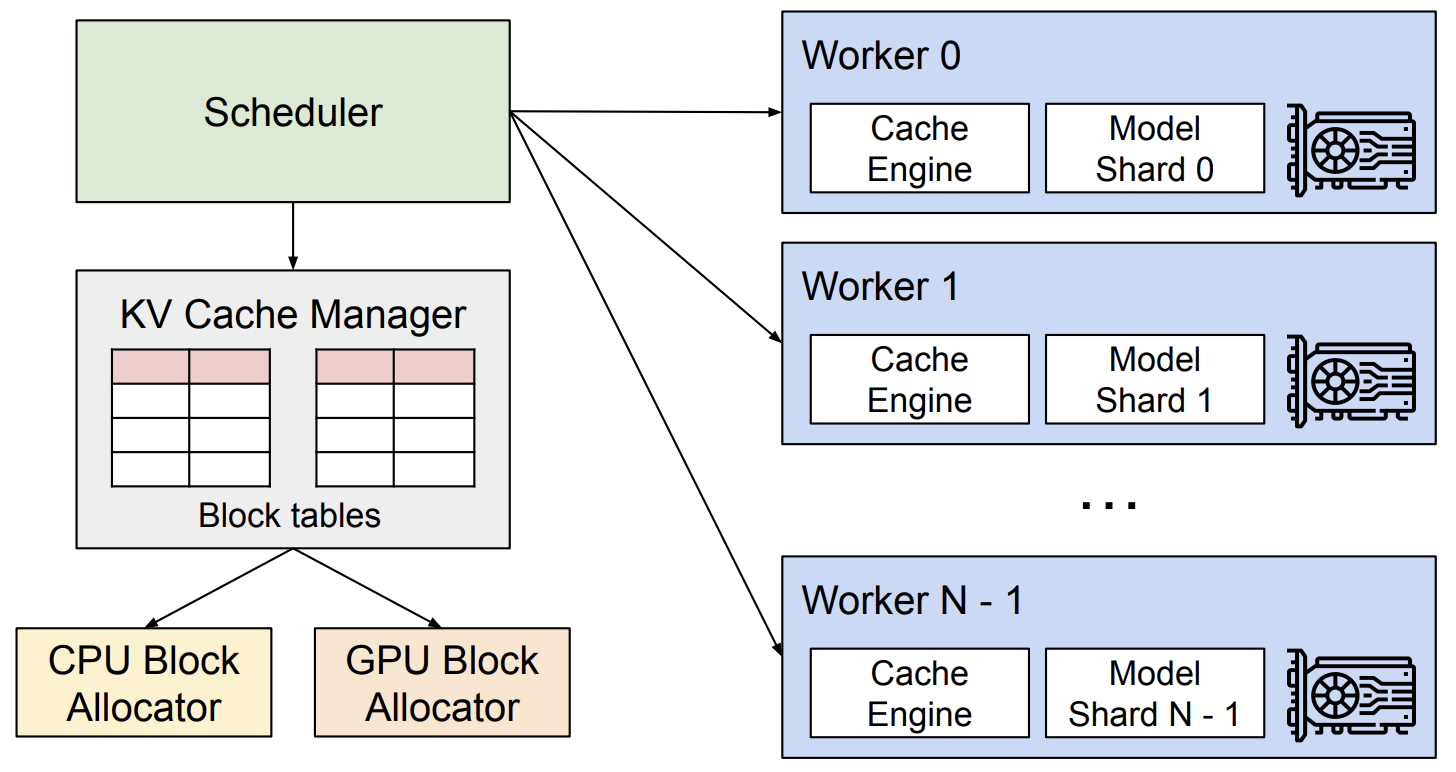
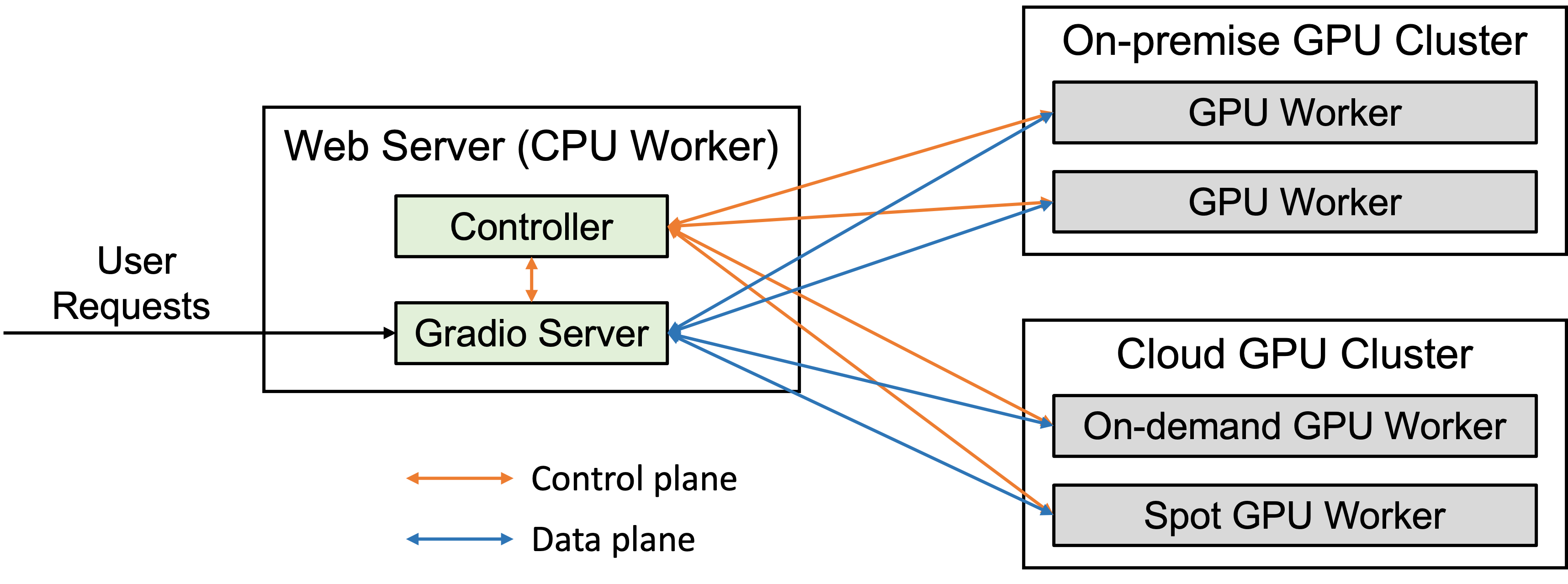
vLLM 系统架构
TGI
Text Generation Inference
TGI 介绍
TGI 是一个用于部署和服务大型语言模型(LLM)的工具包。 TGI 为最流行的开源 LLM 提供高性能文本生成,包括 Llama、Falcon、StarCoder、BLOOM、GPT-NeoX 和 T5 。
- 张量并行性,可在多个 GPU 上进行更快的推理
- 批处理连续传入的请求,以增加总吞吐量
- 在最流行的架构上使用 [Flash Attention][Flash-Attention] 和 [Paged Attention][Paged-Attention] 优化 Transformers 代码进行推理
- 使用 [bitsandbytes][bitsandbytes] 和 [GPT-Q][GPT-Q] 进行量化
- [safetensors][safetensors] 权重加载
- 给模型输出加水印(Watermark)
- 微调支持:定制针对特定任务的微调模型来实现更高的准确性和性能
TGI 系统架构
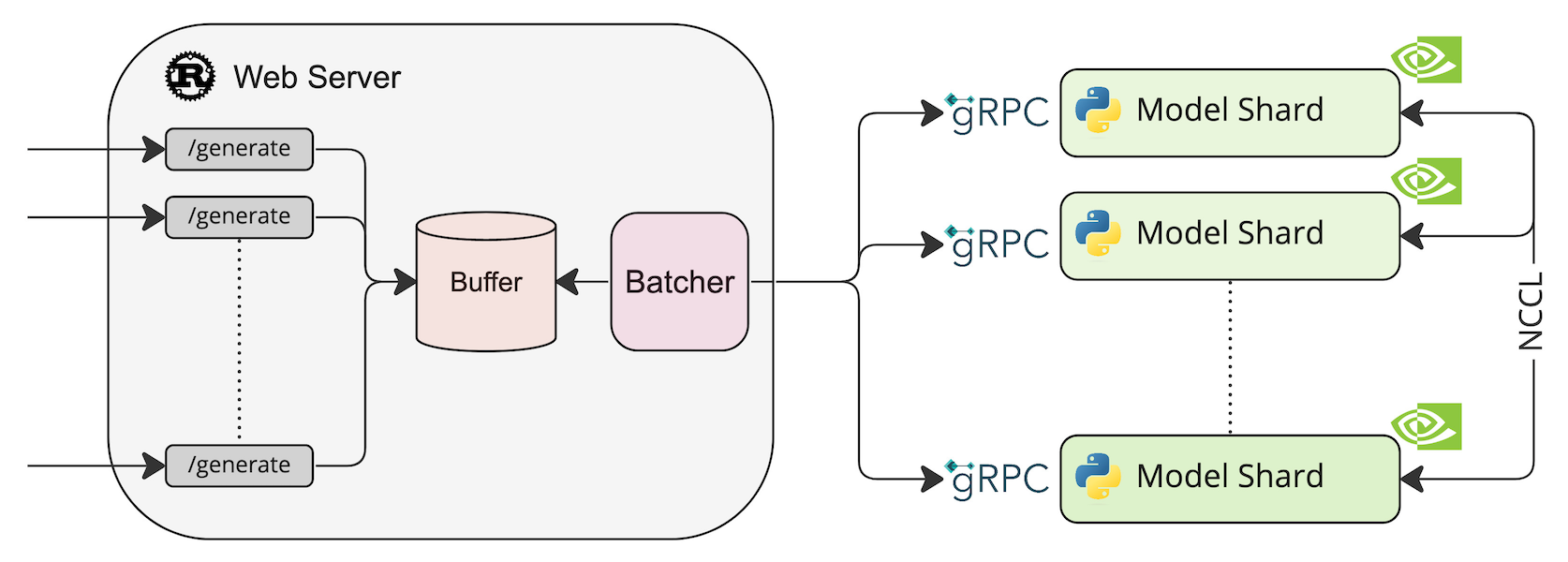
部署模型 HuggingFaceH4/zephyr-7b-beta
model=HuggingFaceH4/zephyr-7b-beta
volume=$PWD/data    # Avoid downloading weights every run
docker run --gpus all --shm-size 1g -p 8080:80 -v $volume:/data \
    ghcr.io/huggingface/text-generation-inference \
    --model-id $model --quantize bitsandbytes --num-shard 1
测试
curl -X POST http://localhost:8080/generate \
    -H 'Content-Type: application/json' \
    -d '{
        "inputs": "What is Deep Learning?",
        "parameters": {
            "max_new_tokens": 20
        }
    }'
CTranslate2
OpenLLM
FastChat
FastChat 介绍
FastChat 是一个开放平台,用于训练、服务和评估基于大型语言模型的聊天机器人。
- FastChat 支持 [Chatbot Arena][Chatbot-Arena],为30多个 LLM 提供超过400万个聊天请求的服务。
- [Chatbot Arena][Chatbot-Arena] 通过进行 LLM 对战的方式,已经收集了超过8万个人类投票,编制了在线 [LLM Elo 排行榜][Chatbot-Arena-Leaderboard]。
FastChat的核心功能包括:
- 最先进模型的训练和评估代码(例如 Vicuna、MT-Bench)。
- 一个分布式多模型服务系统,具有 Web UI 和 OpenAI 兼容的 RESTful API。
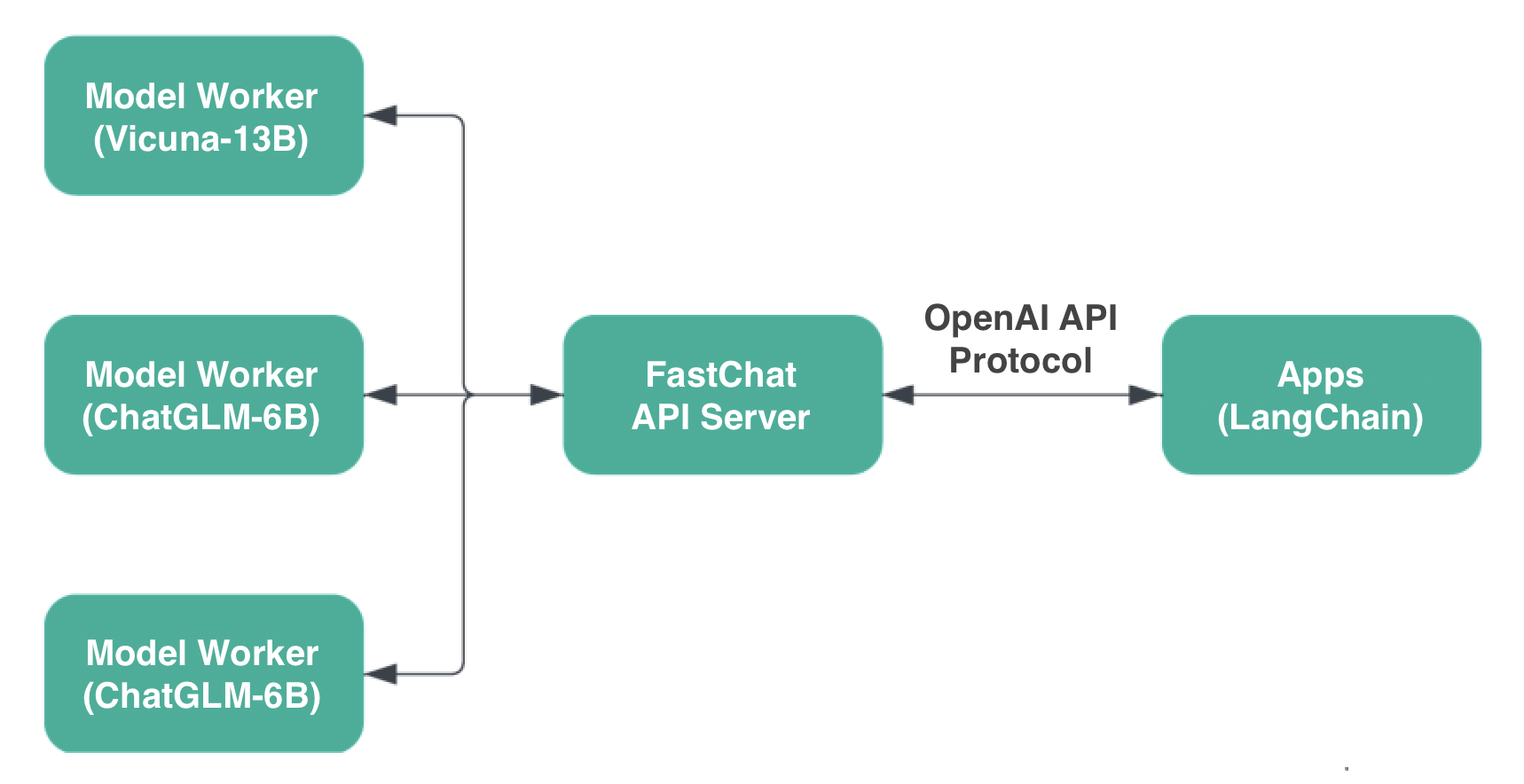
FastChat 系统架构
兼容 OpenAI API
部署 FastChat Server
安装
pip install "fschat[model_worker,webui]"
部署
python -m fastchat.serve.controller
CUDA_VISIBLE_DEVICES=2 python -m fastchat.serve.model_worker \
    --model-path chatglm2-6b --port 21002 --worker-address http://localhost:21002
CUDA_VISIBLE_DEVICES=3 python -m fastchat.serve.model_worker \
    --model-path chatglm2-6b --port 21003 --worker-address http://localhost:21003
python -m fastchat.serve.openai_api_server --host 0.0.0.0 --port 8000
测试 OpenAI API 接口
curl http://localhost:8000/v1/chat/completions \
    -H "Content-Type: application/json" \
    -d '{
        "model": "chatglm2-6b",
        "messages": [{
            "role": "user",
            "content": "你好"
        }],
        "temperature": 0.3
    }'
TensorRT-LLM
TensorRT-LLM 介绍
TensorRT-LLM 为用户提供了易于使用的 Python API 来定义大型语言模型(LLM)并构建包含最先进优化的 TensorRT 引擎,以便在 NVIDIA GPU 上高效地执行推理。TensorRT-LLM 还包含用于创建执行这些 TensorRT 引擎的 Python 和 C++ 运行时的组件。
TensorRT-LLM 还包括一个用于与 NVIDIA Triton 推理服务器集成的后端;为 LLM 服务的生产质量体系。使用 TensorRT-LLM 构建的模型可以在各种配置上执行,从单个 GPU 到具有多个 GPU 的多个节点。
构建 TensorRT 引擎
运行 TensorRT-LLM 的 Docker 镜像
docker run --gpus 1 --rm -it -v /data/models:/data/models \
    tensorrt_llm/release:latest bash
构建 TensorRT 引擎
cd examples/chatglm/
python build.py -m chatglm3_6b \
    --model_dir /data/models/llm/chatglm3-6b \
    --output_dir /data/models/trt-engines/chatglm3-6b/fp16/1-gpu
推理
python3 ../run.py --input_text "写一篇1000字的玄幻小说" \
                  --max_output_len 1024 \
                  --tokenizer_dir /data/models/llm/chatglm3-6b \
                  --engine_dir /data/models/trt-engines/chatglm3-6b/fp16/1-gpu
结果:
Input [Text 0]: "[gMASK]sop 写一篇1000字的玄幻小说"
Output [Text 0 Beam 0]: ",讲述一个神秘的世界,这个世界有魔法、神秘生物和奇幻的冒险故事。
在一个神秘的世界中,魔法、神秘生物和奇幻的冒险故事充斥着每一个角落。这个世界被称为“奇幻大陆”,
由许多种族组成,包括人类、精灵、兽人、矮人、巨魔、龙等等。每一个种族都有自己独特的文化和传统,
同时也存在着许多神秘的生物和魔法。
在这个世界中,有一个年轻的人类男孩叫做亚瑟。亚瑟出生在一个普通的人类家庭,但他从小就表现出了对
魔法和神秘生物的浓厚兴趣。他常常独自一人深入森林和山脉,探索那些被认为充满神秘和魔法的地方。
......