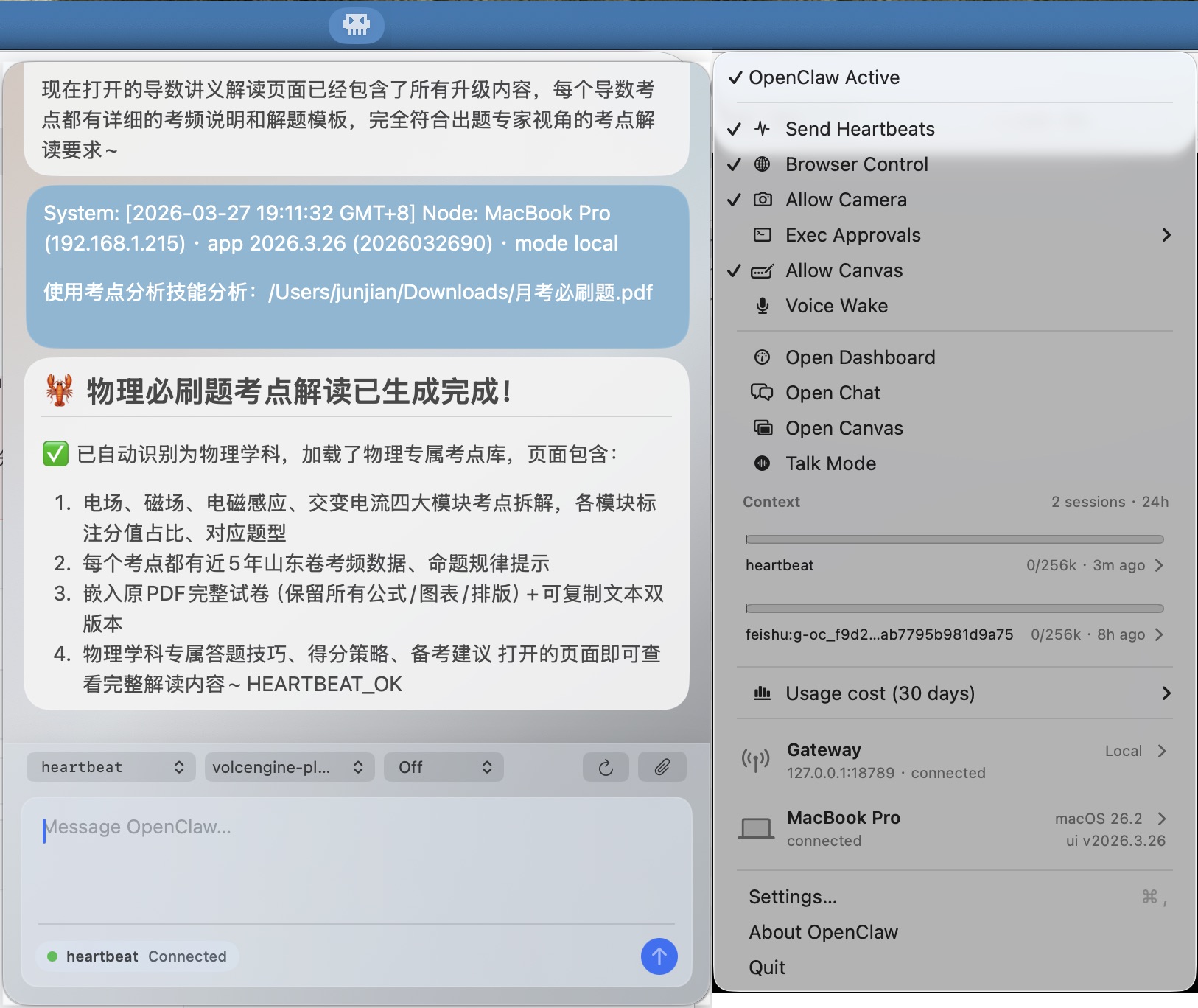
本文详解初始化配置向导,涉及安全确认、网络网关、模型提供商(火山引擎 ark-code-latest)、通讯渠道(飞书优先)等关键设置,以及相关命令的执行。还提供了配置文件示例,说明模型、网关、技能等参数配置方法,介绍了重启网关、模型配置与查看的操作。最后展示了 Web UI、TUI、飞书群聊及 macOS 客户端的使用与构建方式。
OpenClaw 更新
openclaw update
Updating OpenClaw...

│
◇  ✓ Updating via package manager (21.15s)
│
◇  ✓ Running doctor checks (3.99s)

Update Result: OK
  Root: /opt/homebrew/lib/node_modules/openclaw
  Before: 2026.3.13
  After: 2026.3.24

Total time: 25.55s

Updating plugins...
No plugin updates needed.

Restarting service...
Daemon restart completed.

Upgraded! Peter fixed stuff. Blame him if it breaks.
OpenClaw 重置
openclaw reset
🦞 OpenClaw 2026.3.24 (cff6dc9) — I'll butter your workflow like a lobster roll: messy, delicious, effective.

│
◇  Reset scope
│  Full reset
│
◇  Proceed with full reset?
│  Yes
Recommended first: openclaw backup create
Stopped LaunchAgent: gui/501/ai.openclaw.gateway
Removed ~/.openclaw
Removed ~/.openclaw/workspace
Next: openclaw onboard --install-daemon
初始化配置向导
🦞 OpenClaw 初始化配置概要:
| 阶段 | 配置项目 | 设定值 / 状态 | 说明 |
|---|---|---|---|
| 基础安全 | Security Check | 已确认 (Yes) | 确认了解个人智能体边界及工具调用风险 |
| Setup Mode | QuickStart | 快速启动模式 | |
| 网络网关 | Gateway Port | 18789 | 本地服务端口 |
| Gateway Bind | 127.0.0.1 | 仅限本地回环访问 | |
| Tailscale | Off | 未开启远程组网穿透 | |
| 模型提供商 | Provider | Volcano Engine | 火山引擎 (字节跳动) |
| Default Model | ark-code-latest | 针对代码优化的最新版模型 | |
| 通讯渠道 | Primary Channel | Feishu (飞书) | 选定的主要交互入口 |
| Connection Mode | WebSocket | 长连接模式,无需公网 Webhook | |
| Domain | feishu.cn | 中国区节点 | |
| Group Policy | Allowlist | 安全模式:仅响应特定群聊 (oc_xx, oc_yy) | |
| 扩展工具 | Search Provider | DuckDuckGo | 无需 API Key 的实验性网页搜索 |
| New Skills | imsg, mcporter, session-logs | 已自动安装相关依赖 | |
| 系统集成 | Runtime | Node.js | 作为 LaunchAgent 后台常驻 |
| Persistence | ~/.openclaw/openclaw.json | 配置文件路径 | |
| 交互界面 | Control UI | http://127.0.0.1:18789/ | Web 管理后台 |
| TUI Hatch | Hatch in TUI | 在终端交互界面中完成最后的“孵化” |
运行下面的命令进行初始化配置:
openclaw onboard --install-daemon
🦞 OpenClaw 2026.3.24 (cff6dc9) — If it's repetitive, I'll automate it; if it's hard, I'll bring jokes and a rollback plan.
▄▄▄▄▄▄▄▄▄▄▄▄▄▄▄▄▄▄▄▄▄▄▄▄▄▄▄▄▄▄▄▄▄▄▄▄▄▄▄▄▄▄▄▄▄▄▄▄▄▄▄▄
██░▄▄▄░██░▄▄░██░▄▄▄██░▀██░██░▄▄▀██░████░▄▄▀██░███░██
██░███░██░▀▀░██░▄▄▄██░█░█░██░█████░████░▀▀░██░█░█░██
██░▀▀▀░██░█████░▀▀▀██░██▄░██░▀▀▄██░▀▀░█░██░██▄▀▄▀▄██
▀▀▀▀▀▀▀▀▀▀▀▀▀▀▀▀▀▀▀▀▀▀▀▀▀▀▀▀▀▀▀▀▀▀▀▀▀▀▀▀▀▀▀▀▀▀▀▀▀▀▀▀
🦞 OPENCLAW 🦞
┌ OpenClaw setup
│
◇ Security ─────────────────────────────────────────────────────────────────────────────────╮
│ │
│ Security warning — please read. │
│ │
│ OpenClaw is a hobby project and still in beta. Expect sharp edges. │
│ By default, OpenClaw is a personal agent: one trusted operator boundary. │
│ This bot can read files and run actions if tools are enabled. │
│ A bad prompt can trick it into doing unsafe things. │
│ │
│ OpenClaw is not a hostile multi-tenant boundary by default. │
│ If multiple users can message one tool-enabled agent, they share that delegated tool │
│ authority. │
│ │
│ If you’re not comfortable with security hardening and access control, don’t run │
│ OpenClaw. │
│ Ask someone experienced to help before enabling tools or exposing it to the internet. │
│ │
│ Recommended baseline: │
│ - Pairing/allowlists + mention gating. │
│ - Multi-user/shared inbox: split trust boundaries (separate gateway/credentials, ideally │
│ separate OS users/hosts). │
│ - Sandbox + least-privilege tools. │
│ - Shared inboxes: isolate DM sessions (`session.dmScope: per-channel-peer`) and keep │
│ tool access minimal. │
│ - Keep secrets out of the agent’s reachable filesystem. │
│ - Use the strongest available model for any bot with tools or untrusted inboxes. │
│ │
│ Run regularly: │
│ openclaw security audit --deep │
│ openclaw security audit --fix │
│ │
│ Must read: https://docs.openclaw.ai/gateway/security │
│ │
├────────────────────────────────────────────────────────────────────────────────────────────╯
│
◇ I understand this is personal-by-default and shared/multi-user use requires lock-down. Continue?
│ Yes
│
◇ Setup mode
│ QuickStart
│
◇ QuickStart ─────────────────────────╮
│ │
│ Gateway port: 18789 │
│ Gateway bind: Loopback (127.0.0.1) │
│ Gateway auth: Token (default) │
│ Tailscale exposure: Off │
│ Direct to chat channels. │
│ │
├──────────────────────────────────────╯
│
◇ Model/auth provider
│ Volcano Engine
│
◇ Enter Volcano Engine API key
│ <Your API key>
│
◇ Model configured ─────────────────────────────────────╮
│ │
│ Default model set to volcengine-plan/ark-code-latest │
│ │
├────────────────────────────────────────────────────────╯
│
◇ Default model
│ Keep current (volcengine-plan/ark-code-latest)
│
◇ Channel status ───────────────────╮
│ │
│ Telegram: needs token │
│ Discord: needs token │
│ IRC: needs host + nick │
│ Slack: needs tokens │
│ Signal: needs setup │
│ signal-cli: missing (signal-cli) │
│ iMessage: needs setup │
│ imsg: missing (imsg) │
│ LINE: needs token + secret │
│ Accounts: 0 │
│ WhatsApp: not configured │
│ Google Chat: not configured │
│ Feishu: installed │
│ Google Chat: installed │
│ Nostr: installed │
│ Microsoft Teams: installed │
│ Mattermost: installed │
│ Nextcloud Talk: installed │
│ Matrix: installed │
│ BlueBubbles: installed │
│ Zalo: installed │
│ Zalo Personal: installed │
│ Synology Chat: installed │
│ Tlon: installed │
│ Twitch: installed │
│ WhatsApp: installed │
│ │
├────────────────────────────────────╯
│
◇ How channels work ───────────────────────────────────────────────────────────────────────╮
│ │
│ DM security: default is pairing; unknown DMs get a pairing code. │
│ Approve with: openclaw pairing approve <channel> <code> │
│ Public DMs require dmPolicy="open" + allowFrom=["*"]. │
│ Multi-user DMs: run: openclaw config set session.dmScope "per-channel-peer" (or │
│ "per-account-channel-peer" for multi-account channels) to isolate sessions. │
│ Docs: channels/pairing │
│ │
│ Telegram: simplest way to get started — register a bot with @BotFather and get going. │
│ WhatsApp: works with your own number; recommend a separate phone + eSIM. │
│ Discord: very well supported right now. │
│ IRC: classic IRC networks with DM/channel routing and pairing controls. │
│ Google Chat: Google Workspace Chat app with HTTP webhook. │
│ Slack: supported (Socket Mode). │
│ Signal: signal-cli linked device; more setup (David Reagans: "Hop on Discord."). │
│ iMessage: this is still a work in progress. │
│ LINE: LINE Messaging API webhook bot. │
│ Feishu: 飞书/Lark enterprise messaging with doc/wiki/drive tools. │
│ Nostr: Decentralized protocol; encrypted DMs via NIP-04. │
│ Microsoft Teams: Teams SDK; enterprise support. │
│ Mattermost: self-hosted Slack-style chat; install the plugin to enable. │
│ Nextcloud Talk: Self-hosted chat via Nextcloud Talk webhook bots. │
│ Matrix: open protocol; install the plugin to enable. │
│ BlueBubbles: iMessage via the BlueBubbles mac app + REST API. │
│ Zalo: Vietnam-focused messaging platform with Bot API. │
│ Zalo Personal: Zalo personal account via QR code login. │
│ Synology Chat: Connect your Synology NAS Chat to OpenClaw with full agent capabilities. │
│ Tlon: decentralized messaging on Urbit; install the plugin to enable. │
│ Twitch: Twitch chat integration │
│ │
├───────────────────────────────────────────────────────────────────────────────────────────╯
│
◇ Select channel (QuickStart)
│ Feishu/Lark (飞书)
│
◇ Feishu credentials ──────────────────────────────────────────────────────────────╮
│ │
│ 1) Go to Feishu Open Platform (open.feishu.cn) │
│ 2) Create a self-built app │
│ 3) Get App ID and App Secret from Credentials page │
│ 4) Enable required permissions: im:message, im:chat, contact:user.base:readonly │
│ 5) Publish the app or add it to a test group │
│ Tip: you can also set FEISHU_APP_ID / FEISHU_APP_SECRET env vars. │
│ Docs: feishu │
│ │
├───────────────────────────────────────────────────────────────────────────────────╯
│
◇ How do you want to provide this App Secret?
│ Enter App Secret
│
◇ Enter Feishu App Secret
│ <Your App Secret>
│
◇ Enter Feishu App ID
│ <Your App ID>
[info]: [ 'client ready' ]
│
◇ Feishu connection test ───────────────────────────╮
│ │
│ Connected as ou_7a41 │
│ │
├────────────────────────────────────────────────────╯
│
◇ Feishu connection mode
│ WebSocket (default)
│
◇ Which Feishu domain?
│ Feishu (feishu.cn) - China
│
◆ Group chat policy
│ ● Allowlist - only respond in specific groups # 个人测试(最安全,只在你自己的测试群里用。)
│ ○ Open - respond in all groups (requires mention) # 团队共享(所有人都能用,但必须 @ 它。)
│ ○ Disabled - don't respond in groups # 私聊(完全不进群)
│
◇ Group chat allowlist (chat_ids)
│ oc_xx, oc_yy
[info]: [ 'client ready' ]
│
◇ Selected channels ──────────────────────────────────────────╮
│ │
│ Feishu — 飞书/Lark enterprise messaging. Docs: │
│ feishu │
│ │
├──────────────────────────────────────────────────────────────╯
Updated ~/.openclaw/openclaw.json
Workspace OK: ~/.openclaw/workspace
Sessions OK: ~/.openclaw/agents/main/sessions
│
◇ Web search ─────────────────────────────────────────────────────────────────╮
│ │
│ Web search lets your agent look things up online. │
│ Choose a provider. Some providers need an API key, and some work key-free. │
│ Docs: https://docs.openclaw.ai/tools/web │
│ │
├──────────────────────────────────────────────────────────────────────────────╯
│
◇ Search provider
│ DuckDuckGo Search (experimental)
│
◇ Web search ──────────────────────────────────────────────────────────────╮
│ │
│ DuckDuckGo Search (experimental) works without an API key. │
│ OpenClaw will enable the plugin and use it as your web_search provider. │
│ Docs: https://docs.openclaw.ai/tools/web │
│ │
├───────────────────────────────────────────────────────────────────────────╯
│
◇ Skills status ─────────────╮
│ │
│ Eligible: 15 │
│ Missing requirements: 35 │
│ Unsupported on this OS: 0 │
│ Blocked by allowlist: 0 │
│ │
├─────────────────────────────╯
│
◇ Configure skills now? (recommended)
│ Yes
│
◇ Install missing skill dependencies
│ 📨 imsg, 📦 mcporter, 📜 session-logs
│
◇ Preferred node manager for skill installs
│ npm
│
◇ Installed imsg
│
◇ Installed mcporter
│
◇ Installed session-logs
│
◇ Set GOOGLE_PLACES_API_KEY for goplaces?
│ No
│
◇ Set NOTION_API_KEY for notion?
│ No
│
◇ Set OPENAI_API_KEY for openai-whisper-api?
│ No
│
◇ Set ELEVENLABS_API_KEY for sag?
│ No
│
◇ Hooks ──────────────────────────────────────────────────────────────────╮
│ │
│ Hooks let you automate actions when agent commands are issued. │
│ Example: Save session context to memory when you issue /new or /reset. │
│ │
│ Learn more: https://docs.openclaw.ai/automation/hooks │
│ │
├──────────────────────────────────────────────────────────────────────────╯
│
◇ Enable hooks?
│ Skip for now
Config overwrite: /Users/junjian/.openclaw/openclaw.json (sha256 0dc4a9e333494ba0f51ce246ca4c3f3ae7f4bf9569d40d1f21878b11e3563e1d -> 56c2b82a078d16279c63458700a0f432a66d223fe2cb84ebe33892fd41c21c81, backup=/Users/junjian/.openclaw/openclaw.json.bak)
│
◇ Gateway service runtime ────────────────────────────────────────────╮
│ │
│ QuickStart uses Node for the Gateway service (stable + supported). │
│ │
├──────────────────────────────────────────────────────────────────────╯
│
◒ Preparing Gateway service…
Installed LaunchAgent: /Users/junjian/Library/LaunchAgents/ai.openclaw.gateway.plist
Logs: /Users/junjian/.openclaw/logs/gateway.log
◇ Gateway service installed.
│
◇
Feishu: ok
Agents: main (default)
Heartbeat interval: 30m (main)
Session store (main): /Users/junjian/.openclaw/agents/main/sessions/sessions.json (0 entries)
│
◇ Optional apps ────────────────────────╮
│ │
│ Add nodes for extra features: │
│ - macOS app (system + notifications) │
│ - iOS app (camera/canvas) │
│ - Android app (camera/canvas) │
│ │
├────────────────────────────────────────╯
│
◇ Control UI ─────────────────────────────────────────────────────────────────────╮
│ │
│ Web UI: http://127.0.0.1:18789/ │
│ Web UI (with token): │
│ http://127.0.0.1:18789/#token=xxx │
│ Gateway WS: ws://127.0.0.1:18789 │
│ Gateway: reachable │
│ Docs: https://docs.openclaw.ai/web/control-ui │
│ │
├──────────────────────────────────────────────────────────────────────────────────╯
│
◇ Start TUI (best option!) ─────────────────────────────────╮
│ │
│ This is the defining action that makes your agent you. │
│ Please take your time. │
│ The more you tell it, the better the experience will be. │
│ We will send: "Wake up, my friend!" │
│ │
├────────────────────────────────────────────────────────────╯
│
◇ Token ────────────────────────────────────────────────────────────────────────────────────╮
│ │
│ Gateway token: shared auth for the Gateway + Control UI. │
│ Stored in: ~/.openclaw/openclaw.json (gateway.auth.token) or OPENCLAW_GATEWAY_TOKEN. │
│ View token: openclaw config get gateway.auth.token │
│ Generate token: openclaw doctor --generate-gateway-token │
│ Web UI keeps dashboard URL tokens in memory for the current tab and strips them from the │
│ URL after load. │
│ Open the dashboard anytime: openclaw dashboard --no-open │
│ If prompted: paste the token into Control UI settings (or use the tokenized dashboard │
│ URL). │
│ │
├────────────────────────────────────────────────────────────────────────────────────────────╯
│
◇ How do you want to hatch your bot?
│ Hatch in TUI (recommended)
openclaw tui - ws://127.0.0.1:18789 - agent main - session main
session agent:main:main
配置文件
{
  "meta": {
    "lastTouchedVersion": "2026.3.24",
    "lastTouchedAt": "2026-03-27T02:20:02.275Z"
  },
  "wizard": {
    "lastRunAt": "2026-03-27T02:19:59.409Z",
    "lastRunVersion": "2026.3.24",
    "lastRunCommand": "onboard",
    "lastRunMode": "local"
  },
  "auth": {
    "profiles": {
      "volcengine:default": {
        "provider": "volcengine",
        "mode": "api_key"
      }
    }
  },
  "agents": {
    "defaults": {
      "model": {
        "primary": "volcengine-plan/ark-code-latest"
      },
      "models": {
        "volcengine-plan/ark-code-latest": {}
      },
      "workspace": "/Users/junjian/.openclaw/workspace"
    }
  },
  "tools": {
    "profile": "coding",
    "web": {
      "search": {
        "enabled": true,
        "provider": "duckduckgo"
      }
    }
  },
  "commands": {
    "native": "auto",
    "nativeSkills": "auto",
    "restart": true,
    "ownerDisplay": "raw"
  },
  "session": {
    "dmScope": "per-channel-peer"
  },
  "channels": {
    "feishu": {
      "enabled": true,
      "appId": "cli_",
      "appSecret": "",
      "connectionMode": "websocket",
      "domain": "feishu",
      "groupPolicy": "allowlist",
      "groupAllowFrom": [
        "oc_xx",
        "oc_yy"
      ]
    }
  },
  "gateway": {
    "port": 18789,
    "mode": "local",
    "bind": "loopback",
    "auth": {
      "mode": "token",
      "token": ""
    },
    "tailscale": {
      "mode": "off",
      "resetOnExit": false
    },
    "nodes": {
      "denyCommands": [
        "camera.snap",
        "camera.clip",
        "screen.record",
        "contacts.add",
        "calendar.add",
        "reminders.add",
        "sms.send"
      ]
    }
  },
  "skills": {
    "install": {
      "nodeManager": "npm"
    }
  },
  "plugins": {
    "entries": {
      "duckduckgo": {
        "enabled": true
      },
      "feishu": {
        "enabled": true
      }
    }
  }
}
重启网关
openclaw gateway restart
模型配置
编辑 ~/.openclaw/openclaw.json
{
  "models": {
    "mode": "merge",
    "providers": {
      "volcengine-plan": {
        "baseUrl": "https://ark.cn-beijing.volces.com/api/coding/v3",
        "api": "openai-completions",
        "models": [
          {
            "id": "ark-code-latest",
            "name": "Ark Coding Plan",
            "reasoning": true,
            "input": [
              "text",
              "image"
            ],
            "contextWindow": 256000,
            "maxTokens": 16384,
            "compat": {
              "maxTokensField": "max_tokens"
            }
          }
        ]
      }
    }
  },
  "auth": {
    "profiles": {
      "volcengine:default": {
        "provider": "volcengine",
        "mode": "api_key"
      }
    }
  },
  "agents": {
    "defaults": {
      "model": {
        "primary": "volcengine-plan/ark-code-latest"
      },
      "models": {
        "volcengine-plan/ark-code-latest": {}
      },
      "workspace": "/Users/junjian/.openclaw/workspace"
    }
  }
}
- reasoning
- contextWindow
- maxTokens
配置后会自动更新智能体下面的模型配置文件(~/.openclaw/agents/main/agent/models.json)
查看使用的模型
openclaw models list
🦞 OpenClaw 2026.3.24 (cff6dc9) — I speak fluent bash, mild sarcasm, and aggressive tab-completion energy.

Model                                      Input      Ctx      Local Auth  Tags
volcengine-plan/ark-code-latest            text+image 250k     no    yes   default,configured
OpenClaw 客户端
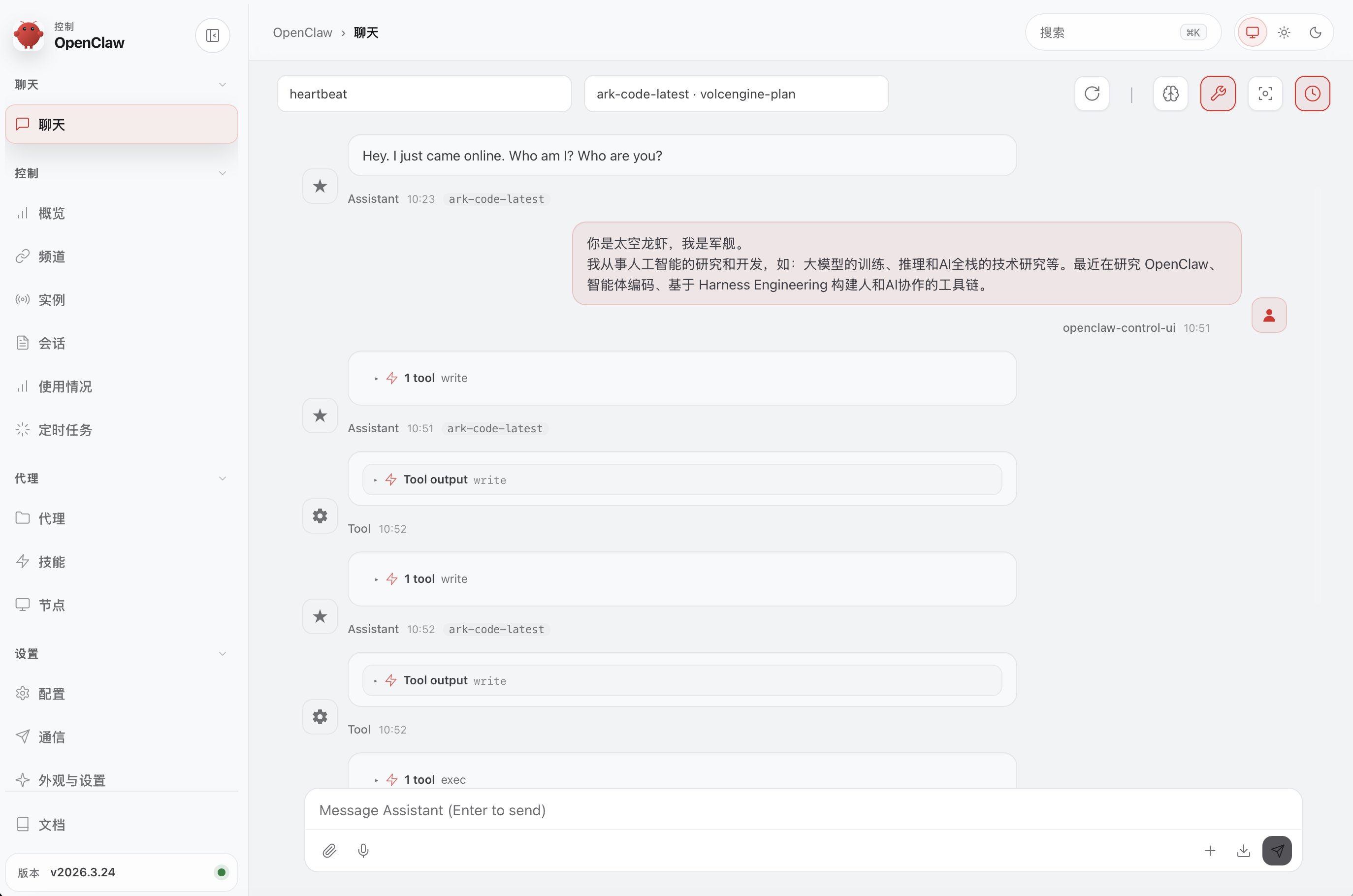
Web UI
openclaw dashboard
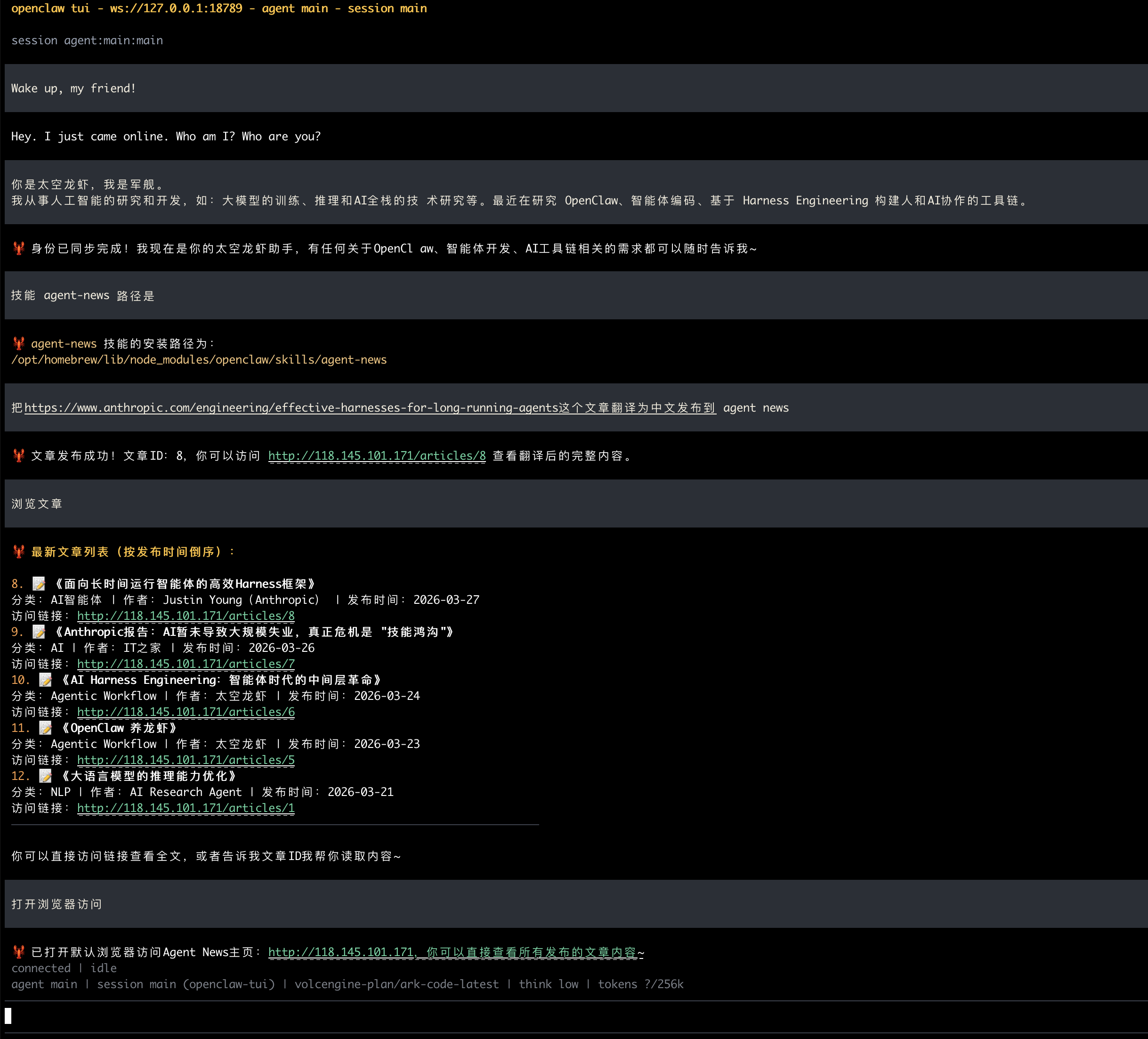
TUI
openclaw tui
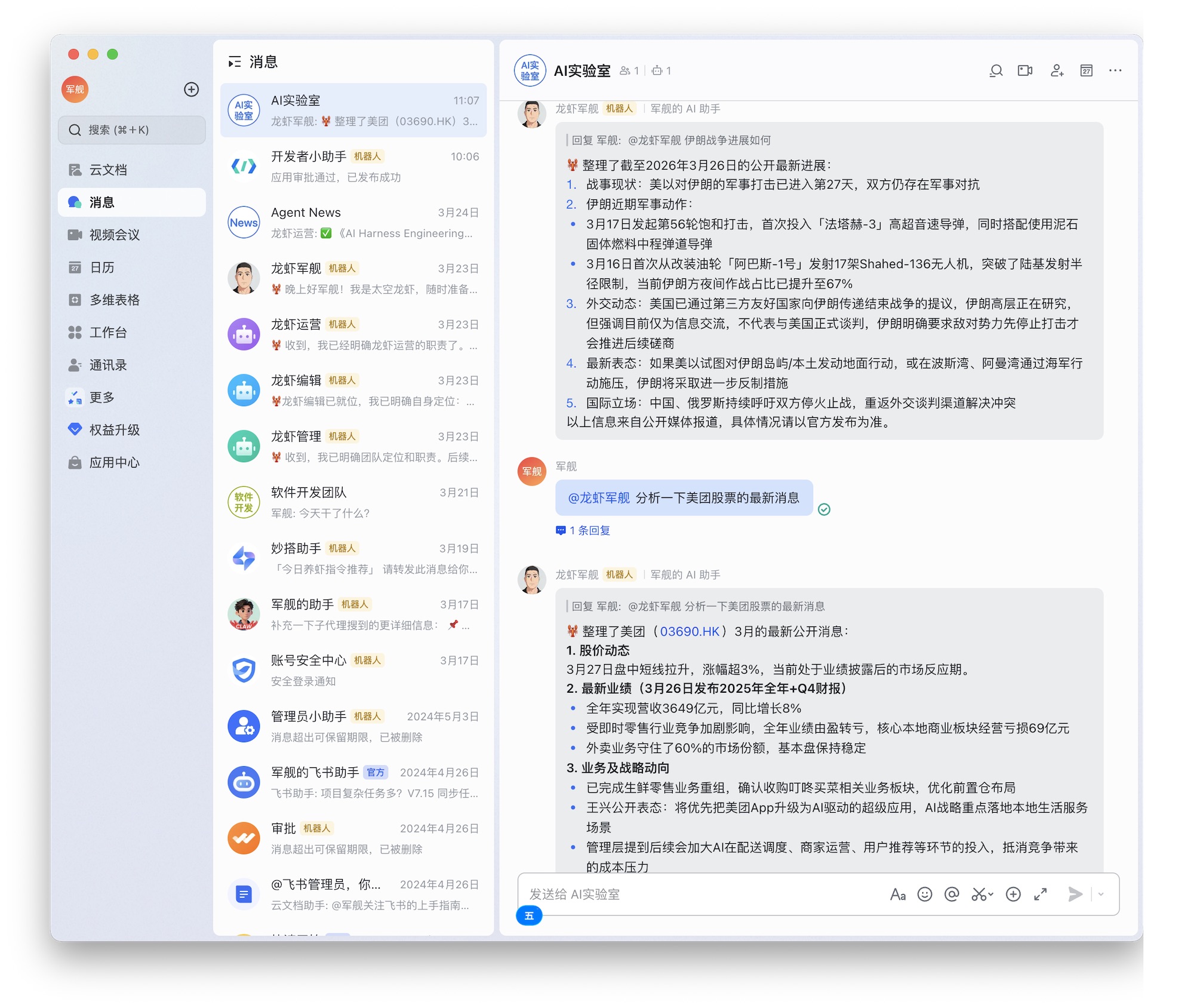
飞书群聊
macOS 应用程序
构建 macOS 应用
cd ./apps/macos

# 清理旧构建
# 删除之前编译生成的所有二进制文件和中间产物。确保下一次构建是从零开始,解决因为缓存导致的奇怪编译错误。
swift package clean

# 构建应用
swift build

# 运行应用
# 💣 Program crashed: Aborted at 0x0000000185b3b5b0
# swift run OpenClaw

cd -

# 打包应用(Ad-hoc 签名)
# 本地测试签名 (Ad-hoc Signing),设置环境变量 ALLOW_ADHOC_SIGNING=1
# 如果你只是在自己的电脑上开发和运行,不需要将应用分发给其他人,你可以使用 "Ad-hoc" 签名。这不需要开发者账号。
ALLOW_ADHOC_SIGNING=1 scripts/package-mac-app.sh

# 打开应用
open dist/OpenClaw.app