Tabby - GitHub Copilot 的开源替代解决方案
Tabby
- Tabby Playground
- Tabby Docs
- Tabby Blog
- GitHub: Tabby
- There’s An AI For That
- Run Curl Commands Online
Coding LLMs Leaderboard (TabbyML Team)
Introducing the Coding LLM Leaderboard

更新日期:2023-11-13
Next Line Accuracy
什么是 Next Line Accuracy ?
在代码补全中,模型预测的是跨越多行的代码块。一种朴素的方法是直接将预测的代码块与实际提交的代码进行比较。虽然这种方法看起来理想,但它通常被认为是一个“过于稀疏”的度量标准。另一方面,下一行准确度可以作为整体代码块匹配准确度的可靠代理。
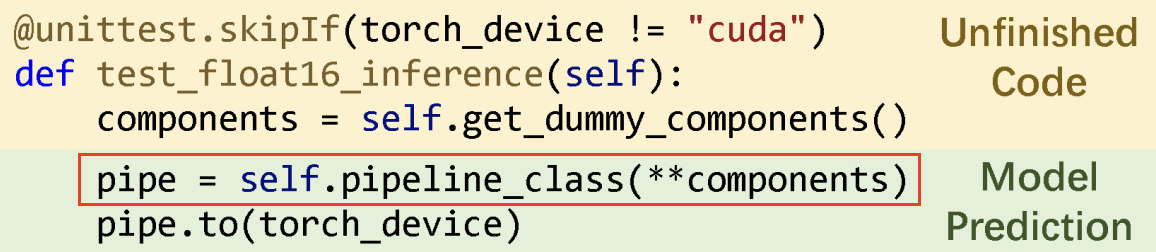
只有红色框内的内容被用于与真实值进行比较,以计算准确度指标。
安装 Tabby
Homebrew (Apple M1/M2)
安装 tabby
brew install tabbyml/tabby/tabby
==> Fetching tabbyml/tabby/tabby
==> Downloading https://github.com/TabbyML/tabby/releases/download/v0.7.0/tabby_aarch64-apple-darwin
==> Running `brew cleanup tabby`...
Disable this behaviour by setting HOMEBREW_NO_INSTALL_CLEANUP.
Hide these hints with HOMEBREW_NO_ENV_HINTS (see `man brew`).
brew cleanup tabby命令的意思是清理所有旧版本的 tabby 包和缓存的 tabby 下载。
运行 Tabby 服务(模型:DeepseekCoder-1.3B)
tabby serve --device metal --model TabbyML/DeepseekCoder-1.3B
   00:01:21 ▕████████████████████▏ 1.33 GiB/1.33 GiB  16.75 MiB/s  ETA 0s.
2024-01-05T11:38:38.816761Z  INFO tabby::serve: crates/tabby/src/serve.rs:111: Starting server, this might takes a few minutes...
2024-01-05T11:38:40.713532Z  INFO tabby::routes: crates/tabby/src/routes/mod.rs:35: Listening at 0.0.0.0:8080

  TELEMETRY

  As an open source project, we collect usage statistics to inform development priorities. For more
  information, read https://tabby.tabbyml.com/docs/configuration#usage-collection

  We will not see or any code in your development process.

  To opt-out, add the TABBY_DISABLE_USAGE_COLLECTION=1 to your tabby server's environment variables.

  Welcome to Tabby!

  If you have any questions or would like to engage with the Tabby team, please join us on Slack
  (https://tinyurl.com/35sv9kz2).
上面是从 HuggingFace TabbyML 上下载的模型,中国的用户不能访问,可以使用 ModelScope TabbyML 下载模型。
TABBY_DOWNLOAD_HOST=modelscope.cn tabby serve --model TabbyML/StarCoder-1B
Writing to new file.
🎯 Downloaded https://modelscope.cn/api/v1/models/TabbyML/StarCoder-1B/repo?FilePath=ggml/q8_0.v2.gguf to /Users/junjian/.tabby/models/TabbyML/StarCoder-1B/ggml/q8_0.v2.gguf.tmp
   00:00:26 ▕████████████████████▏ 1.23 GiB/1.23 GiB  46.58 MiB/s  ETA 0s.                                                                                                                                                  2024-01-06T03:08:13.393167Z  INFO tabby::serve: crates/tabby/src/serve.rs:111: Starting server, this might takes a few minutes...
2024-01-06T03:08:14.976912Z  INFO tabby::routes: crates/tabby/src/routes/mod.rs:35: Listening at 0.0.0.0:8080
模型缓存目录
tree ~/.tabby
/Users/junjian/.tabby
├── events
│   ├── 2024-01-05.json
│   └── 2024-01-06.json
├── models
│   └── TabbyML
│       ├── DeepseekCoder-1.3B
│       │   ├── ggml
│       │   │   └── q8_0.v2.gguf
│       │   └── tabby.json
│       ├── DeepseekCoder-6.7B
│       │   ├── ggml
│       │   │   └── q8_0.v2.gguf
│       │   └── tabby.json
│       ├── StarCoder-1B
│       │   ├── ggml
│       │   │   └── q8_0.v2.gguf
│       │   └── tabby.json
│       └── models.json
└── usage_anonymous_id
Docker (CUDA)
cuda>=11.7
安装 NVIDIA Driver
-
NVIDIA Driver Installation
sudo sh NVIDIA-Linux-x86_64-535.129.03.run
模型:DeepSeek Coder
- deepseek-coder-1.3b-base
huggingface-cli download deepseek-ai/deepseek-coder-1.3b-base
huggingface-cli download deepseek-ai/deepseek-coder-1.3b-base --local-dir deepseek-ai/deepseek-coder-1.3b-base --local-dir-use-symlinks False
- deepseek-coder-6.7b-base
huggingface-cli download deepseek-ai/deepseek-coder-6.7b-base
huggingface-cli download deepseek-ai/deepseek-coder-6.7b-base --local-dir deepseek-ai/deepseek-coder-6.7b-base --local-dir-use-symlinks False
运行 Tabby 服务(模型:DeepseekCoder-1.3B / DeepseekCoder-6.7B)
- —runtime nvidia
docker run -d --runtime nvidia --name tabby \
    -e NVIDIA_VISIBLE_DEVICES=3 \
    -e RUST_BACKTRACE=full \
    -p 8080:8080 -v `pwd`/.tabby:/data tabbyml/tabby \
    serve --model TabbyML/DeepseekCoder-6.7B \
    --device cuda
在 Rust 中,设置环境变量 RUST_BACKTRACE 来显式调用栈的信息:
- RUST_BACKTRACE=1: 打印简单信息
- RUST_BACKTRACE=full:打印全部信息
- —gpus ‘“device=3”’
docker run -d --gpus '"device=3"' --name tabby -p 8080:8080 \
    -e RUST_BACKTRACE=full \
    -v `pwd`/.tabby:/data tabbyml/tabby \
    serve --model TabbyML/DeepseekCoder-6.7B \
    --device cuda
在一张卡上部署模型 DeepseekCoder-1.3B,并设置并行度为 3:
docker run -d --gpus '"device=3"' --name tabby -p 8080:8080 \
    -e RUST_BACKTRACE=full \
    -v `pwd`/.tabby:/data tabbyml/tabby \
    serve --model TabbyML/DeepseekCoder-1.3B \
    --device cuda --parallelism 3
- —gpus all
docker run -d --gpus all --name tabby -p 8080:8080 \
    -v `pwd`/.tabby:/data tabbyml/tabby \
    serve --model TabbyML/DeepseekCoder-6.7B \
    --device cuda --parallelism 4
- —parallelism
模型服务的并行度( 4张卡的NVIDIA T4 16GB的服务器)TabbyML/DeepseekCoder-1.3B模型最多设置12个并行度TabbyML/DeepseekCoder-6.7B模型最多设置4个并行度
SkyPilot Serving
测试服务
curl -X 'POST' \
  'http://localhost:8080/v1/completions' \
  -H 'accept: application/json' \
  -H 'Content-Type: application/json' \
  -d '{
  "language": "python",
  "segments": {
    "prefix": "def swap(x, y):\n    ",
    "suffix": "\n    return x, y"
  }
}'
{
  "id": "cmpl-4f3f4974-7c19-4a17-86ad-d6cb92515181",
  "choices": [
    {
      "index": 0,
      "text": "x, y = y, x"
    }
  ]
}
模型
Completion models (--model)
官方推荐
- For 1B to 3B models, it’s advisable to have at least NVIDIA T4, 10 Series, or 20 Series GPUs.
- For 7B to 13B models, we recommend using NVIDIA V100, A100, 30 Series, or 40 Series GPUs.
Chat models (--chat-model)
官方推荐至少使用 3B 参数的模型.
| Model ID | License |
|---|---|
| TabbyML/WizardCoder-3B | BigCode-OpenRAIL-M |
| TabbyML/Mistral-7B | Apache 2.0 |
Benchmark
| GPU | Model | Parallelism | QPS | Latency (Avg) | Latency (Med) | Latency (p90) | Latency (p95) |
|---|---|---|---|---|---|---|---|
| T4 | TabbyML/StarCoder-1B | 7 | 4.14 | 1.69 | 1.58 | 2 | 2.05 |
| T4 | TabbyML/StarCoder-1B | 10 | 4.85 | 2.06 | 1.98 | 2.49 | 2.63 |
| T4 | TabbyML/StarCoder-1B | 8 | 4.22 | 1.9 | 1.85 | 2.29 | 2.38 |
| A10G | TabbyML/StarCoder-1B | 17 | 12.01 | 1.42 | 1.35 | 1.66 | 1.9 |
| A10G | TabbyML/StarCoder-1B | 25 | 14.61 | 1.71 | 1.68 | 1.97 | 2.07 |
| A10G | TabbyML/StarCoder-1B | 29 | 15.94 | 1.82 | 1.79 | 2.11 | 2.17 |
| A10G | TabbyML/StarCoder-1B | 27 | 14.89 | 1.81 | 1.79 | 2.03 | 2.37 |
| A10G | TabbyML/StarCoder-1B | 26 | 14.79 | 1.76 | 1.72 | 2.08 | 2.22 |
| A100 | TabbyML/StarCoder-1B | 33 | 13.16 | 2.51 | 1.57 | 2.58 | 11.52 |
| A100 | TabbyML/StarCoder-1B | 17 | 12.94 | 1.31 | 1.29 | 1.46 | 1.53 |
| A100 | TabbyML/StarCoder-1B | 25 | 16.98 | 1.47 | 1.43 | 1.69 | 1.86 |
| A100 | TabbyML/StarCoder-1B | 29 | 10.46 | 2.77 | 2.8 | 3.11 | 3.18 |
| A100 | TabbyML/StarCoder-1B | 27 | 13.58 | 1.99 | 1.96 | 2.37 | 2.42 |
| A100 | TabbyML/StarCoder-1B | 26 | 16.52 | 1.57 | 1.47 | 1.96 | 2.19 |
| T4 | TabbyML/DeepseekCoder-1.3B | 7 | 3.82 | 1.83 | 1.86 | 1.94 | 1.96 |
| T4 | TabbyML/DeepseekCoder-1.3B | 4 | 3.05 | 1.31 | 1.32 | 1.45 | 1.49 |
| T4 | TabbyML/DeepseekCoder-1.3B | 5 | 3.18 | 1.57 | 1.54 | 1.92 | 1.97 |
| T4 | TabbyML/DeepseekCoder-1.3B | 6 | 3.33 | 1.8 | 1.84 | 1.92 | 1.95 |
| A10G | TabbyML/DeepseekCoder-1.3B | 17 | 11.66 | 1.46 | 1.46 | 1.65 | 1.77 |
| A10G | TabbyML/DeepseekCoder-1.3B | 21 | 6.83 | 3.07 | 1.63 | 14.32 | 14.56 |
| A10G | TabbyML/DeepseekCoder-1.3B | 19 | 12.63 | 1.5 | 1.5 | 1.69 | 1.78 |
| A10G | TabbyML/DeepseekCoder-1.3B | 20 | 12.88 | 1.55 | 1.53 | 1.79 | 1.92 |
| A100 | TabbyML/DeepseekCoder-1.3B | 33 | 20.78 | 1.59 | 1.55 | 1.84 | 1.9 |
| A100 | TabbyML/DeepseekCoder-1.3B | 49 | 18.2 | 2.69 | 2.62 | 3.15 | 3.38 |
| A100 | TabbyML/DeepseekCoder-1.3B | 41 | 16.44 | 2.49 | 2.36 | 2.9 | 3.49 |
| A100 | TabbyML/DeepseekCoder-1.3B | 37 | 21.15 | 1.75 | 1.67 | 2.07 | 2.18 |
| A100 | TabbyML/DeepseekCoder-1.3B | 39 | 14.78 | 2.64 | 2.6 | 3.02 | 3.13 |
| A100 | TabbyML/DeepseekCoder-1.3B | 38 | 20.88 | 1.82 | 1.76 | 2.08 | 2.19 |
| T4 | TabbyML/StarCoder-3B | 7 | 1.89 | 3.7 | 3.68 | 3.89 | 3.96 |
| T4 | TabbyML/StarCoder-3B | 4 | 1.53 | 2.62 | 2.62 | 2.75 | 2.78 |
| T4 | TabbyML/StarCoder-3B | 2 | 0.86 | 2.32 | 2.34 | 2.43 | 2.47 |
| A10G | TabbyML/StarCoder-3B | 17 | 5.42 | 3.14 | 3.16 | 3.47 | 3.84 |
| A10G | TabbyML/StarCoder-3B | 9 | 4.31 | 2.09 | 2.05 | 2.39 | 2.69 |
| A10G | TabbyML/StarCoder-3B | 5 | 2.85 | 1.75 | 1.73 | 1.95 | 2.28 |
| A10G | TabbyML/StarCoder-3B | 7 | 3.61 | 1.94 | 1.94 | 2.18 | 2.29 |
| A10G | TabbyML/StarCoder-3B | 6 | 3.17 | 1.89 | 1.91 | 2.04 | 2.06 |
| A100 | TabbyML/StarCoder-3B | 33 | 8.12 | 4.07 | 4.12 | 4.53 | 4.61 |
| A100 | TabbyML/StarCoder-3B | 17 | 7.9 | 2.15 | 2.1 | 2.34 | 2.81 |
| A100 | TabbyML/StarCoder-3B | 9 | 4.47 | 2.01 | 1.99 | 2.19 | 2.26 |
| A100 | TabbyML/StarCoder-3B | 5 | 3.21 | 1.56 | 1.56 | 1.68 | 1.72 |
| A100 | TabbyML/StarCoder-3B | 7 | 4.29 | 1.63 | 1.61 | 1.78 | 1.8 |
| A100 | TabbyML/StarCoder-3B | 8 | 4.63 | 1.73 | 1.73 | 1.92 | 2.03 |
| A10G | TabbyML/DeepseekCoder-6.7B | 5 | 1.3 | 3.85 | 3.83 | 4.25 | 4.31 |
| A10G | TabbyML/DeepseekCoder-6.7B | 3 | 1.14 | 2.63 | 2.6 | 2.81 | 2.86 |
| A10G | TabbyML/DeepseekCoder-6.7B | 2 | 0.83 | 2.4 | 2.4 | 2.48 | 2.5 |
| A100 | TabbyML/DeepseekCoder-6.7B | 9 | 3.14 | 2.87 | 2.85 | 3.08 | 3.13 |
| A100 | TabbyML/DeepseekCoder-6.7B | 5 | 2.08 | 2.4 | 2.46 | 2.58 | 2.63 |
| A100 | TabbyML/DeepseekCoder-6.7B | 3 | 1.32 | 2.27 | 2.3 | 2.54 | 2.69 |
| A100 | TabbyML/DeepseekCoder-6.7B | 2 | 1.2 | 1.67 | 1.66 | 1.84 | 1.93 |
| A100 | TabbyML/CodeLlama-7B | 9 | 3.69 | 2.44 | 2.45 | 2.59 | 2.63 |
| A100 | TabbyML/CodeLlama-7B | 5 | 2.14 | 2.34 | 2.31 | 2.61 | 3.26 |
| A100 | TabbyML/CodeLlama-7B | 3 | 1.52 | 1.97 | 2.02 | 2.3 | 2.37 |
| A100 | TabbyML/CodeLlama-7B | 5 | 2.37 | 2.11 | 2.13 | 2.24 | 2.26 |
| A100 | TabbyML/CodeLlama-7B | 3 | 1.59 | 1.89 | 1.95 | 2.04 | 2.07 |
| A100 | TabbyML/CodeLlama-7B | 2 | 1.45 | 1.38 | 1.39 | 1.54 | 1.56 |
| A100 | TabbyML/CodeLlama-13B | 5 | 1.21 | 4.14 | 4.15 | 4.38 | 4.5 |
| A100 | TabbyML/CodeLlama-13B | 3 | 0.89 | 3.36 | 3.4 | 3.71 | 3.73 |
- Parallelism:并行性,指的是系统同时处理多个任务的能力。在多核处理器或多处理器的环境中,多个任务可以同时执行。
- QPS:每秒查询率,是一个衡量服务器负载能力的指标,表示服务器每秒能处理的查询请求的数量。
- Latency (Avg):平均延迟,表示系统处理请求的平均时间。
- Latency (Med):中位数延迟,表示所有请求处理时间的中位数。与平均延迟相比,中位数延迟对极端值不敏感,更能反映系统的典型性能。
- Latency (p90):90th 百分位延迟,表示 90% 的请求处理时间都在这个值以下。这是一个衡量系统在大多数情况下性能的指标。
- Latency (p95):95th 百分位延迟,表示 95% 的请求处理时间都在这个值以下。这个指标可以帮助我们理解系统在几乎所有情况下的性能。
IDE/Editor 插件
IntelliJ Platform
Tabby IntelliJ 平台插件适用于所有构建版本为 2022.2.5 或更高版本的 IntelliJ 平台 IDE,如 IDEA、PyCharm、GoLand、Android Studio 等。
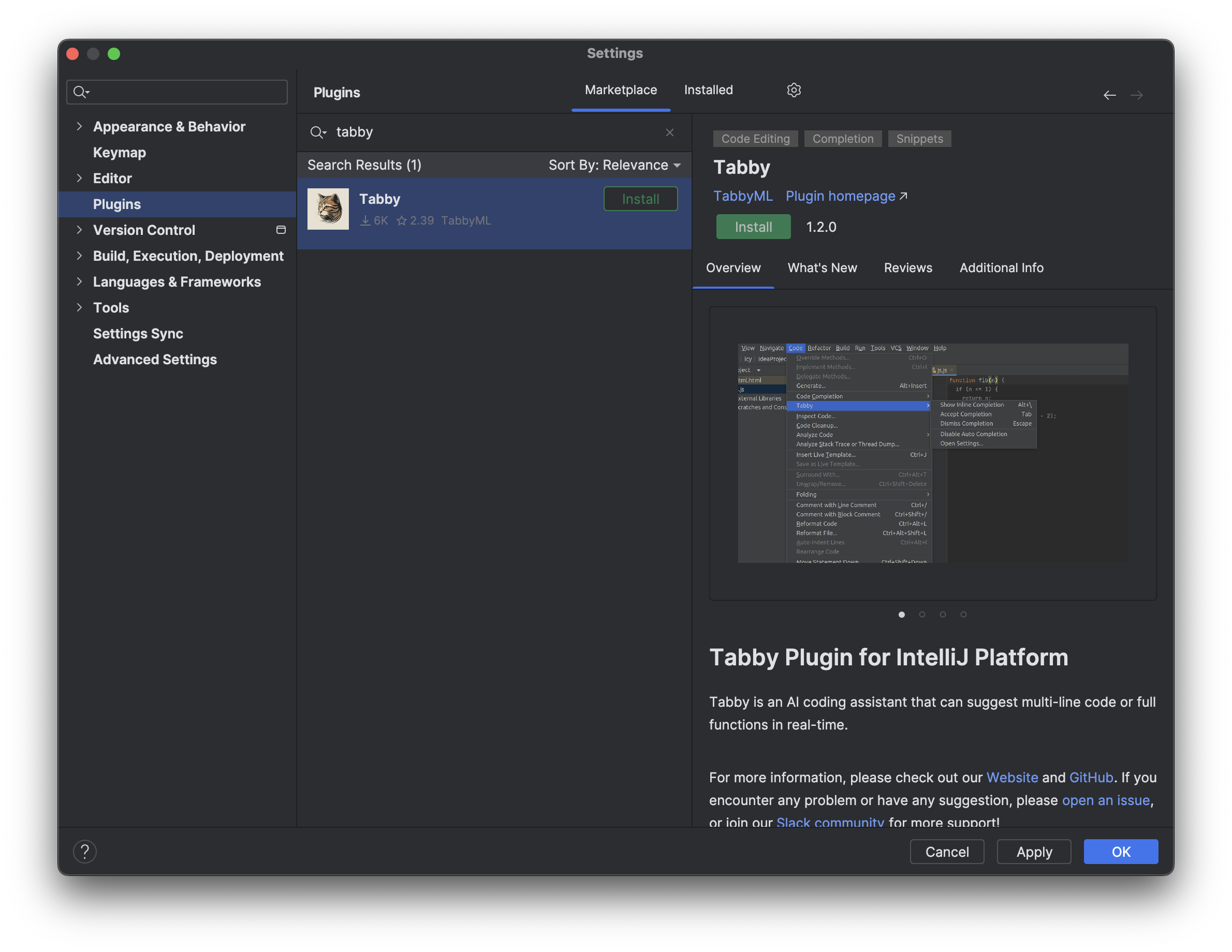
Tabby Plugin 安装
Tabby 配置
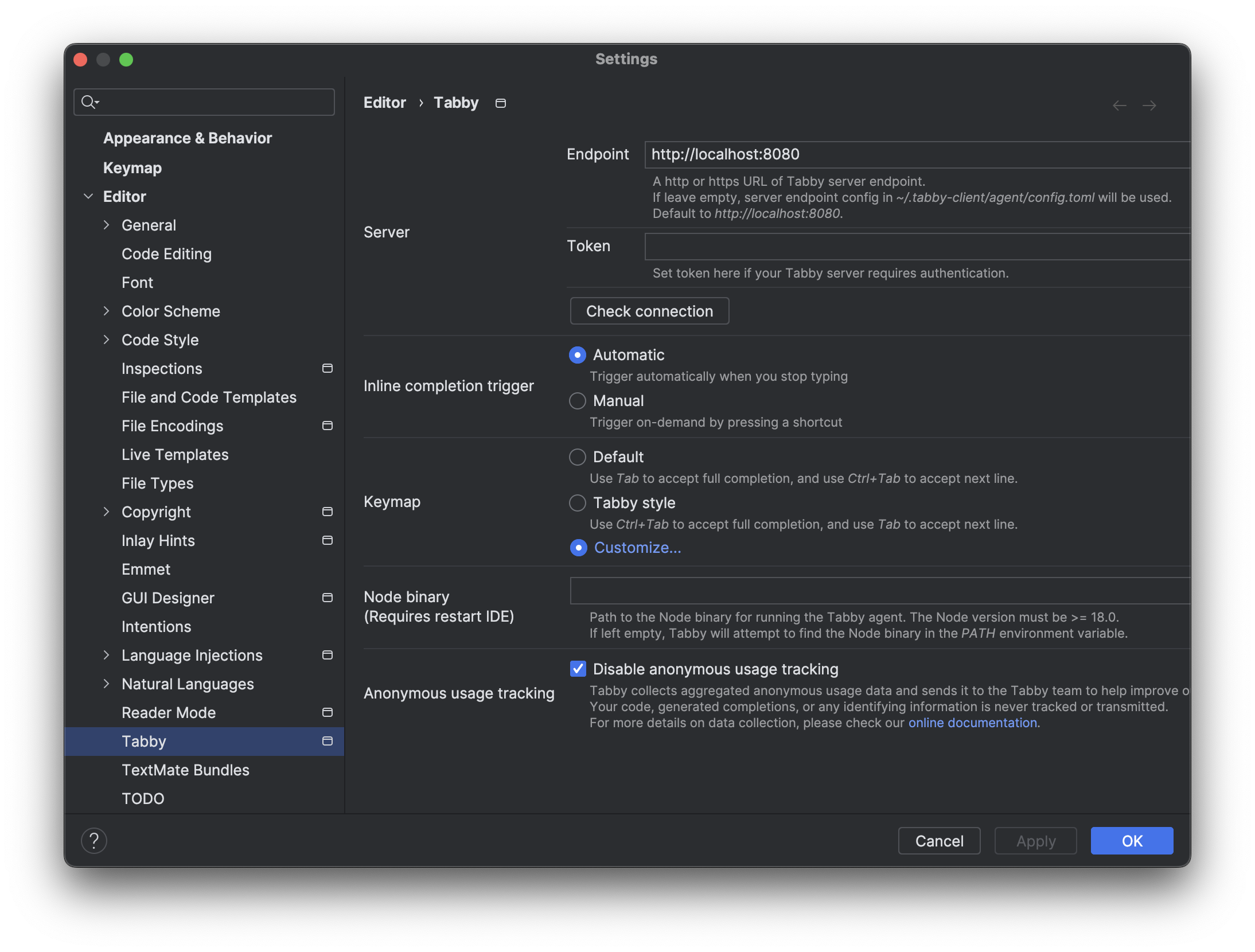
安装完插件最好重启一下 IntelliJ IDEA,否则可能会出现不能触发自动补全的情况。
配置文件路径
tree ~/.tabby-client
/Users/junjian/.tabby-client
└── agent
    ├── config.toml
    └── data.json
代码自动补全
自动补全默认 4秒 触发一次,也可以通过快捷键触发 Option + \。
下面是自动补全的例子。

IDEA 日志
通过日志文件 ~/Library/Logs/JetBrains/IdeaIC2023.3/idea.log 可以看到 Tabby 的日志信息 com.tabbyml.intellijtabby.agent.Agent。
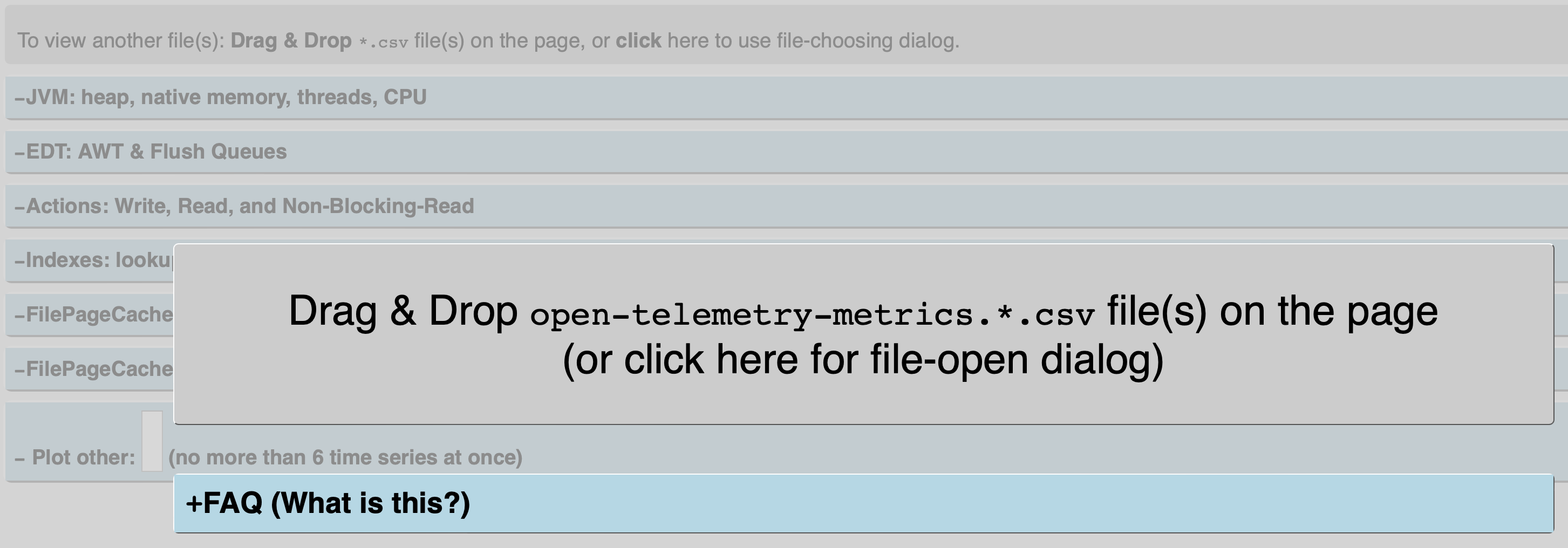
在工作期间,IDE 将其内部监控数据导出到 open-telemetry-metrics.*.csv 文件中。该页面 ~/Library/Logs/JetBrains/IdeaIC2023.3/open-telemetry-metrics-plotter.html 可以解析这些文件并绘制漂亮的时间序列图表。这些数据主要供 JetBrains 支持和开发工程师使用。
Visual Studio Code
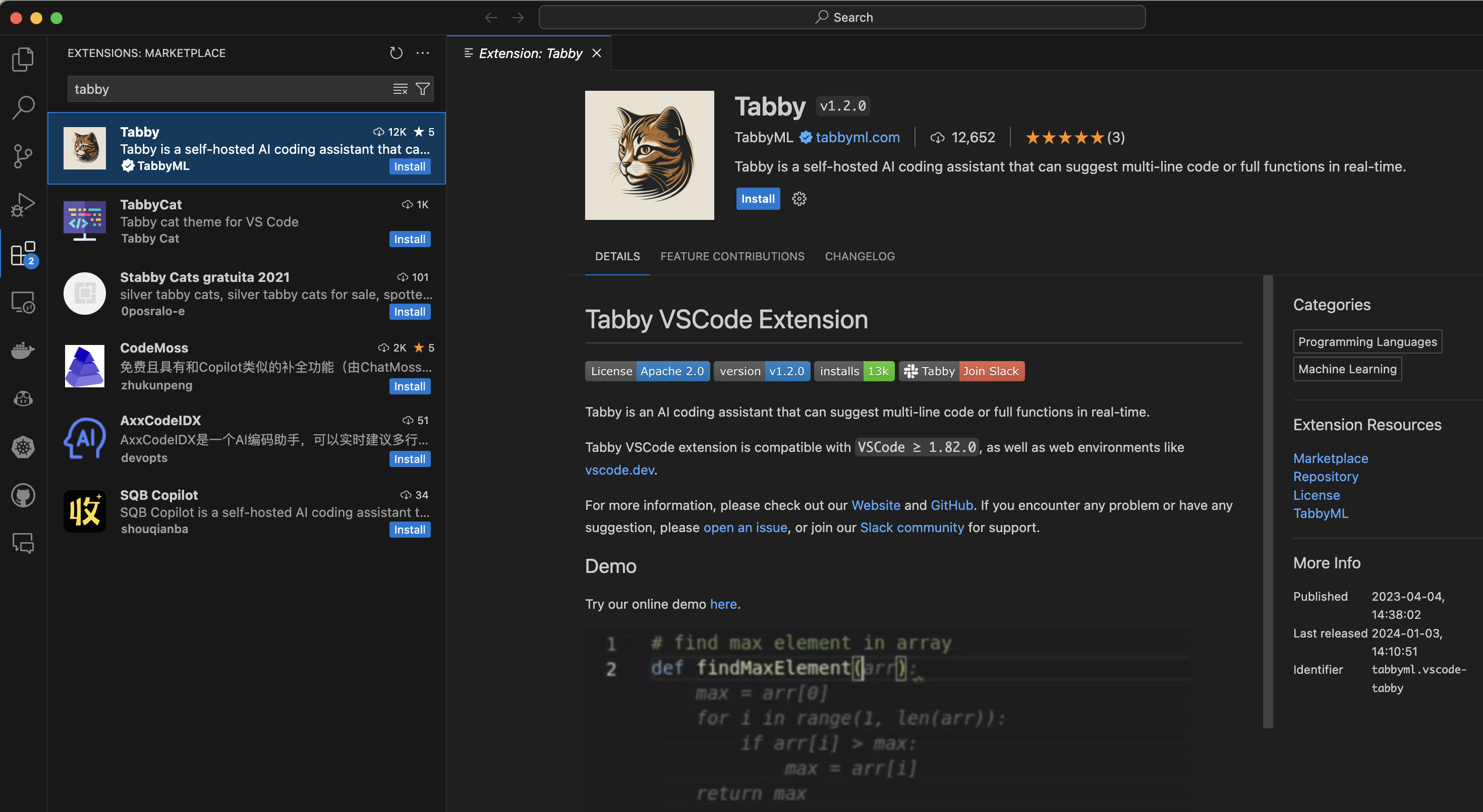
Tabby Extension 安装
Tabby 配置
单击状态栏中的 Tabby 图标,打开 Tabby 配置页面。
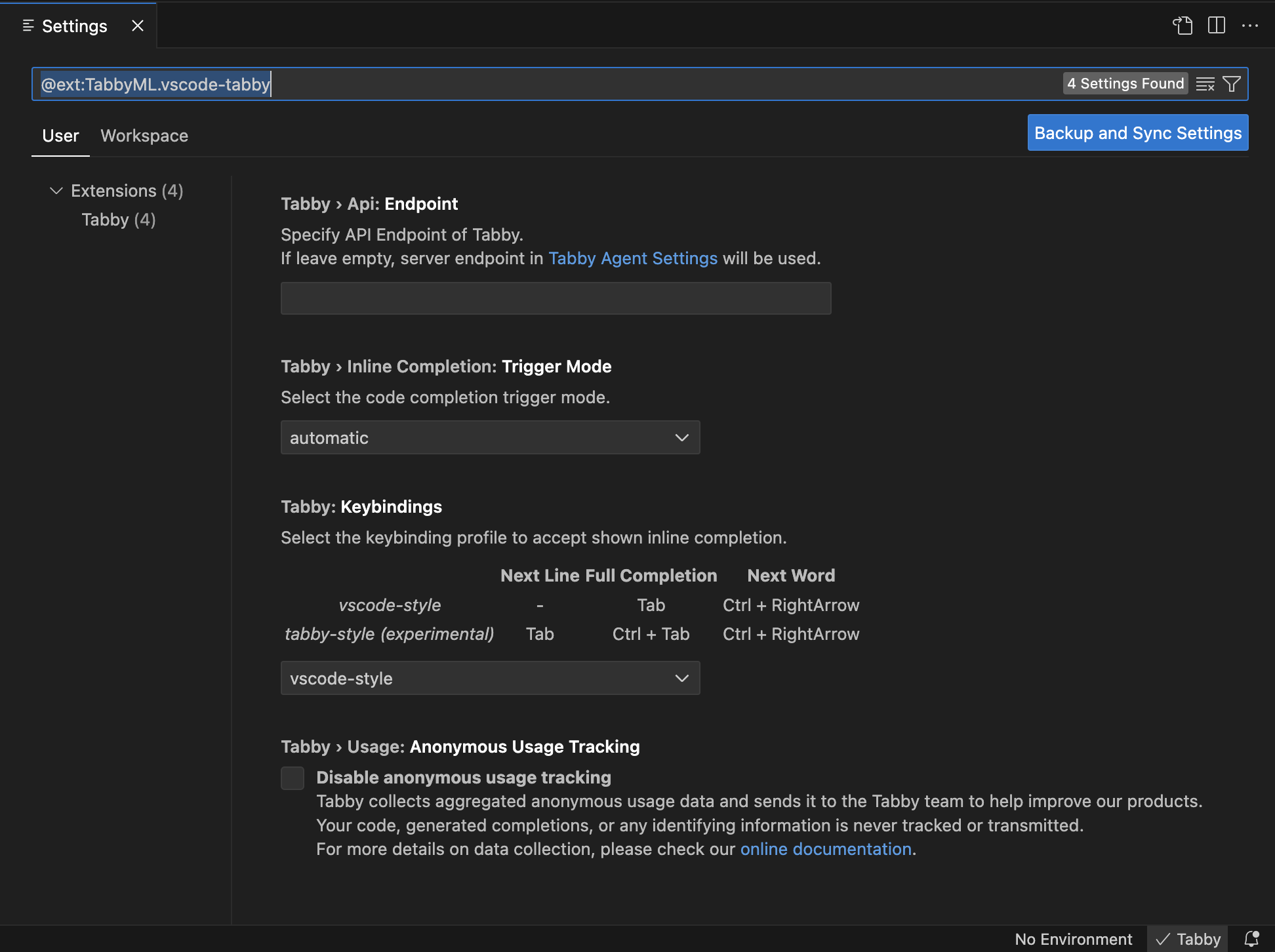
我在使用的过程中发现,我把 Tabby Disable 之后,之前生成的代码还可以继续使用,只是不能再生成新的代码了,好像在本地增加了 RAG 的功能。
配置
Tabby Agent 配置 - IDE 插件
Tabby Agent 作为 Tabby IDE 扩展的核心组件,从 ~/.tabby-client/agent/config.toml 文件中读取配置。当你首次运行 Tabby IDE 扩展时,这个文件会自动创建。你可以编辑这个文件来修改配置。当检测到变化时,Tabby IDE 扩展会自动重新加载配置文件。
~/.tabby-client/agent/config.toml
## Tabby agent configuration file

## Online documentation: https://tabby.tabbyml.com/docs/extensions/configurations
## You can uncomment and edit the values below to change the default settings.
## Configurations in this file have lower priority than the IDE settings.

## Server
## You can set the server endpoint here and an optional authentication token if required.
# [server]
# endpoint = "http://localhost:8080" # http or https URL
# token = "your-token-here" # if token is set, request header Authorization = "Bearer $token" will be added automatically

## You can add custom request headers.
# [server.requestHeaders]
# Header1 = "Value1" # list your custom headers here
# Header2 = "Value2" # values can be strings, numbers or booleans

## Completion
## (Since 1.1.0) You can set the completion request timeout here.
## Note that there is also a timeout config at the server side.
# [completion]
# timeout = 4000 # 4s

## Logs
## You can set the log level here. The log file is located at ~/.tabby-client/agent/logs/.
# [logs]
# level = "silent" # "silent" or "error" or "debug"

## Anonymous usage tracking
## Tabby collects anonymous usage data and sends it to the Tabby team to help improve our products.
## Your code, generated completions, or any sensitive information is never tracked or sent.
## For more details on data collection, see https://tabby.tabbyml.com/docs/extensions/configurations#usage-collection
## Your contribution is greatly appreciated. However, if you prefer not to participate, you can disable anonymous usage tracking here.
# [anonymousUsageTracking]
# disable = false # set to true to disable
默认这个文件的配置都是注释的,发现通过 UI 配置并不会更改这个文件。
Tabby Server 配置
Tabby Server 将在 ~/.tabby/config.toml 中查找配置文件以获取高级功能。
Repository context for code completion
- 编辑配置文件
~/.tabby/config.toml设置源代码存储库
# Index three repositories' source code as additional context for code completion.

[[repositories]]
name = "tabby"
git_url = "https://github.com/TabbyML/tabby.git"

# git through ssh protocol.
[[repositories]]
name = "CTranslate2"
git_url = "git@github.com:OpenNMT/CTranslate2.git"

# local directory is also supported!
[[repositories]]
name = "repository_a"
git_url = "file:///home/users/repository_a"
- 索引源代码存储库
默认情况下,tabby scheduler 程序在守护进程中运行,并每 5 小时处理一次其管道。要立即运行管道,请使用 tabby Scheduler --now。
tabby scheduler --now
编程语言
在 Tabby 中,我们需要为每种语言添加配置,以最大限度地提高性能和完成质量。
目前,每种语言需要添加两个方面的支持。
- 停用词(Stop Words)
停止词决定了语言模型何时可以提前停止其解码步骤,从而导致更好的延迟并影响完成的质量。我们建议将所有顶级关键字添加为停用词的一部分。
- 存储库上下文(Repository Context)
我们将语言解析为块(chunks)并计算基于 Token 的索引以用于服务时间检索增强代码完成(Retrieval Augmented Code Completion)。在 Tabby 中,我们将这些存储库上下文定义为 treesitter 查询,查询结果将被索引。
有关添加上述支持的问题或拉取请求的实际示例,请查看 https://github.com/TabbyML/tabby/issues/553 作为参考。
Tree-sitter 是一个解析器生成工具和增量解析库。它可以为源文件构建一个具体的语法树,并在源文件被编辑时有效地更新语法树。
支持的编程语言
- Rust
- Python
- JavaScript
- TypeScript
- Golang
- Ruby
- Java
- Kotlin
- C/C++
代码助手
- GitHub Copilot
- Tabnine
- Tabby
- 10 Free GitHub Copilot Alternatives for VS Code 2023
- Sourcegraph
- Cody
- FauxPilot
Tabnine 代码助手功能
生成(Completion)
- 自动完成代码行
- 建议基于函数声明的完整函数完成
- 根据自然语言注释生成代码块
聊天(Chat)
- 生成代码
- 发现并学习如何使用新的 API
- 生成测试
- 从一种编程语言翻译为另一种编程语言
- 了解当前代码库支持的内容
- 使用自然语言搜索您的组织代码库
- 重构和改进现有代码或添加功能
- 编写文档字符串