FunASR - 基础语音识别工具包
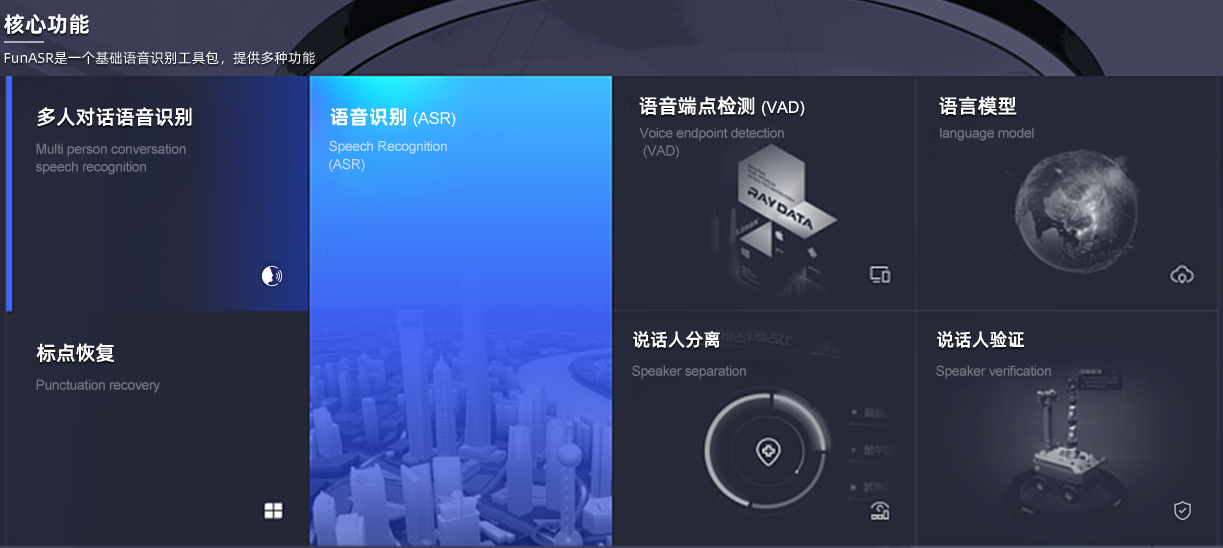
FunASR 是一个基础语音识别工具包,提供多种功能,包括语音识别(ASR)、语音端点检测(VAD)、标点恢复、语言模型、说话人验证、说话人分离和多人对话语音识别等。
FunASR 快速入门
核心功能
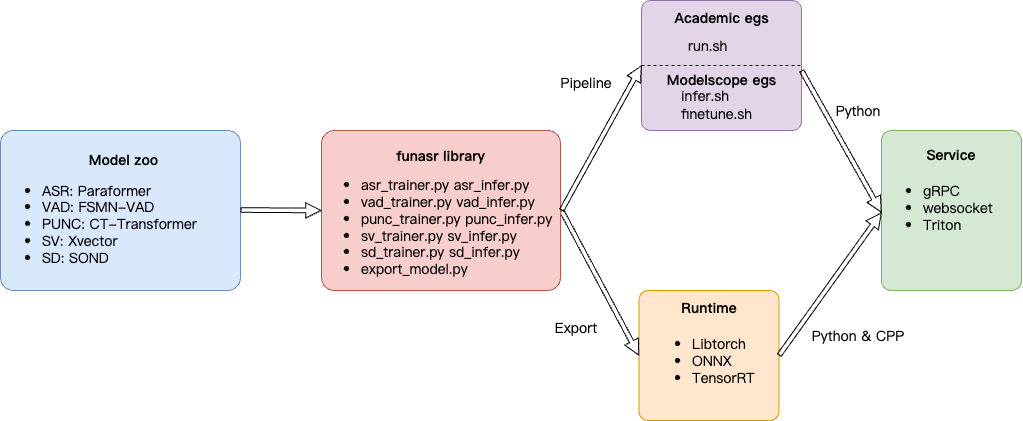
工作流程
离线文件转写服务

FunASR离线文件转写软件包,提供了一款功能强大的语音离线文件转写服务。拥有完整的语音识别链路,结合了语音端点检测、语音识别、标点等模型,可以将几十个小时的长音频与视频识别成带标点的文字,而且支持上百路请求同时进行转写。输出为带标点的文字,含有字级别时间戳,支持ITN与用户自定义热词等。服务端集成有ffmpeg,支持各种音视频格式输入。软件包提供有html、python、c++、java与c#等多种编程语言客户端。
实时听写服务
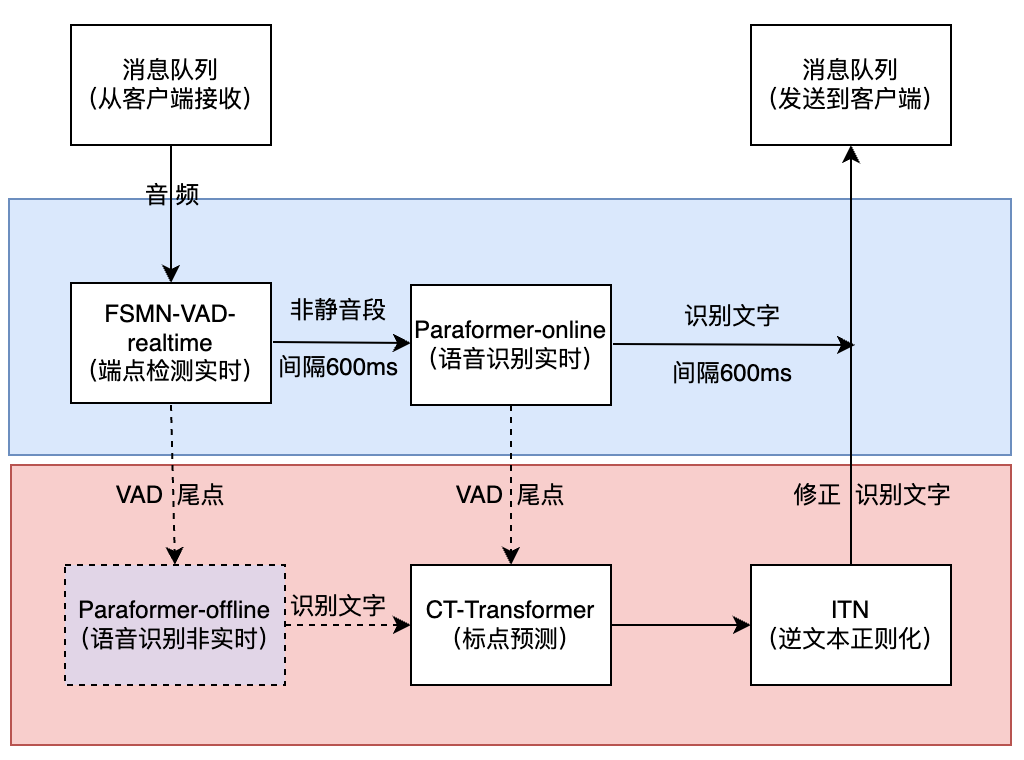
FunASR实时语音听写软件包,集成了实时版本的语音端点检测模型、语音识别、语音识别、标点预测模型等。采用多模型协同,既可以实时的进行语音转文字,也可以在说话句尾用高精度转写文字修正输出,输出文字带有标点,支持多路请求。依据使用者场景不同,支持实时语音听写服务(online)、非实时一句话转写(offline)与实时与非实时一体化协同(2pass)3种服务模式。软件包提供有html、python、c++、java与c#等多种编程语言客户端。
FunASR 镜像
- 在线 CPU 版本
docker pull registry.cn-hangzhou.aliyuncs.com/funasr_repo/funasr:funasr-runtime-sdk-online-cpu-0.1.13
- 离线 GPU 版本
docker pull registry.cn-hangzhou.aliyuncs.com/funasr_repo/funasr:funasr-runtime-sdk-gpu-0.2.1
部署 FunASR 服务
创建模型存储目录
- macOS
mkdir -p ~/GitHub/FunASR/funasr-runtime-resources/models
- Ubuntu (Jetson Thor)
mkdir -p /models/FunASR/funasr-runtime-resources/models
运行容器
- macOS
docker run -p 10095:10095 -it --name funasr --privileged=true \
  -v ~/GitHub/FunASR/funasr-runtime-resources/models:/workspace/models \
  registry.cn-hangzhou.aliyuncs.com/funasr_repo/funasr:funasr-runtime-sdk-online-cpu-0.1.13 \
  bash
- Ubuntu (Jetson Thor)
docker run -p 10095:10095 -it --name funasr --privileged=true \
  -v /models/FunASR/funasr-runtime-resources/models:/workspace/models \
  registry.cn-hangzhou.aliyuncs.com/funasr_repo/funasr:funasr-runtime-sdk-online-cpu-0.1.13 \
  bash
安装 ffmpeg
apt update && apt install ffmpeg -y
运行服务(2pass 模式)
联网
cd FunASR/runtime

bash run_server_2pass.sh \
  --download-model-dir /workspace/models \
  --vad-dir damo/speech_fsmn_vad_zh-cn-16k-common-onnx \
  --model-dir damo/speech_paraformer-large-vad-punc_asr_nat-zh-cn-16k-common-vocab8404-onnx \
  --online-model-dir damo/speech_paraformer-large_asr_nat-zh-cn-16k-common-vocab8404-online-onnx \
  --punc-dir damo/punc_ct-transformer_zh-cn-common-vad_realtime-vocab272727-onnx \
  --lm-dir damo/speech_ngram_lm_zh-cn-ai-wesp-fst \
  --itn-dir thuduj12/fst_itn_zh \
  --hotword /workspace/models/hotwords.txt \
  --certfile 0
内网
cd FunASR/runtime

bash run_server_2pass.sh \
  --vad-dir /workspace/models/damo/speech_fsmn_vad_zh-cn-16k-common-onnx \
  --model-dir /workspace/models/damo/speech_paraformer-large-vad-punc_asr_nat-zh-cn-16k-common-vocab8404-onnx \
  --online-model-dir /workspace/models/damo/speech_paraformer-large_asr_nat-zh-cn-16k-common-vocab8404-online-onnx \
  --punc-dir /workspace/models/damo/punc_ct-transformer_zh-cn-common-vad_realtime-vocab272727-onnx \
  --lm-dir /workspace/models/damo/speech_ngram_lm_zh-cn-ai-wesp-fst \
  --itn-dir /workspace/models/thuduj12/fst_itn_zh \
  --hotword /workspace/models/hotwords.txt \
  --certfile 0
测试
下载例子
wget https://isv-data.oss-cn-hangzhou.aliyuncs.com/ics/MaaS/ASR/sample/funasr_samples.tar.gz
tar xzvf funasr_samples.tar.gz
打开客户端
open samples/html/static/index.html
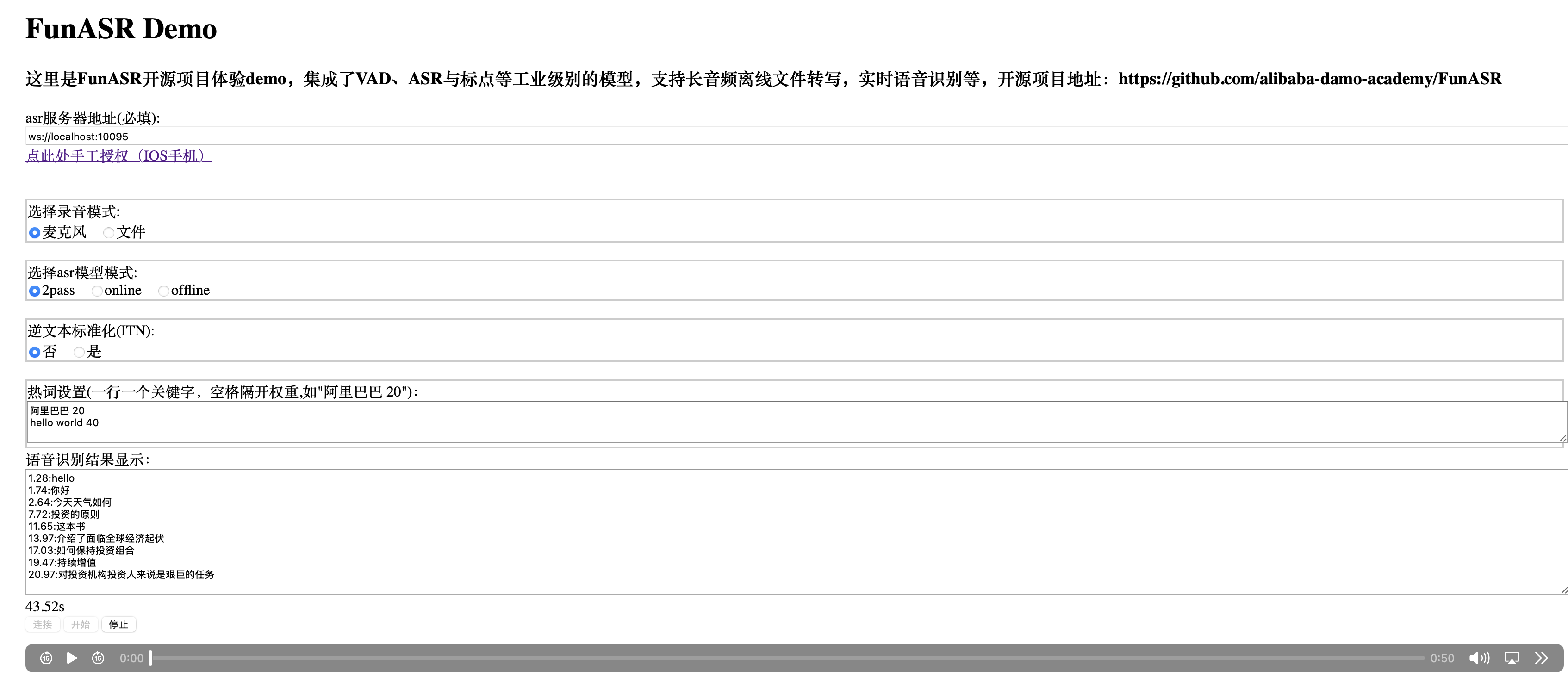
内网部署
- 设备: Jetson Thor (
agx-thor-2) - 位置:
/home/lnsoft/wjj/models/FunASR/
进入目录:/home/lnsoft/wjj/models/FunASR/
FunASR 服务
entrypoint.sh
# 进入容器内运行下面的命令。
bash /workspace/FunASR/runtime/run_server_2pass.sh \
  --vad-dir /workspace/models/damo/speech_fsmn_vad_zh-cn-16k-common-onnx \
  --model-dir /workspace/models/damo/speech_paraformer-large-vad-punc_asr_nat-zh-cn-16k-common-vocab8404-onnx \
  --online-model-dir /workspace/models/damo/speech_paraformer-large_asr_nat-zh-cn-16k-common-vocab8404-online-onnx \
  --punc-dir /workspace/models/damo/punc_ct-transformer_zh-cn-common-vad_realtime-vocab272727-onnx \
  --lm-dir /workspace/models/damo/speech_ngram_lm_zh-cn-ai-wesp-fst \
  --itn-dir /workspace/models/thuduj12/fst_itn_zh \
  --hotword /workspace/models/hotwords.txt
编写 Dockerfile
# 1. 指定基础镜像
FROM registry.cn-hangzhou.aliyuncs.com/funasr_repo/funasr:funasr-runtime-sdk-online-cpu-0.1.13

# 2. 拷贝模型文件
# 假设你的构建目录结构为 ./funasr-runtime-resources/models
COPY funasr-runtime-resources/models /workspace/models

# 3. 设置工作目录
WORKDIR /workspace/FunASR/runtime

# 4. (可选) 暴露端口
# FunASR 默认通常使用 10095,如果脚本中有修改请对应调整
EXPOSE 10095

# ----------------------------------------------------
# 生成自签名证书(1年有效期)
# ----------------------------------------------------
RUN openssl req -x509 -newkey rsa:4096 \
      -keyout /workspace/FunASR/runtime/ssl_key/server.key \
      -out /workspace/FunASR/runtime/ssl_key/server.crt \
      -days 365 \
      -nodes \
      -subj "/C=CN/ST=ShanDong/L=JiNan/O=LNSoft/OU=LNSoft/CN=localhost/emailAddress=wjj@163.com"

COPY entrypoint.sh /root/entrypoint.sh
CMD ["bash", "cat /root/entrypoint.sh"]
构建镜像
docker build -t wangjunjian/funasr-runtime-sdk-online-cpu-0.1.13 .
运行容器
docker run -it -p 10095:10095 --name funasr-server wangjunjian/funasr-runtime-sdk-online-cpu-0.1.13 bash
FunASR 服务 + 客户端
nginx.conf
server {
    listen 80;
    listen [::]:80;
    root /var/www/html;
    index index.html;

    # 1. 静态文件服务:处理对 index.html 和其他静态资源(/main.js, /pcm.js 等)的请求
    location / {
        try_files $uri $uri/ =404;
    }

    # 2. WebSocket 代理:将客户端代码中连接 FunASR 服务的 WebSocket 请求转发到 FunASR 容器的 10095 端口
    # 假设您的客户端代码中 WebSocket 连接地址是 ws://<host>/ws 或 wss://<host>/ws
    location /ws {
        proxy_pass http://127.0.0.1:10095;
        proxy_http_version 1.1;
        proxy_set_header Upgrade $http_upgrade;
        proxy_set_header Connection "upgrade";
        proxy_set_header Host $host;
    }

    # 您可能还需要根据 FunASR 的实际 API 路径添加其他代理规则。
}
entrypoint.sh
# 进入容器内运行下面的命令。
bash /workspace/FunASR/runtime/run_server_2pass.sh \
  --vad-dir /workspace/models/damo/speech_fsmn_vad_zh-cn-16k-common-onnx \
  --model-dir /workspace/models/damo/speech_paraformer-large-vad-punc_asr_nat-zh-cn-16k-common-vocab8404-onnx \
  --online-model-dir /workspace/models/damo/speech_paraformer-large_asr_nat-zh-cn-16k-common-vocab8404-online-onnx \
  --punc-dir /workspace/models/damo/punc_ct-transformer_zh-cn-common-vad_realtime-vocab272727-onnx \
  --lm-dir /workspace/models/damo/speech_ngram_lm_zh-cn-ai-wesp-fst \
  --itn-dir /workspace/models/thuduj12/fst_itn_zh \
  --hotword /workspace/models/hotwords.txt
编写 Dockerfile.server_and_client
# 1. 指定基础镜像
FROM registry.cn-hangzhou.aliyuncs.com/funasr_repo/funasr:funasr-runtime-sdk-online-cpu-0.1.13

# ----------------------------------------------------
# A. 解决源不稳定问题:更换为阿里云镜像源
# ----------------------------------------------------
# 假设 base image 是 Ubuntu/Debian,并且是 arm64 架构,更换 ports 源为阿里云国内镜像。
# 注意:arm64 架构的源可能与标准 amd64 的源地址略有不同。
RUN sed -i 's/http:\/\/ports.ubuntu.com/http:\/\/mirrors.aliyun.com/g' /etc/apt/sources.list

# 2. 更新源并安装 ffmpeg
# 使用 apt-get 并清理缓存以减小镜像体积
RUN apt-get update && \
   apt-get install -y ffmpeg && \
   apt-get install -y --no-install-recommends nginx curl && \
   rm -rf /var/lib/apt/lists/*

# ----------------------------------------------------
# 配置 Nginx
# ----------------------------------------------------
# 创建一个简单的 Nginx 配置,将请求转发给 FunASR 服务
COPY nginx.conf /etc/nginx/conf.d/default.conf
# 移除 Nginx 默认的欢迎页
RUN rm /etc/nginx/sites-enabled/default

# 拷贝 Web 客户端代码
# 将你的 html 目录下的静态文件拷贝到 Nginx 的默认服务目录
COPY html/static /var/www/html

RUN service nginx start

# 3. 拷贝模型文件
# 假设你的构建目录结构为 ./funasr-runtime-resources/models
COPY funasr-runtime-resources/models /workspace/models

# 4. 设置工作目录
WORKDIR /workspace/FunASR/runtime

# 5. (可选) 暴露端口
# FunASR 默认通常使用 10095,如果脚本中有修改请对应调整
EXPOSE 10095

# ----------------------------------------------------
# 生成自签名证书(1年有效期)
# ----------------------------------------------------
RUN openssl req -x509 -newkey rsa:4096 \
      -keyout /workspace/FunASR/runtime/ssl_key/server.key \
      -out /workspace/FunASR/runtime/ssl_key/server.crt \
      -days 365 \
      -nodes \
      -subj "/C=CN/ST=ShanDong/L=JiNan/O=LNSoft/OU=LNSoft/CN=localhost/emailAddress=wjj@163.com"

COPY entrypoint.sh /root/entrypoint.sh
CMD ["bash", "cat /root/entrypoint.sh"]
构建镜像
docker build -f Dockerfile.server_and_client -t wangjunjian/funasr-runtime-sdk-online-cpu-0.1.13:server_and_client .
运行容器
docker run -it -p 10095:10095 -p 8000:80 --name funasr-server wangjunjian/funasr-runtime-sdk-online-cpu-0.1.13:server_and_client bash
浏览器访问 http://<host>:8000,即可使用 FunASR 在线语音识别服务,未能连接 wss://192.168.55.1:10095/ ASR 服务(无反应)。
运行服务(容器内)
- 使用自签名证书
bash /workspace/FunASR/runtime/run_server_2pass.sh \
  --vad-dir /workspace/models/damo/speech_fsmn_vad_zh-cn-16k-common-onnx \
  --model-dir /workspace/models/damo/speech_paraformer-large-vad-punc_asr_nat-zh-cn-16k-common-vocab8404-onnx \
  --online-model-dir /workspace/models/damo/speech_paraformer-large_asr_nat-zh-cn-16k-common-vocab8404-online-onnx \
  --punc-dir /workspace/models/damo/punc_ct-transformer_zh-cn-common-vad_realtime-vocab272727-onnx \
  --lm-dir /workspace/models/damo/speech_ngram_lm_zh-cn-ai-wesp-fst \
  --itn-dir /workspace/models/thuduj12/fst_itn_zh \
  --hotword /workspace/models/hotwords.txt
- 不使用证书
bash /workspace/FunASR/runtime/run_server_2pass.sh \
  --vad-dir /workspace/models/damo/speech_fsmn_vad_zh-cn-16k-common-onnx \
  --model-dir /workspace/models/damo/speech_paraformer-large-vad-punc_asr_nat-zh-cn-16k-common-vocab8404-onnx \
  --online-model-dir /workspace/models/damo/speech_paraformer-large_asr_nat-zh-cn-16k-common-vocab8404-online-onnx \
  --punc-dir /workspace/models/damo/punc_ct-transformer_zh-cn-common-vad_realtime-vocab272727-onnx \
  --lm-dir /workspace/models/damo/speech_ngram_lm_zh-cn-ai-wesp-fst \
  --itn-dir /workspace/models/thuduj12/fst_itn_zh \
  --hotword /workspace/models/hotwords.txt \
  --certfile 0
本地部署(macOS)
创建并激活 Conda 环境
conda create -n funasr python=3.10.9 -y
conda activate funasr
克隆代码库
git clone https://github.com/modelscope/FunASR
cd FunASR
安装依赖
# -i https://pypi.tuna.tsinghua.edu.cn/simple
pip install -r runtime/python/http/requirements.txt
pip install "fastapi[standard]"
pip install funasr_onnx funasr_torch
模型缓存路径
| 模型 | 本地缓存路径 | 说明 |
|---|---|---|
| paraformer-zh-streaming | ~/.cache/modelscope/hub/models/iic/speech_paraformer-large_asr_nat-zh-cn-16k-common-vocab8404-online | 大型中文在线语音识别模型 |
| paraformer-zh | ~/.cache/modelscope/hub/models/iic/speech_seaco_paraformer_large_asr_nat-zh-cn-16k-common-vocab8404-pytorch | 大型中文语音识别模型 |
| fsmn-vad | ~/.cache/modelscope/hub/models/iic/speech_fsmn_vad_zh-cn-16k-common-pytorch | 中文语音端点检测模型 |
| ct-punc | ~/.cache/modelscope/hub/models/iic/punc_ct-transformer_cn-en-common-vocab471067-large | 中英文标点恢复模型 |
| cam++ | ~/.cache/modelscope/hub/models/iic/speech_campplus_sv_zh-cn_16k-common | 中文说话人验证模型 |
模型
(注:⭐ 表示ModelScope模型仓库,🤗 表示Huggingface模型仓库,🍀表示OpenAI模型仓库)
| 模型名字 | 任务详情 | 训练数据 | 参数量 |
|---|---|---|---|
| SenseVoiceSmall (⭐ 🤗 ) |
多种语音理解能力,涵盖了自动语音识别(ASR)、语言识别(LID)、情感识别(SER)以及音频事件检测(AED) | 400000小时,中文 | 330M |
| paraformer-zh (⭐ 🤗 ) |
语音识别,带时间戳输出,非实时 | 60000小时,中文 | 220M |
| paraformer-zh-streaming ( ⭐ 🤗 ) |
语音识别,实时 | 60000小时,中文 | 220M |
| paraformer-en ( ⭐ 🤗 ) |
语音识别,非实时 | 50000小时,英文 | 220M |
| conformer-en ( ⭐ 🤗 ) |
语音识别,非实时 | 50000小时,英文 | 220M |
| ct-punc ( ⭐ 🤗 ) |
标点恢复 | 100M,中文与英文 | 290M |
| fsmn-vad ( ⭐ 🤗 ) |
语音端点检测,实时 | 5000小时,中文与英文 | 0.4M |
| fsmn-kws ( ⭐ ) |
语音唤醒,实时 | 5000小时,中文 | 0.7M |
| fa-zh ( ⭐ 🤗 ) |
字级别时间戳预测 | 50000小时,中文 | 38M |
| cam++ ( ⭐ 🤗 ) |
说话人确认/分割 | 5000小时 | 7.2M |
| Whisper-large-v3 (⭐ 🍀 ) |
语音识别,带时间戳输出,非实时 | 多语言 | 1550 M |
| Whisper-large-v3-turbo (⭐ 🍀 ) |
语音识别,带时间戳输出,非实时 | 多语言 | 809 M |
| Qwen-Audio (⭐ 🤗 ) |
音频文本多模态大模型(预训练) | 多语言 | 8B |
| Qwen-Audio-Chat (⭐ 🤗 ) |
音频文本多模态大模型(chat版本) | 多语言 | 8B |
| emotion2vec+large (⭐ 🤗 ) |
情感识别模型 | 40000小时,4种情感类别 | 300M |